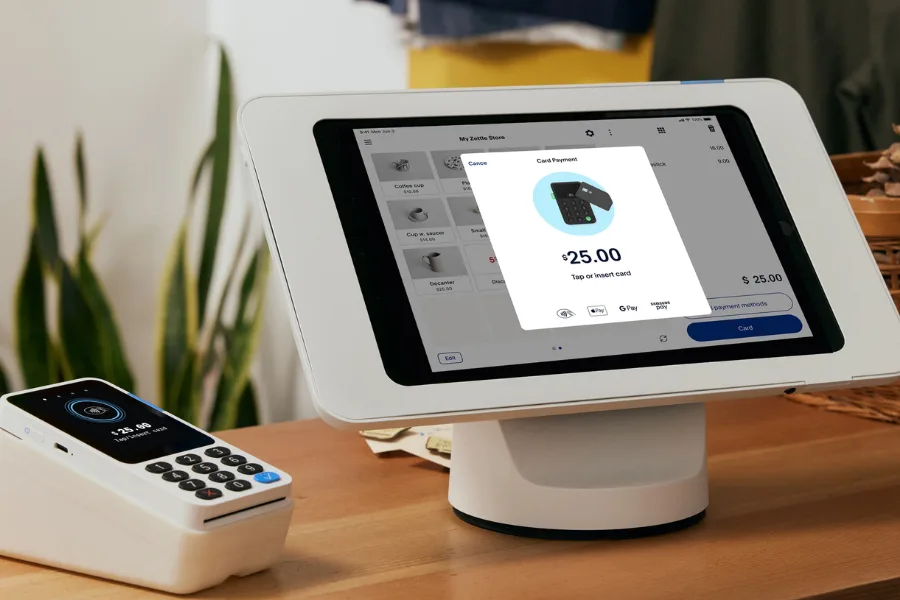
Choosing the right POS often comes down to speed, cost clarity, and how well sales channels stay connected. Many US merchants turn to PayPal for payments, then wonder how far its POS tools really go in daily retail work. The PayPal POS system in US sits at that crossroads. In this guide from ConnectPOS, we’ll walk you through how PayPal’s POS setup works, what it includes, and where it fits best.
Highlights
- PayPal POS in the US works best for fast checkout, mobile selling, and businesses already familiar with PayPal’s payment tools.
- Pricing stays flexible but becomes harder to track as sales channels, payment types, and add-on services increase.
- Hardware and software focus on portability and ease of use, with clear limits once inventory, locations, or workflows grow more complex.
PayPal POS System Overview for US Businesses
In the US alone, there are 36.2 million small businesses, and they account for almost 46% of private-sector employment. This helps explain why “easy-to-start” payment setups stay popular with small teams. The PayPal POS setup in the US brings payments, basic POS software, and mobile hardware into one platform. It centers on fast checkout and broad payment acceptance, rather than deep retail control. For many small teams, that balance feels familiar and easy to adopt.
This system mainly fits SMBs, mobile sellers, pop-ups, and service-based stores. It works best when sales stay simple and locations stay limited. You can run it in-store through handheld devices, on the go using a phone or tablet, or online through PayPal checkout tools.
Strengths sit in brand trust, quick setup, and wide payment coverage. Limits appear as sales grow more complex. Inventory depth, multi-store control, and custom workflows remain basic. That trade-off shapes how far the platform can scale for US retailers using PayPal’s POS offering for US businesses.
| Category | Details |
| Deployment | Mobile POS, handheld terminal, online checkout |
| Ideal users | Small to mid-size US businesses |
| POS software | PayPal POS app and web dashboard |
| Hardware options | PayPal Reader, PayPal Terminal |
| Payment types | Cards, wallets, ACH, Pay Later, Venmo |
| Pricing model | No monthly fee, per-transaction pricing |
PayPal POS Pricing Structure in the US
Pricing often becomes the deciding factor once daily sales pick up. PayPal POS pricing in the US market follows a layered model, with rates shifting based on how a payment happens. In-person sales, online checkout, and keyed-in transactions all land at different price points. That structure gives flexibility, yet it also adds complexity. To make sense of this system, we’ll walk through the main cost areas step by step and show where fees tend to add up.
Monthly Account and Optional Service Fees
PayPal’s POS setup starts with no required monthly subscription. That entry point feels appealing for small teams testing in-person sales. Costs appear when optional tools enter the picture.
Recurring billing, invoicing, and subscription tools add fixed monthly charges. Service businesses and sellers running memberships often rely on these add-ons. Retailers focused on quick counter sales usually skip them, keeping base costs lower at the start.
| Service | Monthly Cost |
| Base merchant account | $0 |
| Recurring billing | $10 |
| Advanced recurring tools | $30 |
| Invoicing tools | $14.99 |
Mobile and In-Person POS Transaction Fees
In-store and mobile payments sit at the core of PayPal’s POS offering for US businesses. Card-present rates combine a percentage and a fixed fee, which shapes margins in subtle ways. In the US, cards are still the everyday default. Consumers made 66% of their payments with cards (debit, credit, prepaid) in October 2024, according to the Federal Reserve’s Survey and Diary of Consumer Payment Choice.
Small tickets feel the fixed fee more sharply. A $10 sale carries a noticeably higher percentage cost than a $100 purchase. Mid-range tickets settle into a steadier range, making costs easier to forecast for everyday retail sales.
| Sale Amount | Lower Fee Estimate | Higher Fee Estimate |
| $10 | $0.32 | $0.44 |
| $25 | $0.66 | $0.96 |
| $50 | $1.24 | $1.84 |
| $100 | $2.38 | $3.58 |
| $200 | $4.67 | $7.07 |
Online Checkout Transaction Fees
Online payments follow a wider spread of rates. Standard card payments land lower than PayPal Checkout, Venmo, or Pay Later options. That difference reflects convenience for buyers rather than savings for sellers.
Pay Later and micropayments cost more per transaction. Cross-border sales add another layer through currency conversion and international fees. For online-first brands, these costs stay manageable at scale. For low-ticket items, margins tighten fast. During the 2025 US holiday season (Nov 1 to Dec 31), Adobe data showed Buy Now, Pay Later accounted for $20 billion in online spend, up 9.8% from the prior holiday period. This signals how often shoppers now expect that option at checkout.
| Sale Amount | Card Payment | PayPal Checkout | Venmo | Micropayments | Local Methods |
| $10 | $0.79 | $0.84 | $0.44 | $0.59 | $0.58 |
| $25 | $1.24 | $1.36 | $0.96 | $1.34 | $1.01 |
| $50 | $1.98 | $2.24 | $1.84 | $2.58 | $1.73 |
| $100 | $3.48 | $3.98 | $3.58 | $5.08 | $3.18 |
Keyed-In and Virtual Terminal Transactions
Manual card entry serves phone orders, invoices, and backup scenarios. Fees here sit higher than tap or chip payments, reflecting added risk. The virtual terminal adds a monthly charge on top of per-transaction costs, which only makes sense with steady volume.
ACH stands out as a lower-cost path for large payments. High-ticket orders benefit most, since fees stay capped rather than scaling with order size.
| Sale Amount | Card Entry (Low Fee) | Card Entry (High Fee) | Virtual Terminal | ACH |
| $10 | $0.58 | $0.78 | $0.63 | $0.08 |
| $25 | $1.01 | $1.21 | $1.14 | $0.20 |
| $50 | $1.73 | $1.93 | $1.99 | $0.40 |
| $100 | $3.18 | $3.38 | $3.68 | $0.80 |
| $200 | $6.07 | $6.27 | $7.07 | $1.60 |
Read more: Top 3 Virtual POS Terminals For Retailers 2026
Incidental and Custom Fees
Disputes and chargebacks introduce fixed penalties, regardless of order size. Guest checkout transactions carry higher chargeback costs, which adds risk during busy sales periods.
Larger businesses may qualify for interchange-plus pricing. That structure ties fees closer to card network rates, though eligibility depends on volume and risk profile.
| Fee Type | Cost |
| Dispute fee | $15 |
| Chargeback fee | $20 |
| Interchange-plus | Network cost + markup |
PayPal POS Hardware Options in the US
Hardware defines how PayPal’s POS setup for US retailers works on the floor. The lineup stays tight and mobile-first, built around handheld devices rather than full counter terminals. That choice suits pop-ups, service counters, and sellers who move between locations.
PayPal terminals and readers focus on speed and portability. Setup stays simple, and hardware pairs quickly with phones or runs on its own. This approach keeps upfront costs low. It also signals where the platform shines, quick sales, light inventory needs, and flexible locations. Stores with fixed counters or complex workflows may feel those limits sooner.
PayPal Card Reader
The PayPal Card Reader fits mobile sellers, market booths, and short-term retail setups. It connects to a phone or tablet and turns that device into a checkout point within minutes.
Bluetooth pairing keeps the setup clean, with no cables crossing the counter. The screen supports PIN entry, which helps with debit transactions. Battery life holds through a full shift, making it practical for events or outdoor selling. For teams starting small, the low upfront cost keeps risk contained.
| Specification | Details |
| Price | $29 first unit, $79 additional |
| Payment types | Swipe, chip, contactless |
| Screen | Color touchscreen |
| Battery | Up to 12 hours active |
| Connectivity | Bluetooth, dock option |
| Warranty | 1 year |
PayPal Terminal
The PayPal Terminal moves one step further by combining hardware and software in one handheld device. It works without a separate phone or tablet, which keeps checkout focused and tidy.
This device fits counters, food trucks, and mobile service teams. Built-in connectivity allows sales to continue across locations. Optional add-ons, like a scanner or dock, add flexibility without locking the store into a full register setup. For sellers who want portability with fewer moving parts, this option feels more complete within PayPal’s POS environment.
| Specification | Details |
| Price | $199 basic, $239 with scanner |
| Payments | Chip, contactless |
| POS software | Built-in |
| Connectivity | Wi-Fi, cellular |
| Battery | Up to 12 hours active |
| Warranty | 1 year |
Read more: POS System PayPal in the US: A Comprehensive Review
PayPal POS Software and Feature Set
The software layer shapes how the PayPal POS system in US feels in daily use. It brings payments, checkout, and basic back-office tools into one place. The design favors speed and familiarity, especially for teams already using PayPal online.
At its core, the platform handles in-store and mobile checkout, light inventory tracking, and simple customer records. Omnichannel coverage exists, yet it stays closer to payments than full retail orchestration. That difference becomes clearer as order volume grows or store setups expand.
For smaller sellers, the PayPal point-of-sale solution covers the essentials without heavy setup. Larger operations often reach the edges faster. Advanced workflows, deeper customer management, and store-wide reporting tend to sit behind integrations or enterprise plans rather than inside the base system.
| Payment Services | Availability | Business Tools | Availability |
| Card payments | Yes | POS software | Yes |
| Digital wallets | Yes | Mobile POS app | Yes |
| ACH and eCheck | Yes | Inventory tracking | Yes |
| Invoicing | Paid add-on | Loyalty tools | Integration |
| Pay Later | Yes | CRM tools | Basic |
| Crypto payments | Yes | Developer APIs | Yes |
Mobile POS Experience
PayPal’s in-store and mobile POS tools run smoothly on phones and tablets. Checkout stays fast, which suits lines that move quickly. Inventory updates happen on the go, though depth stays limited.
Light loyalty tools and sales summaries appear inside the app. These work well for day-to-day checks. As sales grow more layered, reporting and stock views can feel surface-level.
Online Checkout and Ecommerce Integrations
Online checkout connects easily to websites and carts. Embedded buttons and hosted flows shorten setup time. Payment links support social selling and direct invoices. Compatibility spans most ecommerce platforms, which keeps adoption friction low for US sellers.
Multicurrency and International Payments
PayPal POS in the US supports many currencies through automatic conversion. International buyers pay in familiar terms, while settlements land in the merchant account. Crypto checkout adds another option, converting balances to cash at payment time without added handling steps.
Fraud Protection and Security
Built-in fraud monitoring checks transactions in real time. Basic filters flag risky patterns without manual tuning. Optional tools add deeper checks for sellers handling higher volumes or cross-border payments. This layered approach suits many risk profiles across the platform.
Dispute and Chargeback Management
The Resolution Center gathers disputes in one view. Merchants respond, upload evidence, and track case status. Funds remain on hold during review, which affects cash flow. Larger sellers can access more automated dispute handling through higher-tier plans.
Reporting and Business Analytics
Standard reports cover sales, fees, refunds, and trends. Exports support accounting workflows and tax prep. Enterprise analytics dig deeper into performance signals, though smaller teams often rely on the default views for daily decisions.
Scalability and Developer Integrations
APIs and SDKs support custom builds across web and mobile. This flexibility suits growing brands that need tailored payment flows. The solution scales technically, yet operational complexity still depends on how much sits outside the core POS layer.
AI-Powered Features in PayPal POS
AI-driven tools focus on checkout speed and re-engagement. Fastlane shortens guest checkout through biometric login. Smart receipts and targeted offers follow purchases, adding a personalized touch without extra setup from the merchant side.
Pros and Cons of PayPal POS System in the US
Before you decide if this platform fits your operation, it helps to pause and weigh the trade-offs. We’ll break down where the PayPal POS system in US performs well and where limits tend to surface.
Pros
- Easy onboarding: Setup feels familiar for sellers already using PayPal online. Teams can start selling quickly without a long learning curve.
- Strong brand recognition: PayPal’s name builds trust at checkout, which helps reduce hesitation for first-time buyers.
- Wide online and mobile coverage: PayPal’s in-store and mobile POS tools work across counters, pop-ups, and remote sales.
- Multicurrency and crypto support: US businesses selling to global or digital-first audiences gain added payment reach.
Cons
- Complicated fee structure: PayPal POS pricing in the US market varies by channel, payment type, and service layer, making cost forecasting harder.
- Add-on costs grow over time: Tools for invoicing, subscriptions, or deeper controls raise monthly expenses as needs expand.
- Account holds and dispute delays: Funds may pause during reviews, which can strain cash flow for high-volume or tight-margin retailers.
Who Should Use PayPal POS?
The PayPal POS system in US fits certain selling models better than others. It works best when payment speed and brand trust matter more than deep retail control. Matching the tool to daily reality helps avoid friction later.
- Mobile-first and pop-up sellers: Teams selling at events, markets, or temporary locations benefit from fast setup and handheld checkout.
- Small US businesses already using PayPal online: Familiar dashboards and shared accounts keep operations simple across online and in-person sales.
- Service-led or low-SKU sellers: Businesses with limited inventory needs can rely on the platform without feeling constrained.
That said, PayPal’s POS setup for US retailers may feel narrow once operations grow. Multi-store brands, complex stock flows, or heavy fulfillment often push teams to explore retail-focused alternatives built for scale.
ConnectPOS – A Strong Alternative to PayPal POS for US Retailers
While PayPal POS works well for payments and basic mobile selling, many US retailers eventually need a more retail-focused system that handles complex inventory, omnichannel workflows, and multi-location operations with greater depth. This is where ConnectPOS stands out as a compelling alternative, especially for growing brick-and-mortar and omnichannel businesses that require tighter control across online and physical stores.
- Retail-first omnichannel architecture: ConnectPOS is built as a Next-gen POS for retailers selling across physical stores, ecommerce sites, and marketplaces, with all channels synced in real time.
- Real-time inventory synchronization: Stock levels update instantly across POS, online stores, warehouses, and fulfillment locations, reducing overselling and stock discrepancies.
- Advanced omnichannel order flows: Supports BOPIS, ship-from-store, ship-to-store, returns anywhere, and mixed-cart scenarios without workarounds.
- Unified customer profiles: Customer data, purchase history, and loyalty activity are consolidated into a single profile across online and in-store transactions.
- Multi-store POS and multi-warehouse management: Manage multiple retail locations and inventory sources from one dashboard, with flexible stock routing and transfer rules.
- Deep eCommerce POS platform integrations: Native integrations with major eCommerce platforms, including Shopify, BigCommerce, Magento, WooCommerce, NetSuite, and Commercetools. This allows seamless data sync without relying on manual imports or third-party connectors.
- Flexible payment gateway support: Works with multiple payment providers, giving retailers freedom to choose processors instead of being locked into a single ecosystem.
- Customizable POS workflows: Checkout flows, receipts, tax logic, discounts, and staff permissions can be configured to match real retail operations.
- Advanced reporting and analytics: Provides detailed insights into sales performance, inventory turnover, staff activity, and omnichannel trends.
- Role-based staff permissions: Granular access controls ensure cashiers, managers, and administrators only see and use what they need.
- Scalable for mid-size to enterprise retail: Built to support higher transaction volumes, complex catalogs, and expansion to new locations without system changes.
- Open API and extensibility: Allows retailers and developers to extend POS functionality, connect external systems, and build custom workflows.
For retailers in the US who have outgrown basic payment-focused POS tools, ConnectPOS offers a more structured and scalable approach to omnichannel retail operations. It provides the flexibility, visibility, and control that modern retail teams need as store networks, product catalogs, and customer expectations continue to expand.
FAQs: PayPal POS System in US
Is PayPal POS suitable for US small businesses?
Yes, PayPal POS in the US suits small teams that value quick setup and familiar checkout. It works best for mobile sellers, pop-ups, and service-led businesses with simple inventory needs.
How competitive are PayPal POS fees in the US?
PayPal POS pricing in the US market often runs higher than flat-rate tools. Fees vary by channel and payment type, which can make monthly costs harder to predict as volume grows.
Is PayPal POS secure for in-person payments?
PayPal’s in-store and mobile POS tools include encryption, fraud checks, and PCI compliance. These protections cover most retail scenarios, though added tools may be needed for higher-risk transactions.
Can PayPal POS run alongside another processor?
The platform mainly centers on PayPal’s payment environment. Some retailers use it alongside other tools, but processor flexibility stays limited compared to retail-first POS systems.
Final Thoughts
The PayPal POS system in US works well when payments take priority and operations stay lean. It brings speed, brand trust, and broad payment coverage into one familiar setup. Yet as stores expand, limits around inventory depth, order flows, and cost clarity become harder to ignore. That is when comparing options makes sense. Retailers seeking stronger omnichannel control and long-term flexibility often look beyond payment-led tools. If you are weighing your next move, exploring a retail-first platform like ConnectPOS can bring sharper visibility and steadier growth. Contact us to explore whether ConnectPOS is the right fit.
►►► Optimal solution set for businesses: Shopify POS, Magento POS, BigCommerce POS, WooCommerce POS, NetSuite POS, E-Commerce POS