Choosing a point-of-sale system can get confusing fast, especially with so many options built for different business types. If you’re running a small or single-location setup, you might be wondering “what is a standalone POS system” and whether it fits your daily operations. This type of POS runs independently, without needing constant internet or external integrations, making it a practical choice for certain retail or service environments. In this article, we’ll go over how it works, where it fits best, its key benefits, and which standalone POS options are worth a closer look. Let’s break it down step by step.
What Is A Standalone POS?
A standalone POS, or Point of Sale system, is a self-contained setup designed to process transactions without needing to connect to external software or online platforms. It operates independently, making it a solid choice for physical stores that don’t rely on cloud-based services.
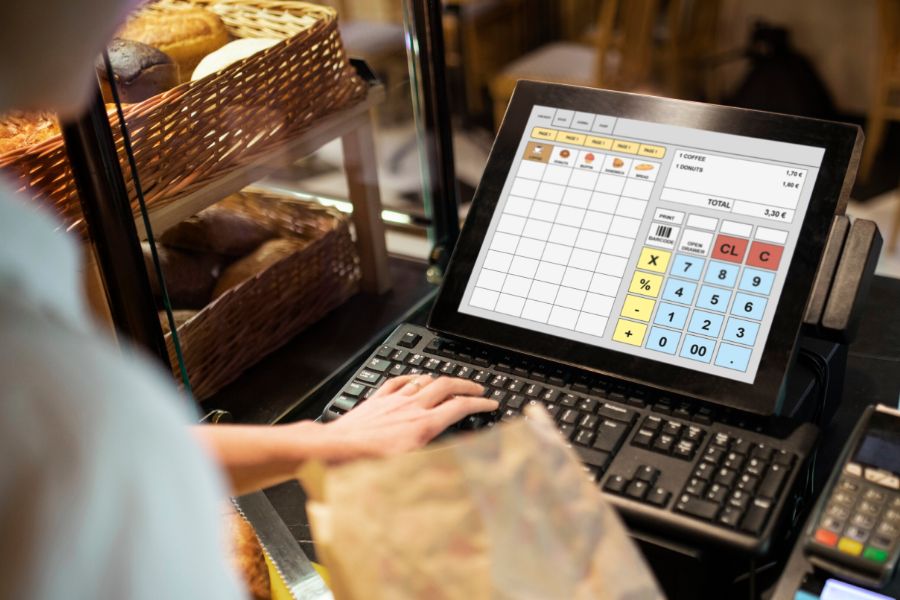
This type of system handles key checkout functions, such as processing payments, printing receipts, and managing basic inventory, without a steady internet connection. It operates on local hardware and keeps data stored directly within the device or local network.
Standalone POS systems are commonly used in fast-paced environments where consistent uptime is important. Small retailers, salons, food stalls, and seasonal businesses often use these systems to manage sales quickly and with minimal complexity.
If your store requires remote access, multi-location syncing, or eCommerce integration, a connected system like ConnectPOS might fit better. But for straightforward, in-person selling, standalone POS systems remain a practical solution.
Core Features of a Standalone POS
Standalone POS systems come with a focused set of tools designed to handle in-store transactions and daily operations without relying on external networks or cloud syncing. These features make them a strong fit for businesses that want a low-maintenance, on-site setup.
Key features include:
- Local transaction processing: All sales activity is handled and stored directly on the device, reducing dependency on internet connectivity.
- Receipt printing: Most systems include built-in or connected printers for issuing physical receipts at checkout.
- Basic inventory tracking: While not as advanced as cloud-based tools, these systems typically include stock level monitoring for in-store items.
- Integrated payment support: Supports major card payments through terminal hardware, often using pre-installed software.
- Single-device setup: All functions are managed through one terminal or register, which simplifies both usage and maintenance.
- Offline operation: Keeps the business running during internet outages, with no disruption to the checkout process.
Some models also feature customer-facing displays, barcode scanning, and limited reporting tools. While these systems may not scale easily across multiple locations or online channels, they remain effective for businesses with straightforward needs and a focus on in-person sales.
Comparison Of Standalone POS vs. Cloud-Based POS System
Business owners often weigh two primary options when selecting a point-of-sale solution: standalone POS systems and cloud-based systems. Each serves different operational needs depending on store size, infrastructure, and long-term plans.
Data Storage and System Accessibility
- Standalone POS: Stores all data locally on the device or internal server. This setup gives you direct access to sales records without relying on remote access or internet service.
- Cloud-based POS: Stores data on remote servers, making it accessible from any internet-connected device. This flexibility introduces convenience, but it also depends on consistent connectivity.
Initial Setup Costs and Ongoing Maintenance
- Standalone POS: The upfront cost may be higher due to hardware and licensing expenses. However, with fewer external platforms involved, ongoing fees tend to be lower.
- Cloud-based POS: Usually has lower startup costs but involves recurring subscription fees for data storage, software access, and vendor support.
Reliability and Performance Under Varying Internet Conditions
- Standalone POS: Performs consistently in locations with limited or unstable internet, since it does not rely on cloud services for core functions.
- Cloud-based POS: Requires a stable internet connection for most tasks. Interruptions in service can impact transaction processing and data syncing.
Security Considerations and Data Control
- Standalone POS: Keeps data within the store’s physical system, giving you full responsibility for security protocols and backups.
- Cloud-based POS: Managed by external providers, often with regular security updates and monitoring. However, this means handing over data management to a third party.
Understanding these differences helps you evaluate what is a standalone POS system in the context of your business goals, whether you prioritize full control, offline reliability, or remote access across devices.
Benefits of Using Standalone POS Systems
Choosing a standalone POS system brings several practical advantages, especially for businesses focused on in-store transactions and day-to-day stability.
- Optional Integration with Online Orders
Although it runs independently, a standalone POS system can be configured to connect with online order platforms. This setup supports consistent sales tracking between in-store and online channels, creating a unified experience for both staff and customers.
- Multi-Function POS Hardware with Long-Term Value
Standalone POS hardware is built to handle various tasks without frequent upgrades. Many systems support sales processing, receipt printing, and inventory tracking in one unit. This setup reduces the need for additional hardware purchases as your store’s needs shift.
- Mobile Setup for Flexible Sales Points
Many standalone POS systems are compatible with mobile devices, offering flexibility in how and where you process transactions. Mobile setups work well for pop-up shops, curbside pickups, or temporary event booths.
Using a mobile tablet cash register can have these functions:
- Discounts, reimbursements, and write-offs are all applied.
- Offering customers special deals depending on their buying history by bundling related products.
- Tracking each employee’s sales.
- Displaying information about taxes.
- Creating digital receipts that may be texted or emailed to customers.
- Barcode scanners, printers, digital scales, cash registers, and card readers can connect with it wirelessly or through cable.
- Full Control Over Customization and Updates
Standalone POS systems give you control over how the software is configured and when updates are made. This flexibility means updates won’t interfere with your busiest hours, and the interface can be tailored to specific workflows or store policies.
- Uninterrupted Sales During Internet Outages
A key benefit of a standalone POS system is its ability to operate without internet connectivity. This reduces the risk of business interruption due to connectivity issues, ensuring that sales can continue even during an internet outage.
- Longer System Lifespan with Minimal Dependencies
Standalone POS systems are designed for durability. Without the need to constantly adapt to fast-changing cloud standards, these systems can remain in use for years with routine maintenance. For many stores, this results in a better return on investment over time.
These benefits highlight the standalone POS as a reliable, efficient, and cost-effective option for businesses that value independence and control over their point of sale processes.
Read more: Become a White Label POS Today with ConnectPOS
When a Standalone POS Makes Sense
A standalone POS system fits best in environments where simplicity, local control, and uninterrupted sales matter most. If your store doesn’t rely heavily on eCommerce or remote access, this type of setup can streamline operations without the need for constant updates or internet connectivity.
Scenarios where a standalone POS system makes sense include:
- Single-location stores that don’t need centralized data access or multi-branch syncing
- Food trucks, kiosks, or pop-ups operating in areas with limited internet access
- Busy retail counters that require fast processing with minimal system interruptions
- Seasonal or temporary businesses that need a low-maintenance setup
- Stores prioritizing local data control, especially those in regulated industries
Standalone systems minimize dependencies while delivering the core tools needed to handle transactions, track stock, and manage day-to-day operations efficiently.
Top Standalone POS Systems to Know in 2026
ConnectPOS
ConnectPOS stands out by delivering a hybrid POS system that supports both standalone and connected operations. It’s designed specifically for retail businesses—especially grocery, fashion, and multi-location stores—that require stable offline performance without giving up advanced features.
What makes ConnectPOS different:
- Works fully offline with automatic syncing once reconnected
- Real-time inventory updates across stores, warehouses, and online channels
- Customizable promotions, customer groups, and loyalty programs
- Multi-device checkout: run POS on desktop, tablet, or mobile
- Native integrations with platforms like Magento, Shopify, and BigCommerce
- Multi-store reporting with centralized control over pricing, staff performance, and product data
- Support for barcode scanning, receipt printers, digital scales, and cash drawers
ConnectPOS is built for scalability. It supports small businesses looking for simplicity and larger retailers planning for growth
Lightspeed POS
Restaurants, retail, and e-commerce businesses can benefit from Lightspeed’s customized point-of-sale systems. Businesses can use its cloud-based software to manage inventory and marketing, track sales, manage staff, and process payments. For extra marketing, customer loyalty, and personnel management functions, the software integrates with third-party platforms.
Key features:
- Product matrix setup for managing multiple variants like size or color
- Inventory tracking with automated reordering and supplier management
- Integrated employee scheduling and shift tracking
- Access to third-party apps for marketing, accounting, and customer loyalty
- eCommerce integration for omnichannel selling
Lightspeed works well for medium to large businesses that want strong reporting tools and advanced inventory controls, but still rely on internet access for most functions.
Square POS
Key features:
- Built-in tools for CRM, loyalty programs, and email receipts
- Mobile and countertop hardware options, including Square Terminal and Square Register
- Real-time sales and inventory reports via the Square Dashboard
- Invoicing, tipping, and appointment booking for service businesses
- Free POS software with optional paid add-ons for advanced functions
Square is a practical option for startups and mobile sellers who need basic POS functionality without complex hardware or long setup times.
Choosing Between Standalone and Connected POS Systems
Selecting the right POS system depends on how your business operates today—and what you plan to do next. While standalone POS systems are practical for in-store transactions and offline reliability, connected POS systems bring in more flexibility for remote access, multi-location syncing, and online selling.
Here’s what to consider when deciding between the two:
- Connectivity needs: If your store runs in areas with poor internet, standalone systems prevent interruptions. Connected systems, meanwhile, rely on stable internet to sync data in real time.
- Store size and structure: Standalone POS fits single-location shops with basic inventory needs. Connected systems suit businesses managing multiple branches or selling across channels.
- Data access and reporting: Cloud-based systems give you access to reports and dashboards anytime, from anywhere. Standalone systems store data locally, limiting remote access.
- Scalability: If you’re planning to expand or add online sales later, a hybrid or connected POS may be more future-ready.
- Customization and control: Standalone systems give you more control over updates and configurations. Connected systems often come with automated updates and vendor-managed features.
Choosing between the two starts with understanding your current requirements and how you expect them to change over time.
Read more: Ecommerce POS System – Point of Sale Systems for all Businesses
Conclusion
Understanding what a POS system is is key to choosing one that fits your business. Standalone POS systems offer stability and control for offline-focused operations, while cloud-based options support real-time access and cross-channel selling. The right match depends on your store’s setup, budget, and growth plans.
Deciding on the right POS system is a significant business step, and ConnectPOS is here to provide the expertise and support required for making this choice. If you are in need of a consultation on this matter, give us a call! Our team is ready to assist you in navigating your options and equipping your business with the tools it needs to succeed.
FAQ
What is a standalone POS system and how is it different from other POS types?
A standalone POS system is a self-contained solution that processes transactions, manages inventory, and stores data locally without needing a constant internet connection or integration with external platforms. Compared to cloud-based systems, it’s more focused on in-store operations and doesn’t rely on real-time syncing across locations or devices.
When should a business choose a standalone POS system over a connected one?
A standalone POS system makes sense for single-location businesses, food stalls, or retail counters where internet access is limited or unstable. It’s also a smart choice for stores that want full control over data and system updates, without depending on third-party platforms for day-to-day functions.
Can standalone POS systems support features like inventory and customer management?
Yes, most standalone POS systems include basic inventory tracking, sales reporting, and customer profile tools. While they may not support complex integrations or multi-location syncing, they cover key functions needed for smooth in-person transactions and store-level control.
►►► Optimal solution set for businesses: Shopify POS, Magento POS, BigCommerce POS, WooCommerce POS, NetSuite POS, E-Commerce POS