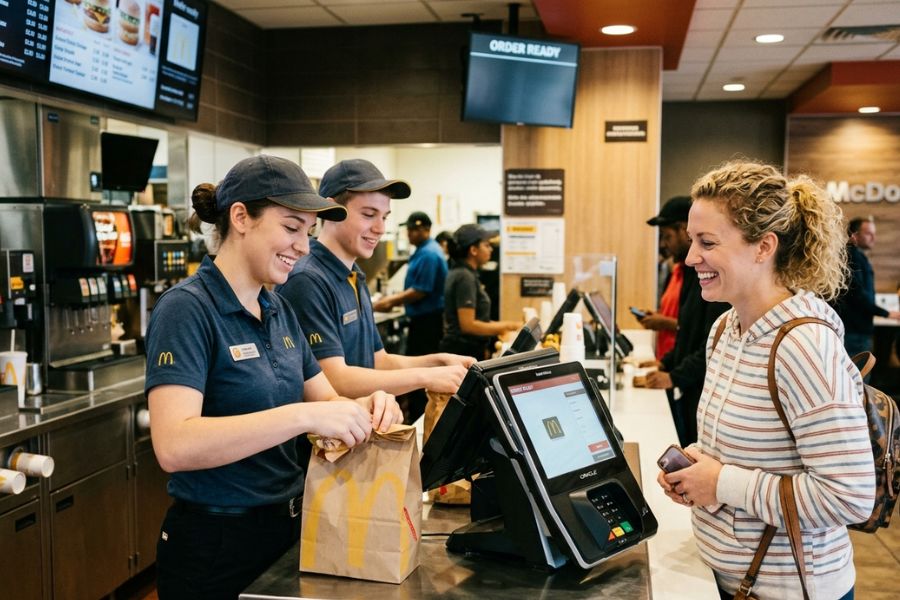
In the high-stakes world of Quick Service Restaurants (QSR), the front counter is the “front line.” For a new McDonald’s crew member, the first time facing a lunch rush can feel like being a pilot in a cockpit full of flashing buttons. However, they have turned McDonald’s POS practice into a science, ensuring that even a teenager on their first day can begin navigating the system with precision.
By utilizing the NP6 (NewPOS) architecture, McDonald’s transforms a complex menu into a streamlined digital experience. Here is how they turn rookies into POS pros in record time. Let’s explore ConnectPOS in this article!
Highlight:
- McDonald’s uses a multi-layered approach, combining gamified e-learning, “sandbox” simulations, and hands-on shadowing, to build muscle memory without live-customer pressure.
- Mastery of the POS is the primary driver for “Speed of Service” and “Order Accuracy,” two metrics that directly dictate the profitability and customer satisfaction of a high-volume retail environment.
Why POS Mastery Is Critical in McDonald’s Operations
Mastering the POS system is not just about pressing buttons; it is the heartbeat of restaurant efficiency. In an environment where McDonald’s serves over 70 million customers daily, any delay at the register ripples through the kitchen and drive-thru, potentially costing thousands in lost revenue and customer goodwill.
McDonald’s POS practice ensures that crew members can handle high-volume transactions with a “zero-error” mindset. Proficiency in the system directly impacts two vital metrics:
- Speed of Service: Advanced POS implementation has been shown to reduce average order processing times by up to 50%, bringing service times down to approximately 4 minutes per customer.
- Order Accuracy: Modern POS systems, combined with voice AI and standardized entry, can increase order accuracy to 93%, significantly reducing food waste and remake costs.
Key Training Methods for New Crew Members Master System Fast
To bridge the gap between a “new hire” and a “top performer,” McDonald’s utilizes a multi-modal training approach that targets different learning styles, making sure every crew member gains confidence quickly.
Interactive Digital Learning Modules
Before ever touching a physical register, trainees often engage with FRED (Food, Restaurants, Entertainment, and Dolls), McDonald’s proprietary e-learning platform.
These modules use gamification to familiarize users with button layouts and menu categories in a low-pressure environment.
POS Simulation Tools
Simulation is the bridge to reality. New hires use “Practice Mode” software that mirrors the live NP6 interface. This allows for McDonald’s POS practice without the risk of accidentally charging a real credit card or sending a “ghost order” to the grill team.
Practical, Hands-On Training
Once the digital basics are covered, trainees move to the physical terminal. This stage focuses on tactile memory, learning exactly where the “Medium Coke” button lives so they can select it without looking, much like a touch-typist on a keyboard.
On-the-Job Coaching and Guided Shadowing
New members are paired with a “Crew Trainer.” The trainee first watches (shadows), then performs tasks while the trainer watches (guided), and finally operates independently. This “See one, Do one, Lead one” philosophy minimizes anxiety during peaks.
In-Station Reference Aids
Even the best memory can fail during a 12:00 PM rush. McDonald’s uses “Laminated Cheat Sheets” or digital pop-ups on the POS screen that provide instant reminders for limited-time offers (LTOs) or complex meal combinations.
Read more: Cake POS System in the US: A Complete Review
Essential Steps for Effective McDonald’s POS Practice
Efficiency is built layer by layer. When breaking the software into logical steps, the learning curve is flattened, allowing new staff to achieve operational autonomy within their first week.
- Step 1: The “Search and Find” Game: The first goal of McDonald’s POS practice is spatial awareness. Trainers give trainees a list of random items (e.g., Filet-O-Fish, Apple Pie, McNuggets) and time how long it takes to find them. This builds the mental map of the tabbed interface.
- Step 2: Mastering Modifications: In the age of “have it your way,” modifications are where errors usually occur. Trainees practice “No Pickle,” “Extra Sauce,” and “Sub-Round Egg” commands. Understanding the “Grill” function on the POS is vital for ensuring the kitchen knows exactly what to build.
- Step 3: Managing Meal Deals: The NP6 system is smart; it can “auto-bundle” items into meals. Crew members must learn how to recognize when a customer’s individual items can be turned into a “Value Meal” to save the customer money, a key component of hospitality.
- Step 4: The Art of the “Promo”: Handling coupons, mobile app rewards, and “buy one get one” deals is the final boss of POS training. Trainees practice scanning QR codes and manually entering promo codes, making sure the total reflects the expected discount.
Key Lessons Crew Members Learn from McDonald’s POS Practice
Asides from the technical “how-to,” the training process instills a professional mindset that defines the McDonald’s service standard.
- Consistent Practice Builds Speed and Confidence: Repetition helps employees develop muscle memory when navigating POS menus. By practicing common transactions such as product lookup, discounts, and refunds, staff can serve customers faster without constantly searching for functions.
- Accuracy should always come before speed: McDonald’s emphasizes verifying orders before finalizing them. Retail teams should also train employees to double-check items, prices, and promotions before completing a sale to prevent costly mistakes and product returns.
- Clear product structure improves transaction flow: Just as McDonald’s organizes menu items into logical categories, retailers should structure POS product catalogs simply and intuitively. Clear categories and visual layouts help staff locate items quickly during busy hours.
- Encouraging questions prevents operational errors: New employees should feel comfortable asking supervisors when something looks incorrect in the POS system. This culture reduces guesswork and prevents inventory mismatches, pricing mistakes, and incorrect transactions.
- Practicing under simulated pressure prepares staff for rush hours: McDonald’s training often includes simulated peak periods. Retail businesses can prepare staff by practicing checkout scenarios during high-demand events such as holiday sales or promotional campaigns.
- Attention to small details protects customer trust: Small POS actions, like selecting the correct product variant, applying the right promotion, or verifying quantities, directly affect customer satisfaction. Careful POS usage reduces errors and strengthens brand credibility.
While training methods are important, the POS system itself must also be designed for quick learning and efficiency. Modern solutions such as ConnectPOS help retailers shorten onboarding time and improve daily operations.
- Intuitive interface design: ConnectPOS uses clear product grouping and touch-friendly layouts that allow employees to navigate the system quickly with minimal training.
- Practice-friendly workflows: The system structure makes it easy for new staff to learn typical retail scenarios such as product searches, promotions, and checkout procedures.
- Smart automation for transactions: Automatic promotions, bundled offers, and simplified checkout processes reduce manual steps and minimize human errors.
- Real-time performance insights: Managers can track transaction accuracy, employee performance, and sales trends, enabling targeted coaching and continuous improvement.
- Omnichannel synchronization: ConnectPOS connects online and offline channels so inventory, customer data, and orders remain consistent across all sales touchpoints
What Modern Retail Businesses Can Learn from McDonald’s POS Training
McDonald’s success with rapid POS mastery proves that technology alone does not drive efficiency; training-friendly system design does. Modern businesses can succeed by studying how McDonald’s builds speed, accuracy, and confidence into every interaction.
By integrating the core philosophies of McDonald’s POS practice, high-growth retailers can unlock a suite of benefits that modernize the employee experience and the bottom line:
- Intuitive Interface Design Minimizes Learning Time: McDonald’s POS organizes large menus into clear, logical categories that guide users naturally through each order. ConnectPOS implements this via highly visual, touch-optimized layouts. Clean designs, smart grouping, and fewer taps lower mental strain, helping new staff work faster and more confidently from day one.
- Built-in Practice Modes Speed Up Onboarding: POS simulation environments allow employees to rehearse real scenarios without pressure. Much like the McDonald’s training modules, these “sandbox” modes build muscle memory early, shorten training periods, and significantly reduce costly mistakes during live customer service.
- Smart Automation Improves Speed and Sales Accuracy: Automatic meal suggestions, promo applications, and modification prompts streamline transactions while boosting order value. These features support staff performance by doing the “heavy lifting” of logic, ensuring service never slows down even during complex requests.
- Real-time Feedback Drives Continuous Improvement: Performance tracking, error monitoring, and transaction analytics enable instant coaching. Just as a McDonald’s manager uses shift data to mentor crew, modern systems provide targeted analytics that help teams refine skills quickly and maintain high operational standards.
- Omnichannel Integration for Seamless Service: McDonald’s masters the art of syncing Kiosk, Mobile, and Counter orders. Systems like ConnectPOS replicate this by confirming that inventory and customer data are updated across all channels instantly, preventing staff confusion and ensuring a “single source of truth” for the business.
Read more: Starbucks POS System Works in 2026
FAQs: Mcdonalds POS Practice
- What POS system does McDonald’s use?
McDonald’s primarily uses a system called NP6 (NewPOS). It is a highly specialized, Linux-based software designed specifically for the extreme volume and complexity of the McDonald’s global menu.
- How do I handle a “Mobile Order” at the register?
When a customer arrives with a mobile code, you typically select the “Mobile Order” or “App” button on the POS and scan their QR code. This automatically pulls their cart into your system, requiring you only to verify and finalize the payment.
- How long does it take for a new crew member to learn the McDonald’s POS system?
Most new crew members can become comfortable with the McDonald’s POS system within their first few shifts. Thanks to structured McDonalds POS practice methods such as e-learning modules, simulation tools, and guided shadowing, many employees achieve basic operational confidence within a week while continuing to improve speed and accuracy over time.
Conclusion
Mastering the register at a world-class QSR is a deliberate process driven by structured McDonalds POS practice and “Accuracy First” training. By utilizing interactive simulations and NP6 architecture, McDonald’s transforms new hires into efficiency experts through muscle memory and systematic navigation. This gold standard proves that a POS system is only as effective as the training supporting it.
For business owners seeking to replicate this success, ConnectPOS offers intuitive, enterprise-grade tools designed to minimize learning curves and maximize speed.
Elevate your retail operations and streamline staff mastery by contacting us today.
►►► Optimal solution set for businesses: Shopify POS, Magento POS, BigCommerce POS, WooCommerce POS, NetSuite POS, E-Commerce POS