Speed breaks down fast in a QSR. One slow screen, one missed modifier, or one kitchen delay can throw off the whole shift. The best POS system for quick service restaurants keeps orders moving, cuts friction at checkout, and gives you clearer control over stock, staff, and repeat visits. In this guide from ConnectPOS, we’ll compare five standout options and show where each one fits best.
Highlights
- The best POS for a quick service restaurant should support fast order entry, clear kitchen routing, live reporting, ingredient tracking, and tools that keep service smooth during rush hours.
- Our top 5 picks for 2026 are ConnectPOS, Toast POS, Square for Restaurants, Clover POS, and TouchBistro POS.
What Makes the Best POS System for Quick Service Restaurants in 2026?
A QSR POS has a harder job than a regular checkout system. It has to keep pace during rush hours, pass orders to the kitchen without confusion, and give managers live store data they can actually use.
That pressure is already visible across the industry. Nearly 75% of all restaurant traffic now happens off-premises, so many QSR teams are handling takeout, drive-thru, delivery, and pickup at the same time.
That’s why quick service brands usually outgrow generic POS tools. They may take payments just fine, but they often fall short once order volume climbs and service gets messy. That gap becomes clear when 94% of consumers say speed is critical in off-premises orders, so even small delays at the counter or in the kitchen can disrupt the entire flow.
- Fast order entry: Counter staff need a layout that feels quick from the first tap. Shorter order paths mean fewer mistakes and shorter lines.
- Kitchen routing that stays clear: Orders must move to the right prep station without manual fixes. When tickets reach the kitchen in a clean format, staff spend less time asking questions.
- Raw-material tracking: A QSR doesn’t just sell finished items. It sells ingredients in different combinations, so stock needs to reflect sauces, toppings, proteins, cups, and packaging.
- Self-service options: Kiosk and QR ordering can ease pressure at the counter. They also give guests a faster path when they already know what they want. That shift is already normal for many guests. Mobile ordering was used recently by 57% of adults, including 74% of millennials and 65% of Gen Z adults.
- Smart combo prompts: Upsell logic matters in fast service. A good system can nudge staff or customers toward add-ons, meals, or higher-value bundles without slowing the order flow.
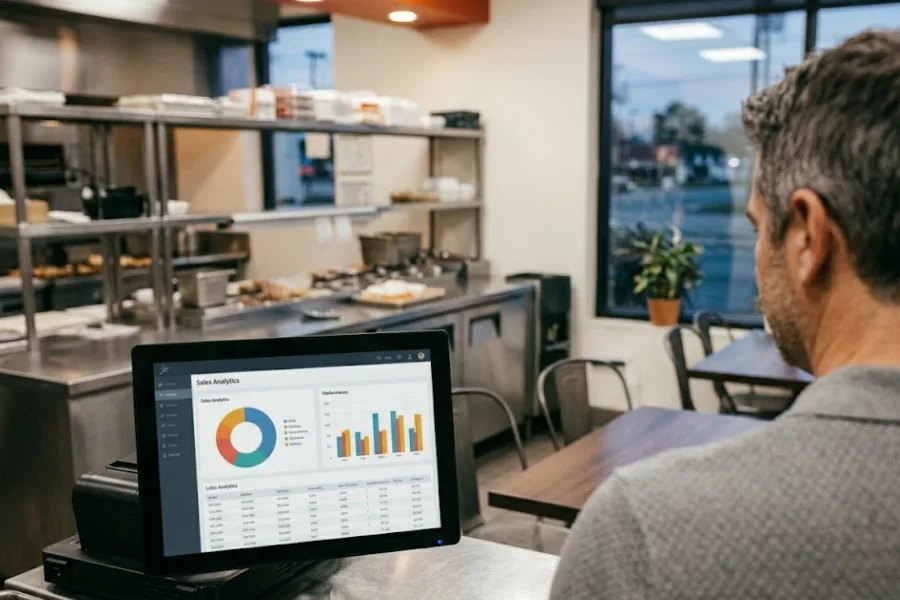
- Live reporting: Rush-hour data, best sellers, voids, and staff activity shouldn’t sit in yesterday’s report. QSR teams need quick visibility while the day is still moving.
- Loyalty and return visits: Quick service runs on repeat habits. A strong CRM POS setup should help you track customers, while a built-in loyalty program POS can reward visits and keep brand recall strong. 65% of drive-thru users and more than 60% of takeout and delivery users say membership affects where they order.
- Online and delivery support: Pickup, delivery, and in-store orders now overlap all day. One dashboard should keep those channels in line.
- Room to grow: A single-location burger bar and a growing chain don’t buy the same system for the same reason. Yet growth plans still matter on day one.
For example, during a lunch rush, online pickups hit at the same time as walk-in orders. The better POS keeps those orders in one clean flow. The weaker one leaves staff jumping between screens and guessing what needs to go out first.
How We Selected the Best POS Systems for Quick Service Restaurants
We didn’t treat this like a broad restaurant list. A QSR has its own pace, its own friction points, and its own buying logic.
So the shortlist focused on what matters in real fast-service work, not what looks good in a generic software pitch.
- Restaurant-first design: Systems built around food service usually handle modifiers, combos, prep flow, and busy counters better than general retail tools.
- Ease of use: Staff training takes time and money. A POS should feel clear enough for new hires to pick up quickly.
- Rush-hour speed: Lunch and dinner peaks expose weak setups fast. We looked for systems that keep checkout moving under pressure.
- Kitchen coordination: Order flow matters just as much as payment flow. Tools that support kitchen displays, prep routing, or cleaner ticket handling scored better.
- Inventory management and reporting depth: QSR teams need more than a daily sales total. Ingredient tracking, product movement, and live store data all matter.
- Hardware flexibility: Some brands want iPads. Others want handhelds or fixed terminals. A system should fit the service model, not force one.
- Pricing clarity: Low starting prices can look attractive at first. But add-ons, hardware, and processing fees can change the real cost quickly.
- Fit by business stage: Some tools suit new operators. Others make more sense once you’re running larger stores or planning new locations.
Take a quick example. A small chicken shop may care most about setup speed and low monthly cost. A five-store QSR brand may care more about mobile selling, stock control, and live reporting from the head office. The best choice depends on where you are and where you’re headed.
5 Best POS Systems for Quick Service Restaurants in 2026
No single POS fits every QSR. Some teams want the lowest starting cost. Others care more about workflow control, kitchen speed, or data visibility.
Still, these five stand out for a reason. They each bring a strong mix of speed, reporting, daily usability, and growth potential.
1. ConnectPOS
ConnectPOS takes the top spot for QSR brands that want a more flexible setup. It suits teams that need fast service at the counter, stronger visibility behind the scenes, and a smoother customer journey across sales channels.
That balance matters. Some systems are easy to start with, but feel limiting later. ConnectPOS gives you more room to shape workflows around your operation, which is a big deal once your service model gets more complex.
Key features
- Raw-Material Inventory: Track ingredients behind each menu item, not just finished products. That gives your team a better view of real stock movement.
- Real-Time Reports & Analytics: Sales, staff activity, and product movement update live. Managers can make decisions during the shift, not after it ends.
- Digital Kitchen Displays: Orders move to prep in a clearer way. That helps kitchen teams stay aligned during busy periods.
- Smart Combo Prompts: Build upsell logic into the order flow. Staff can move faster and still raise average order value.
- Self-Service & QR: Give customers another path to order. That can ease pressure at the counter and shorten queues.
- Customer Loyalty: Keep repeat visits in focus through rewards and customer tracking. That matters a lot in fast service.
- Mobile POS: Line busting works better when staff can take orders away from the main counter. It also helps during packed shifts or pop-up service points.
- Flexible customization: ConnectPOS gives brands more control over workflows, layouts, and connected tools through a Custom POS setup. That makes it easier to match the system to your real operation.
Best for: ConnectPOS fits quick service restaurants that want a scalable setup and stronger workflow control. It also suits growing brands that need deeper data visibility and cleaner omnichannel coordination.
Why it stands out
- Built around flexibility: ConnectPOS gives QSR teams more control over how the system works in daily service. That matters when one store model doesn’t match another.
- Strong mobile and customer flow: Mobile POS, self-service options, and customer-facing tools all support faster selling and shorter wait times.
- Clearer visibility across operations: Real-time reporting, stock control, and connected workflows help teams stay sharp during peak hours.
For example, a QSR that wants to push QR ordering at lunch, use handheld devices for line busting, and still keep product and stock data in sync. ConnectPOS handles that kind of mixed flow better than a rigid setup.
Pricing: Standard starts at $49 per register/month, Advanced at $79 per register/month, Premium at $99 per register/month, and Enterprise is custom pricing.
2. Toast POS
Toast has built a strong name in restaurant tech, and it still ranks high for QSR brands that want a restaurant-first system. It’s well known for handling busy service, kitchen flow, and connected order management.
That restaurant’s focus is the main draw. Toast feels most at home in food service, which helps when menus, modifiers, and prep timing all need to stay in line.
Key features
- Restaurant-focused POS workflows: Designed around food orders, modifiers, and day-to-day restaurant operations
- Kitchen Display System: Sends orders to prep in a more organized format
- Online ordering and delivery integrations: Keep off-premise sales closer to the main workflow
- Menu and modifier management: Useful for combos, add-ons, and custom requests
- Real-time reporting: Gives store teams a live view of sales and trends
- Handheld and counter hardware options: Supports different service styles
- Loyalty and guest engagement tools: Help brands stay connected with repeat customers
Best for: Toast fits high-volume QSRs and growing restaurant groups that want a mature restaurant ecosystem.
Why it stands out
- Restaurant-native setup: Toast was built for restaurant operations from the start
- Strong kitchen coordination: Front-of-house and back-of-house stay more connected
- Good fit for growth: Larger brands often like its depth once order volume rises
Pricing: Starter Kit from $0/month, Point of Sale from $69/month, and Build Your Own custom pricing. Hardware and implementation costs vary.
3. Square for Restaurants
Square for Restaurants is often the easiest way into the category. It works well for smaller QSRs that want a simple setup, a familiar interface, and a lower starting cost.
That’s the appeal. You can get started quickly, train staff fast, and avoid a heavy software commitment early on.
Key features
- Free or low-cost entry plan: Good for new operators watching spending closely
- Simple order and payment flow: Easy for staff to learn
- Online ordering support: Helps smaller teams sell across more channels
- Mobile payment tools: Useful for counters, kiosks, and quick service points
- Real-time sales tracking: Gives a clearer picture of daily performance
- Basic inventory tools: Enough for simpler operations
- User-friendly interface: Keeps daily use straightforward
Best for: Square works best for small to mid-sized quick service restaurants, food counters, kiosks, and new operators.
Why it stands out
- Quick to launch: Setup is usually faster than deeper restaurant systems
- Easy to train on: Staff can get comfortable without a long learning curve
- Strong value at the low end: It makes sense for lean teams that want to move fast
Pricing: Square Free at $0/month per location, Square Plus at $49/month per location, and Square Premium at $149/month per location. In-person processing is 2.6% + 15¢, 2.5% + 15¢, and 2.4% + 15¢ depending on plan.
4. Clover POS
Clover sits in a different lane. It appeals to QSR operators who want more hardware choice and more room to shape the setup through apps and add-ons.
That can be useful when your service style doesn’t fit neatly into one mold. Counter service, handheld checkout, and customer-facing devices can all play a role here.
Key features
- Flexible hardware lineup: Choose from counter terminals and handheld devices
- App marketplace: Extend the setup with added tools
- Counter and handheld options: Useful for mixed service models
- Payment processing tools: Built for quick transactions
- Employee management: Gives teams more day-to-day control
- Loyalty and customer engagement add-ons: Supports repeat-visit strategies
- Multi-device sync: Keeps devices aligned across the store
Best for:
Clover suits QSRs that want hardware flexibility and a setup they can shape over time.
Why it stands out
- Device choice: Good for brands that care about counter layout and service flow
- App-based expansion: Add tools as your needs change
- Useful for hybrid operations: Cafes, counters, and mixed-service stores often like this setup
Pricing: Quick-service restaurant pricing is commonly listed at $89.95/month for Starter, $89.95/month for Standard, and $109.90/month for Advanced, with hardware costs varying by bundle or device.
5. TouchBistro POS
TouchBistro remains a practical choice for restaurants that prefer an iPad-based system. It’s often picked for ease of use, stable daily performance, and reliable offline support.
That offline angle matters more than many buyers expect. Internet issues still happen, and a busy service window is the worst time for a system to freeze.
Key features
- iPad-based POS: Familiar setup for many teams
- Offline mode: Keeps service running when internet issues hit
- Menu and order management: Helps staff move through orders quickly
- Quick order flow: Good fit for busy periods
- Table and counter support: Useful for QSRs with a mixed service layout
- Reporting tools: Give managers a clearer read on sales
- Add-ons for online ordering and loyalty: Available for brands that need a wider range
Best for: TouchBistro suits QSRs that want an iPad-based setup and dependable offline performance.
Why it stands out
- Keeps running during outages: That can save a shift when service gets busy
- Easy to get used to: Staff often pick it up quickly
- Solid middle ground: It balances simplicity and restaurant-focused tools well
Pricing: TouchBistro POS starts at $69/month. Add-ons like KDS, loyalty, online ordering, reservations, and marketing are separate and quote-based.
Quick Comparison of the Best POS Systems for Quick Service Restaurants
A side-by-side table helps when you’re skimming options. It won’t make the final choice for you, but it does make the trade-offs easier to spot.
| POS System | Starting Price | Best For | Key Strengths | Limitations |
| ConnectPOS | $49/register/month | Growing QSR brands | Strong customization, real-time data, mobile POS, loyalty, omnichannel | Requires setup for full customization |
| Toast POS | $0 to $69/month | High-volume restaurants | Built for restaurants, strong kitchen tools, delivery integrations | Higher total cost with add-ons |
| Square | $0 to $149/month/location | Small QSRs and startups | Easy setup, low entry cost, simple UI | Limited deeper tools at scale |
| Clover POS | $89.95 to $109.90/month | Flexible hardware setups | Device options, app marketplace, customizable workflows | Pricing varies by provider |
| TouchBistro | From $69/month | iPad-based restaurant setups | Offline mode, stable performance, simple interface | Add-ons increase total cost |
Which POS System is Best for Your Quick Service Restaurant?
The shortlist gets easier once you match each tool to your daily needs. Not every QSR wants the same thing, even when they serve similar food.
Start with the pressure points in your store. Then look at which system solves those first.
- Best for growing QSR brands: ConnectPOS and Toast make the most sense when growth is already part of the plan. ConnectPOS gives more workflow flexibility, while Toast leans into restaurant depth.
- Best for small teams and lower upfront cost: Square for Restaurants is still the easiest starting point. It suits operators who want less friction during setup.
- Best for hardware flexibility: Clover stands out if device choice matters to your service model. That’s useful for brands mixing counter service and handheld checkout.
- Best for iPad-based and offline-friendly use: TouchBistro fits teams that want familiar hardware and backup support during internet issues.
- Best for customization and workflow control: ConnectPOS is the strongest pick when you want to shape the system around your operation. That becomes more valuable as your QSR setup gets more complex.
A simple example is a two-store QSR planning to add kiosks, mobile ordering, and more live reporting across locations. In that case, ConnectPOS usually makes more sense than a lighter entry system.
FAQs: Best POS System for Quick Service Restaurants
1. What is the best POS system for quick service restaurants?
The answer depends on your size and service model, but ConnectPOS stands out for brands that want flexibility, live data, and room to grow. Smaller teams may lean toward Square, while larger restaurant groups may prefer Toast.
2. What features should a QSR POS have?
Look for fast order entry, kitchen routing, inventory control, self-service options, combo logic, live reporting, loyalty tools, and support for online and delivery orders.
3. Is a restaurant-specific POS better than a general POS?
Usually, yes. Restaurant-first systems handle modifiers, prep flow, combos, and busy service better than general tools that focus mostly on payment processing.
4. What is the best POS for small quick service restaurants?
Square for Restaurants is a common pick for smaller QSRs because setup is fast and the entry cost stays low. It works well when your operation is still simple.
5. Which POS is best for multi-location QSR brands?
ConnectPOS and Toast are strong choices for multi-location growth. They give brands better control over reporting, stock, and connected workflows across stores.
Final Thoughts
The best POS system for quick service restaurants should keep orders moving, give you cleaner data, and support the way your team actually works. Some brands need a low-cost starting point. Others need a tighter kitchen flow, better stock control, or more room to customize. ConnectPOS stands out when flexibility, visibility, and growth all matter at once. If you’re comparing your next move, contact us and let’s talk through what fits your QSR best.
►►► Optimal solution set for businesses: Shopify POS, Magento POS, BigCommerce POS, WooCommerce POS, NetSuite POS, E-Commerce POS