
A pharmacy counter can look calm and still feel overloaded. One refill is waiting, one insurance check is stuck, and one staff member is trying to confirm expiry dates before pickup. The best POS system for pharmacy searches usually starts at that point, when billing alone no longer fixes the daily mess. In this guide from ConnectPOS, we’ll map the core tools a pharmacy POS must include and the gaps that usually slow teams down.
Highlights
- A pharmacy POS must connect checkout, inventory, compliance, and patient-facing workflows in one clean flow.
- Batch control, refill support, barcode checks, and reporting do more than save time, they help prevent costly mistakes.
- The right system should fit current pharmacy routines and still support new branches, new service models, and higher script volume.
Pharmacy Workflows Demand a Different Kind of POS
A pharmacy POS handles far more than payment. It sits close to prescriptions, patient records, stock rotation, insurance checks, and daily compliance work. That changes everything.
A regular retail setup can ring up shampoo, snacks, or vitamins just fine. Yet pharmacies work under tighter rules. Staff need faster checks, clearer records, and better control over products that can expire, move in batches, or require closer tracking.
The pace is real, too. 49.9% of people in the United States used at least one prescription drug in the past 30 days, according to the CDC. That volume explains why pharmacies can’t rely on loose manual steps or half-connected systems.
This is where the difference shows. A generic POS records a sale. A pharmacy POS must connect the sale to the right medication, the right customer, the right stock movement, and the right record trail.
That’s why the buying question isn’t only about price or hardware. The real priority is control. The best POS system for pharmacy must support billing, stock, compliance, and service in one practical setup.
Issues Pharmacies Usually Struggle With Before Upgrading Their POS
Most pharmacies don’t start shopping for new software because they want something ‘new.’ They start because daily work keeps getting harder to manage.
- Slow checkout during peak hours: Pickup lines build fast when staff have to jump between screens. A simple payment can turn into a long stop once refills, co-pays, or product checks enter the picture.
- Weak stock visibility: Teams often know an item is ‘somewhere’ in the system, but not which branch has it, which batch it belongs to, or which units expire first. That creates waste and awkward conversations at the counter.
- Disconnected workflows: Prescription data, billing details, customer history, and inventory movement often sit in separate places. Staff then re-enter the same data again and again, and mistakes follow.
- Compliance pressure: Pharmacies deal with tighter privacy rules and stronger recordkeeping demands than many other retail businesses. One missing log or one weak access setting can create bigger problems later.
- Insurance friction: Even when the pharmacy side runs well, insurance steps can slow everything down. The AMA said physicians completed an average of 39 prior authorization requests per physician per week in its 2024 survey. That shows how much admin pressure already exists around medication access.
- Poor branch control: A pharmacy that grows from one branch to two or three often finds out its old system can’t keep up. Transfers, pricing, reporting, and store-level oversight become harder than they should be.
- Limited reporting: Owners may see total sales, but not enough detail on margin, refill patterns, dead stock, or peak-hour staff load. That leaves too much guesswork in daily decisions.
These gaps don’t stay small. They pile up, then start shaping service quality, stock accuracy, and customer trust.
The Best POS System for Pharmacy Must Have These Features
The right setup should make daily pharmacy work feel tighter, clearer, and easier to trust. That means each core area needs to pull its weight.
Prescription Management and Prescription-Linked Checkout
Prescriptions shouldn’t live in one workflow while checkout happens in another. That split creates delays and opens the door to errors.
- Direct prescription links: A pharmacy POS should connect each prescription to the final transaction. Staff can then confirm the sale, the item, and the patient record in one flow.
- Less manual entry: Re-typing drug names, quantities, or customer details slows pickup and raises the risk of mistakes. A linked system cuts that repetition.
- Refill support: Refill requests should move cleanly from request to preparation to pickup. That helps staff work faster and gives customers a smoother visit.
- Full record trail: Every script should leave a trace from order to handoff. That helps with review, dispute handling, and internal checks later.
The scale of digital prescription traffic shows why this counts. Surescripts said 2.6 billion e-prescriptions were filled in 2024. When that much volume moves through connected systems, pharmacies need checkout logic that can keep pace.
A weak handoff between prescription handling and checkout wastes time. A strong one keeps the counter moving.
Real-Time Inventory Management with Batch and Expiry Tracking
Inventory discipline keeps a pharmacy steady. If stock data is late or shallow, the whole operation starts to wobble.
- Real-time stock levels: Staff should know what is in stock right now, not what was in stock earlier that day. That helps at pickup, during internal transfers, and while planning reorders.
- Batch and lot tracking: The system should track products by batch, not only by item name. That gives pharmacies better control when recalls or expiry checks come up.
- Expiry visibility: Products with short shelf life need closer attention. Clear expiry tracking helps teams avoid selling items too late.
- FEFO or FIFO logic: Stock should move in the right order. FEFO matters a lot in pharmacy settings because the first item to expire should often move first.
- Low-stock alerts and reorder rules: Teams shouldn’t wait until shelves look empty. The system should flag risk earlier and support reorder timing.
This section is where natural internal linking helps. Pharmacies that handle large OTC ranges or several branches usually need stronger inventory management software support tied closely to the POS, not a separate tool that updates late.
Take a simple case. A customer wants a common medicine that exists in three batches across two branches. A pharmacy-ready POS should show which branch has stock, which batch expires sooner, and which unit should move first. That’s the kind of detail that keeps waste lower and service cleaner.
Compliance, Security, and Audit Trails
Pharmacy systems carry sensitive data. That means access rules and record trails can’t be casual.
- Role-based permissions: Staff members should only see the parts of the system tied to their job. That keeps data cleaner and limits risky access.
- Secure storage and encryption: Patient and transaction data need stronger protection, especially once the system connects across branches or cloud access points.
- Audit logs: The system should record edits, sales, stock changes, and user actions clearly. That helps pharmacies explain what happened and when.
- Inspection readiness: A good POS should make records easier to pull when audits or checks happen. No scrambling through folders. No unclear edit history.
Security gaps are not rare in healthcare. HHS said that from 2020 through 2023, the Office for Civil Rights received over 50 large breach reports tied to stolen equipment and devices containing electronic protected health information, affecting over 1,000,000 individuals. That’s a direct reminder that access control and secure records belong in the core system, not on a wish list.
Compliance work can feel dry. Yet once something goes wrong, dry becomes expensive very fast.
Insurance Billing and Flexible Payment Processing
Insurance is one of the first places where pharmacy workflows slow down. The POS needs to help, not add another layer of admin.
- Eligibility checks at checkout: Staff should be able to confirm coverage and expected co-pay without switching between separate tools.
- Claim support: Claim submission and reimbursement tracking should stay visible. That makes follow-up easier and keeps billing work from getting buried.
- Mixed payment handling: Many pharmacy transactions don’t end in one payment type. The POS should handle insurance plus out-of-pocket cleanly.
- Practical payment range: Cards, mobile wallets, cash, and HSA or FSA-related flows may all show up in a single day.
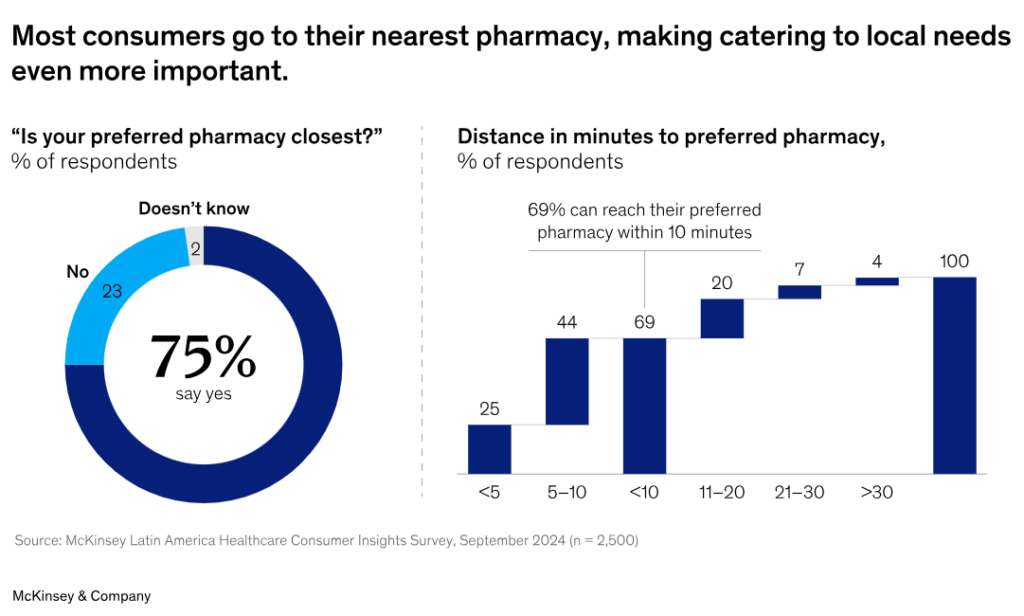
Payment flexibility also supports convenience. McKinsey found in a 2024 survey across Latin America that 75% of consumers prefer their nearest pharmacy, and 69% can reach their preferred pharmacy within ten minutes. Fast local service depends on quick payment and pickup steps, not long checkout detours.
If the payment side is clumsy, even a well-run pharmacy starts to feel slow.
Barcode Scanning and Medication Verification
Barcode scanning does more than speed up payment. It supports cleaner verification at the point where mistakes hurt the most.
- Faster pickup: Scanning helps staff move from item check to handoff quickly. That cuts wait time, especially during rush periods.
- Safer product verification: The system should confirm the right item, strength, and batch before the sale closes.
- Cleaner inventory updates: Each scan should update stock correctly. That makes the counts more reliable and lowers manual correction later.
- Support for pharmacy barcode needs: Pharmacies may work with product coding that goes beyond basic retail scanning. The POS should handle that level of detail where required.
At a busy counter, scanning is one of those small tools that changes the feel of the whole shift. Less hesitation. Fewer double checks. Better confidence.
Patient Profiles, CRM, and Refill Reminders
Pharmacy service gets stronger when staff can see the full customer picture. A one-time sale is easy. A long-term relationship takes better records and better follow-up.
- Patient history in one place: Purchase records and prescription history help staff answer questions faster and spot repeat needs.
- Better communication: Staff can give clearer service when they can see earlier interactions, notes, or refill patterns.
- Reminder support: Refill reminders and follow-up messages keep customers engaged and help them return on time.
- Loyalty and repeat visits: For the retail side of pharmacy, loyalty tools can still play a useful role, especially for OTC, wellness, and beauty products.
This is also where a linked CRM POS setup can support stronger day-to-day communication. The goal isn’t noise. The goal is better timing, better relevance, and fewer missed follow-ups.
Good patient profiles make the service feel familiar. That kind of familiarity builds trust over time.
Reporting and Analytics for Better Decision-Making
A pharmacy POS should show more than daily revenue. Managers need clear numbers that help them make better calls.
- Sales and margin tracking: The system should show what sells well, what brings a strong margin, and what takes up shelf space without moving.
- Prescription and stock visibility: Refill volume, inventory turnover, and dead stock should be easy to review.
- Staff and timing data: Peak service hours and staff output help owners plan schedules with more confidence.
- Decision support: Better numbers lead to better ordering, staffing, and promotion timing.
Multi-Location Management and Scalability
A one-store pharmacy can survive on simpler habits. A growing group cannot.
- Central inventory control: Branches need one clear view of stock, even when items move between locations.
- Easier transfers: Internal transfers should be tracked clearly so teams don’t lose sight of where items went.
- Consistent pricing and operations: Customers notice when one branch behaves very differently from another. The system should help keep rules aligned.
- Room to grow: A pharmacy POS should still work well when script volume rises, new branches open, or new service models arrive.
If growth is even slightly on the table, this is the point where multi-store POS planning starts to count. Waiting too long usually turns growth into cleanup work.
How to Choose the Best POS System for Pharmacy?
Shopping for a pharmacy POS gets messy when every vendor says the same nice things. The easiest way to cut through that is to tie the decision back to daily work.
- Start with actual pain points: Map out where your team loses time right now. Pickup delays, stock issues, billing gaps, and weak reports should lead the shortlist.
- Put pharmacy needs ahead of retail basics: Nice-looking checkout screens mean very little if the system can’t handle batch control, refill flow, or audit records.
- Check integration depth: A vendor may say the system connects to outside tools. Ask what the connection actually does, how fast it syncs, and which data moves both ways.
- Test daily ease of use: Pharmacists and front-desk staff should be able to use the system without long workarounds. Short clicks count.
- Review support and onboarding: Training shapes adoption. If support is weak, the system will feel harder than it really is.
- Think two years ahead: New branches, delivery services, curbside pickup, or broader retail lines can all change what you need from the system.
- Ask for a real demo: Don’t accept a generic sales tour. Ask the vendor to show script pickup, batch checks, stock transfer, insurance steps, and report review.
The pharmacy software market is moving because more businesses are trying to fix these exact workflow gaps. Grand View Research estimated the global medication management system market at $7.70 billion in 2024 and projected it to reach $12.79 billion by 2030. Buyers are moving toward tighter, more connected systems for a reason.
The best POS system for pharmacy is the one that fits your real workflow on a normal Tuesday, not just during a polished demo.
Common Mistakes to Avoid When Selecting a Pharmacy POS
Bad POS choices usually look fine on day one. Problems show up later, when the pharmacy gets busy or starts to grow.
- Choosing on upfront price alone: A cheaper retail POS can cost more later once staff start doing extra steps by hand.
- Ignoring compliance details: Weak logs, weak permissions, or poor data storage can create trouble long after the contract is signed.
- Skipping insurance workflow checks: If claims or co-pay logic sit outside the system, front-desk work becomes slower and harder to follow.
- Looking at stock only at item level: Pharmacies need more than item counts. Batch, expiry, and movement history should be part of the review.
- Underestimating training: Even a good system fails when the team doesn’t know how to use it well.
- Forgetting future scale: A setup that works for one branch may struggle badly once more locations enter the picture.
A lot of buyers also miss one smaller point. They don’t test speed under pressure. Yet checkout pace can change the feel of the whole store. In ConnectPOS case studies, Yeti Cycles said the team sped up the process by at least one minute per transaction after moving to a tighter sync between BigCommerce and the POS.
That kind of gain looks small on paper. Over a full day, it adds up fast.
ConnectPOS: A Flexible Retail POS Layer for Modern Pharmacies
Pharmacies need more than a checkout screen. They need retail operations that stay clean while stock moves, customers pick up orders, and branch teams keep up with daily demand.
ConnectPOS can support that retail side well, especially for pharmacies that sell OTC products, wellness items, beauty products, and health essentials across one store or many. Its strengths in real-time inventory, mobility, analytics, and flexible setup make it a strong fit for pharmacy retail workflows that need speed and control.
- Prescription management: We can connect prescription-related checkout workflows to cut manual work at pickup. That helps staff move faster and keeps transactions tied to the right order.
- Batch and expiry date management in MSI: We can support deeper stock control through MSI-based logic. This helps pharmacies watch lot movement, manage short-life items, and keep shelf handling tighter. ConnectPOS also supports Magento 2.4 MSI in its Magento-ready setup.
- Batch selling: We can set up batch-based selling flows for products that need closer stock handling. That gives teams better control when the same item sits across different batches.
- FEFO stock selling: We can shape selling logic around first-expiring stock. That helps limit waste and keeps product movement more disciplined.
- Reports: ConnectPOS gives teams real-time analytics and historical reporting, so managers can track product trends, staff activity, and store performance more clearly.
- Drive-thru, curbside, and delivery support: We can adapt the workflow for faster handoff beyond the main counter. That helps pharmacies add convenience without making operations harder to manage.
- Multi-store control: ConnectPOS supports inventory and sales management across stores and gives HQ teams stronger oversight. That makes it easier to keep pricing, stock, and daily routines aligned.
- Mobile flexibility: Staff can complete transactions away from a fixed counter, support queue-busting, and serve customers on the spot. ConnectPOS also states checkout can happen in less than a minute in its Mobile POS setup, which fits busy pickup environments well.
- Custom compliance based on client demand: We can tailor workflows to match local operating needs. That includes custom fields, approval steps, selling logic, and process changes tied to each pharmacy model. This is where a Custom POS approach becomes useful.
- Integration-ready setup: ConnectPOS is built to connect with broader business tools, including ERP, CRM, accounting, payment, and eCommerce systems. That gives pharmacies more room to shape a setup that fits daily retail work.
In short, ConnectPOS fits pharmacies that want stronger retail control around checkout, stock flow, reporting, branch management, and custom workflows. For businesses that also need heavy prescription or insurance logic, it can sit well as a flexible retail POS layer inside a wider pharmacy tech stack.
FAQs: Best POS System for Pharmacy
1. What is the most important feature in the best POS system for pharmacy?
Prescription-linked checkout is one of the top priorities. It keeps the sale connected to the right script, the right customer, and the right stock movement. Inventory depth comes right behind it.
2. Can a pharmacy use a regular retail POS system?
Yes, but it often creates more manual work. Generic retail systems usually fall short on batch control, refill support, audit logs, and insurance-related steps. That makes daily pharmacy work harder to manage.
3. Why do batch and expiry tracking matter in a pharmacy POS?
They help teams rotate stock the right way, avoid expired sales, and respond faster when recall issues show up. They also help protect margin because less stock gets wasted.
4. Does a pharmacy POS need insurance billing support?
If insurance plays a big role in daily sales, then yes. A system that can handle eligibility checks, co-pays, and claim tracking makes checkout cleaner and lowers admin pressure.
5. How do multi-location features help growing pharmacies?
They centralize stock visibility, branch reporting, pricing control, and transfer handling. That makes it easier to grow from one store to several without losing day-to-day control.
Final Thoughts
The best POS system for pharmacy supports more than sales. It keeps prescriptions, stock, compliance, reporting, and customer service working in a tighter flow. That’s the real standard. If your pharmacy needs stronger retail control, clearer branch visibility, and room for custom workflows, ConnectPOS is worth a closer look. We’d be glad to help you map the right setup for your operation, so feel free to contact us today. searches usually starts at that point, when billing alone no longer fixes the daily mess. In this guide from ConnectPOS, we’ll map the core tools a pharmacy POS must include and the gaps that usually slow teams down.
Highlights
- A pharmacy POS must connect checkout, inventory, compliance, and patient-facing workflows in one clean flow.
- Batch control, refill support, barcode checks, and reporting do more than save time, they help prevent costly mistakes.
- The right system should fit current pharmacy routines and still support new branches, new service models, and higher script volume.
Pharmacy Workflows Demand a Different Kind of POS
A pharmacy POS handles far more than payment. It sits close to prescriptions, patient records, stock rotation, insurance checks, and daily compliance work. That changes everything.
A regular retail setup can ring up shampoo, snacks, or vitamins just fine. Yet pharmacies work under tighter rules. Staff need faster checks, clearer records, and better control over products that can expire, move in batches, or require closer tracking.
The pace is real, too. 49.9% of people in the United States used at least one prescription drug in the past 30 days, according to the CDC. That volume explains why pharmacies can’t rely on loose manual steps or half-connected systems.
This is where the difference shows. A generic POS records a sale. A pharmacy POS must connect the sale to the right medication, the right customer, the right stock movement, and the right record trail.
That’s why the buying question isn’t only about price or hardware. The real priority is control. The best POS system for pharmacy must support billing, stock, compliance, and service in one practical setup.
Issues Pharmacies Usually Struggle With Before Upgrading Their POS
Most pharmacies don’t start shopping for new software because they want something ‘new.’ They start because daily work keeps getting harder to manage.
- Slow checkout during peak hours: Pickup lines build fast when staff have to jump between screens. A simple payment can turn into a long stop once refills, co-pays, or product checks enter the picture.
- Weak stock visibility: Teams often know an item is ‘somewhere’ in the system, but not which branch has it, which batch it belongs to, or which units expire first. That creates waste and awkward conversations at the counter.
- Disconnected workflows: Prescription data, billing details, customer history, and inventory movement often sit in separate places. Staff then re-enter the same data again and again, and mistakes follow.
- Compliance pressure: Pharmacies deal with tighter privacy rules and stronger recordkeeping demands than many other retail businesses. One missing log or one weak access setting can create bigger problems later.
- Insurance friction: Even when the pharmacy side runs well, insurance steps can slow everything down. The AMA said physicians completed an average of 39 prior authorization requests per physician per week in its 2024 survey. That shows how much admin pressure already exists around medication access.
- Poor branch control: A pharmacy that grows from one branch to two or three often finds out its old system can’t keep up. Transfers, pricing, reporting, and store-level oversight become harder than they should be.
- Limited reporting: Owners may see total sales, but not enough detail on margin, refill patterns, dead stock, or peak-hour staff load. That leaves too much guesswork in daily decisions.
These gaps don’t stay small. They pile up, then start shaping service quality, stock accuracy, and customer trust.
The Best POS System for Pharmacy Must Have These Features
The right setup should make daily pharmacy work feel tighter, clearer, and easier to trust. That means each core area needs to pull its weight.
Prescription Management and Prescription-Linked Checkout
Prescriptions shouldn’t live in one workflow while checkout happens in another. That split creates delays and opens the door to errors.
- Direct prescription links: A pharmacy POS should connect each prescription to the final transaction. Staff can then confirm the sale, the item, and the patient record in one flow.
- Less manual entry: Re-typing drug names, quantities, or customer details slows pickup and raises the risk of mistakes. A linked system cuts that repetition.
- Refill support: Refill requests should move cleanly from request to preparation to pickup. That helps staff work faster and gives customers a smoother visit.
- Full record trail: Every script should leave a trace from order to handoff. That helps with review, dispute handling, and internal checks later.
The scale of digital prescription traffic shows why this counts. Surescripts said 2.6 billion e-prescriptions were filled in 2024. When that much volume moves through connected systems, pharmacies need checkout logic that can keep pace.
A weak handoff between prescription handling and checkout wastes time. A strong one keeps the counter moving.
Real-Time Inventory Management with Batch and Expiry Tracking
Inventory discipline keeps a pharmacy steady. If stock data is late or shallow, the whole operation starts to wobble.
- Real-time stock levels: Staff should know what is in stock right now, not what was in stock earlier that day. That helps at pickup, during internal transfers, and while planning reorders.
- Batch and lot tracking: The system should track products by batch, not only by item name. That gives pharmacies better control when recalls or expiry checks come up.
- Expiry visibility: Products with short shelf life need closer attention. Clear expiry tracking helps teams avoid selling items too late.
- FEFO or FIFO logic: Stock should move in the right order. FEFO matters a lot in pharmacy settings because the first item to expire should often move first.
- Low-stock alerts and reorder rules: Teams shouldn’t wait until shelves look empty. The system should flag risk earlier and support reorder timing.
This section is where natural internal linking helps. Pharmacies that handle large OTC ranges or several branches usually need stronger inventory management software support tied closely to the POS, not a separate tool that updates late.
Take a simple case. A customer wants a common medicine that exists in three batches across two branches. A pharmacy-ready POS should show which branch has stock, which batch expires sooner, and which unit should move first. That’s the kind of detail that keeps waste lower and service cleaner.
Compliance, Security, and Audit Trails
Pharmacy systems carry sensitive data. That means access rules and record trails can’t be casual.
- Role-based permissions: Staff members should only see the parts of the system tied to their job. That keeps data cleaner and limits risky access.
- Secure storage and encryption: Patient and transaction data need stronger protection, especially once the system connects across branches or cloud access points.
- Audit logs: The system should record edits, sales, stock changes, and user actions clearly. That helps pharmacies explain what happened and when.
- Inspection readiness: A good POS should make records easier to pull when audits or checks happen. No scrambling through folders. No unclear edit history.
Security gaps are not rare in healthcare. HHS said that from 2020 through 2023, the Office for Civil Rights received over 50 large breach reports tied to stolen equipment and devices containing electronic protected health information, affecting over 1,000,000 individuals. That’s a direct reminder that access control and secure records belong in the core system, not on a wish list.
Compliance work can feel dry. Yet once something goes wrong, dry becomes expensive very fast.
Insurance Billing and Flexible Payment Processing
Insurance is one of the first places where pharmacy workflows slow down. The POS needs to help, not add another layer of admin.
- Eligibility checks at checkout: Staff should be able to confirm coverage and expected co-pay without switching between separate tools.
- Claim support: Claim submission and reimbursement tracking should stay visible. That makes follow-up easier and keeps billing work from getting buried.
- Mixed payment handling: Many pharmacy transactions don’t end in one payment type. The POS should handle insurance plus out-of-pocket cleanly.
- Practical payment range: Cards, mobile wallets, cash, and HSA or FSA-related flows may all show up in a single day.
Payment flexibility also supports convenience. McKinsey found in a 2024 survey across Latin America that 75% of consumers prefer their nearest pharmacy, and 69% can reach their preferred pharmacy within ten minutes. Fast local service depends on quick payment and pickup steps, not long checkout detours.
If the payment side is clumsy, even a well-run pharmacy starts to feel slow.

Barcode Scanning and Medication Verification
Barcode scanning does more than speed up payment. It supports cleaner verification at the point where mistakes hurt the most.
- Faster pickup: Scanning helps staff move from item check to handoff quickly. That cuts wait time, especially during rush periods.
- Safer product verification: The system should confirm the right item, strength, and batch before the sale closes.
- Cleaner inventory updates: Each scan should update stock correctly. That makes the counts more reliable and lowers manual correction later.
- Support for pharmacy barcode needs: Pharmacies may work with product coding that goes beyond basic retail scanning. The POS should handle that level of detail where required.
At a busy counter, scanning is one of those small tools that changes the feel of the whole shift. Less hesitation. Fewer double checks. Better confidence.
Patient Profiles, CRM, and Refill Reminders
Pharmacy service gets stronger when staff can see the full customer picture. A one-time sale is easy. A long-term relationship takes better records and better follow-up.
- Patient history in one place: Purchase records and prescription history help staff answer questions faster and spot repeat needs.
- Better communication: Staff can give clearer service when they can see earlier interactions, notes, or refill patterns.
- Reminder support: Refill reminders and follow-up messages keep customers engaged and help them return on time.
- Loyalty and repeat visits: For the retail side of pharmacy, loyalty tools can still play a useful role, especially for OTC, wellness, and beauty products.
This is also where a linked CRM POS setup can support stronger day-to-day communication. The goal isn’t noise. The goal is better timing, better relevance, and fewer missed follow-ups.
Good patient profiles make the service feel familiar. That kind of familiarity builds trust over time.
Reporting and Analytics for Better Decision-Making
A pharmacy POS should show more than daily revenue. Managers need clear numbers that help them make better calls.
- Sales and margin tracking: The system should show what sells well, what brings a strong margin, and what takes up shelf space without moving.
- Prescription and stock visibility: Refill volume, inventory turnover, and dead stock should be easy to review.
- Staff and timing data: Peak service hours and staff output help owners plan schedules with more confidence.
- Decision support: Better numbers lead to better ordering, staffing, and promotion timing.
Multi-Location Management and Scalability
A one-store pharmacy can survive on simpler habits. A growing group cannot.
- Central inventory control: Branches need one clear view of stock, even when items move between locations.
- Easier transfers: Internal transfers should be tracked clearly so teams don’t lose sight of where items went.
- Consistent pricing and operations: Customers notice when one branch behaves very differently from another. The system should help keep rules aligned.
- Room to grow: A pharmacy POS should still work well when script volume rises, new branches open, or new service models arrive.
If growth is even slightly on the table, this is the point where multi-store POS planning starts to count. Waiting too long usually turns growth into cleanup work.
How to Choose the Best POS System for Pharmacy?
Shopping for a pharmacy POS gets messy when every vendor says the same nice things. The easiest way to cut through that is to tie the decision back to daily work.
- Start with actual pain points: Map out where your team loses time right now. Pickup delays, stock issues, billing gaps, and weak reports should lead the shortlist.
- Put pharmacy needs ahead of retail basics: Nice-looking checkout screens mean very little if the system can’t handle batch control, refill flow, or audit records.
- Check integration depth: A vendor may say the system connects to outside tools. Ask what the connection actually does, how fast it syncs, and which data moves both ways.
- Test daily ease of use: Pharmacists and front-desk staff should be able to use the system without long workarounds. Short clicks count.
- Review support and onboarding: Training shapes adoption. If support is weak, the system will feel harder than it really is.
- Think two years ahead: New branches, delivery services, curbside pickup, or broader retail lines can all change what you need from the system.
- Ask for a real demo: Don’t accept a generic sales tour. Ask the vendor to show script pickup, batch checks, stock transfer, insurance steps, and report review.
The pharmacy software market is moving because more businesses are trying to fix these exact workflow gaps. Grand View Research estimated the global medication management system market at $7.70 billion in 2024 and projected it to reach $12.79 billion by 2030. Buyers are moving toward tighter, more connected systems for a reason.
The best POS system for pharmacy is the one that fits your real workflow on a normal Tuesday, not just during a polished demo.
Common Mistakes to Avoid When Selecting a Pharmacy POS
Bad POS choices usually look fine on day one. Problems show up later, when the pharmacy gets busy or starts to grow.
- Choosing on upfront price alone: A cheaper retail POS can cost more later once staff start doing extra steps by hand.
- Ignoring compliance details: Weak logs, weak permissions, or poor data storage can create trouble long after the contract is signed.
- Skipping insurance workflow checks: If claims or co-pay logic sit outside the system, front-desk work becomes slower and harder to follow.
- Looking at stock only at item level: Pharmacies need more than item counts. Batch, expiry, and movement history should be part of the review.
- Underestimating training: Even a good system fails when the team doesn’t know how to use it well.
- Forgetting future scale: A setup that works for one branch may struggle badly once more locations enter the picture.
A lot of buyers also miss one smaller point. They don’t test speed under pressure. Yet checkout pace can change the feel of the whole store. In ConnectPOS case studies, Yeti Cycles said the team sped up the process by at least one minute per transaction after moving to a tighter sync between BigCommerce and the POS.
That kind of gain looks small on paper. Over a full day, it adds up fast.
ConnectPOS: A Flexible Retail POS Layer for Modern Pharmacies
Pharmacies need more than a checkout screen. They need retail operations that stay clean while stock moves, customers pick up orders, and branch teams keep up with daily demand.
ConnectPOS can support that retail side well, especially for pharmacies that sell OTC products, wellness items, beauty products, and health essentials across one store or many. Its strengths in real-time inventory, mobility, analytics, and flexible setup make it a strong fit for pharmacy retail workflows that need speed and control.
- Prescription management: We can connect prescription-related checkout workflows to cut manual work at pickup. That helps staff move faster and keeps transactions tied to the right order.
- Batch and expiry date management in MSI: We can support deeper stock control through MSI-based logic. This helps pharmacies watch lot movement, manage short-life items, and keep shelf handling tighter. ConnectPOS also supports Magento 2.4 MSI in its Magento-ready setup.
- Batch selling: We can set up batch-based selling flows for products that need closer stock handling. That gives teams better control when the same item sits across different batches.
- FEFO stock selling: We can shape selling logic around first-expiring stock. That helps limit waste and keeps product movement more disciplined.
- Reports: ConnectPOS gives teams real-time analytics and historical reporting, so managers can track product trends, staff activity, and store performance more clearly.
- Drive-thru, curbside, and delivery support: We can adapt the workflow for faster handoff beyond the main counter. That helps pharmacies add convenience without making operations harder to manage.
- Multi-store control: ConnectPOS supports inventory and sales management across stores and gives HQ teams stronger oversight. That makes it easier to keep pricing, stock, and daily routines aligned.
- Mobile flexibility: Staff can complete transactions away from a fixed counter, support queue-busting, and serve customers on the spot. ConnectPOS also states that checkout can happen in less than a minute in its Mobile POS setup, which fits busy pickup environments well.
- Custom compliance based on client demand: We can tailor workflows to match local operating needs. That includes custom fields, approval steps, selling logic, and process changes tied to each pharmacy model. This is where a Custom POS approach becomes useful.
- Integration-ready setup: ConnectPOS is built to connect with broader business tools, including ERP, CRM, accounting, payment, and eCommerce systems. That gives pharmacies more room to shape a setup that fits daily retail work.
In short, ConnectPOS fits pharmacies that want stronger retail control around checkout, stock flow, reporting, branch management, and custom workflows. For businesses that also need heavy prescription or insurance logic, it can sit well as a flexible retail POS layer inside a wider pharmacy tech stack.
FAQs: Best POS System for Pharmacy
1. What is the most important feature in the best POS system for pharmacy?
Prescription-linked checkout is one of the top priorities. It keeps the sale connected to the right script, the right customer, and the right stock movement. Inventory depth comes right behind it.
2. Can a pharmacy use a regular retail POS system?
Yes, but it often creates more manual work. Generic retail systems usually fall short on batch control, refill support, audit logs, and insurance-related steps. That makes daily pharmacy work harder to manage.
3. Why do batch and expiry tracking matter in a pharmacy POS?
They help teams rotate stock the right way, avoid expired sales, and respond faster when recall issues show up. They also help protect the margin because less stock gets wasted.
4. Does a pharmacy POS need insurance billing support?
If insurance plays a big role in daily sales, then yes. A system that can handle eligibility checks, co-pays, and claim tracking makes checkout cleaner and lowers admin pressure.
5. How do multi-location features help growing pharmacies?
They centralize stock visibility, branch reporting, pricing control, and transfer handling. That makes it easier to grow from one store to several without losing day-to-day control.
Final Thoughts
The best POS system for pharmacy supports more than sales. It keeps prescriptions, stock, compliance, reporting, and customer service working in a tighter flow. That’s the real standard. If your pharmacy needs stronger retail control, clearer branch visibility, and room for custom workflows, ConnectPOS is worth a closer look. We’d be glad to help you map the right setup for your operation, so feel free to contact us today.
►►► Optimal solution set for businesses: Shopify POS, Magento POS, BigCommerce POS, WooCommerce POS, NetSuite POS, E-Commerce POS