Choosing a POS system for retail operations often depends on how well the software supports daily workflows, growth plans, and store–to–accounting coordination. QuickBooks POS was once a familiar choice for retailers who preferred a setup connected directly to their internal accounting. After Intuit stopped developing the product, many retailers began questioning whether the system still meets current demands or if it is time to move toward a modern platform.
This QuickBooks POS review from ConnectPOS examines QuickBooks POS across its functional depth, operational experience, limitations, and cost structure to help retailers form a clear, practical assessment before deciding to continue using it or transition away.
Highlights:
- QuickBooks POS centers on in-store sales workflows, basic inventory tracking, and data sync with QuickBooks Desktop, making it suitable for retailers that keep a traditional storefront model.
- Its one-time licensing cost creates a high upfront expense and brings long-term maintenance concerns now that development has ended, pushing many retailers to consider newer POS platforms for more stable future operations.
Overview of QuickBooks POS
QuickBooks Point of Sale (POS) is a retail management software designed to optimize day-to-day store operations, acting as a complete system for sales, inventory, and customer data handling. It permits store personnel to quickly process customer transactions, accept varied payment methods, and handle returns and exchanges directly at the register.
At its core, the system automatically adjusts stock levels as items sell, assisting the business in keeping track of what is available and when to reorder goods. The software also holds detailed records of customer purchases and information, which supports loyalty programs and targeted marketing activities.
Core Features – Quickbooks POS Review
Quickbooks POS Review about core features , we can see Quickbooks POS functions as the central electronic register, where staff can quickly ring up items, apply promotions, and finalize customer payments.
The core value of this system lies in its deep integration with QuickBooks financial accounting software. QuickBooks POS automatically synchronizes sales data, tax information, and inventory levels into the accounting ledger, eliminating manual data entry, improving accuracy, and saving business owners significant time on bookkeeping tasks.
Sales and Payment Management
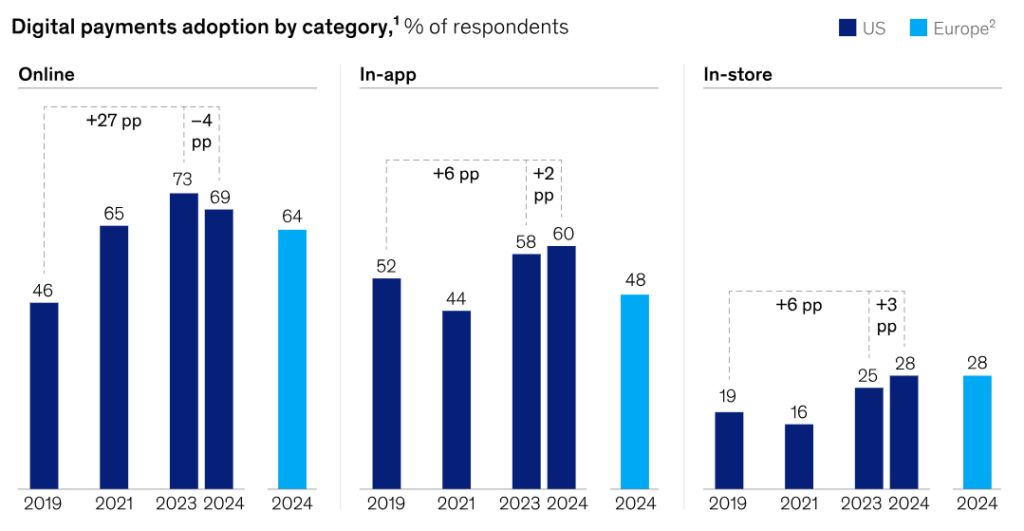
According to a recent survey by McKinsey, over 90% of consumers in certain regions used some form of digital payment in the past year, including mobile wallets and digital cards for in‑store purchases. This trend highlights the growing importance of payment systems capable of handling diverse methods.
QuickBooks POS provides the tools needed to process all types of retail transactions and accommodate this shift in consumer behavior. Staff can perform standard sales, handle returns or exchanges, and manage special orders or layaways. The system accurately records each transaction, covering sales tax calculations and receipt generation.
It supports multiple payment methods, including cash, gift cards, and electronic payments. When connected to a card reader, QuickBooks POS processes credit card transactions securely and posts funds directly to the accounting system, supporting faster and more reliable checkout operations in line with the increasing use of digital payment options.
Inventory Management
The inventory control feature of QuickBooks POS is central to any retail store. The system automatically adjusts item quantities in stock every time a product is sold or returned, giving the store a realistic and accurate view of what is currently available for sale. This point is frequently discussed in a Quickbooks POS review because inventory accuracy has a direct impact on daily operations.
It also supports tracking items based on detailed attributes like size, color, or style, allowing more complex businesses (such as apparel or furniture stores) to manage their stock meticulously. Furthermore, it helps manage processes like receiving new goods from suppliers and making necessary stock adjustments due to damage or shrinkage.
A significant benefit is the capability to alert staff when stock levels drop below a predefined threshold. This feature is important for ensuring popular items are always available, helping the store avoid stockouts and facilitating timely reordering, thereby maintaining optimal inventory balance.
Customer and Marketing Management
QuickBooks POS maintains a robust customer database, storing not only contact information but also the complete purchase history of each individual. This data aids sales staff in providing personalized service and quickly looking up past transactions when customers have inquiries or need to make a return.
The software supports marketing strategies, allowing the store to create and manage loyalty programs or store gift cards. Using purchase data, the store sends targeted notifications or promotions tailored to the specific interests of different customer groups.
Employee Management
The system enables managers to track the performance of each employee in detail. It records the transactions processed by each individual, which helps in evaluating sales effectiveness, speed of transaction processing, and data entry accuracy. Each employee uses a unique login code to guarantee accountability and transparency.
In addition to tracking performance, QuickBooks POS allows managers to strictly control access permissions. Permissions can be customized to limit sensitive operations; for example, only managers may be allowed to process large refunds or make inventory adjustments.
Reporting and Accounting
QuickBooks POS generates a variety of essential business reports. These reports provide insights into every aspect of operations, ranging from total sales volume by day, week, or hour to detailed inventory reports on stock levels and best-selling items.
The most critical feature highlighted in this QuickBooks POS Review is the ability to sync instantly with QuickBooks Desktop (accounting software). This automatic transfer of revenue, sales tax, cost of goods sold, and inventory data makes bookkeeping straightforward. It guarantees small businesses have up-to-date and accurate financial reports without spending time on manual data entry.
Pricing Review
QuickBooks POS does not charge monthly fees for the software, but the upfront cost is substantial. At the time of writing, QuickBooks provided a promotional discount, which is not reflected in the prices listed below.
Software
POS Basic – $1,200
- Ring sales
- Accept payments, including contactless methods
- Manage customer data
- GoPayment app for mobile payments
- Track inventory at a basic level
- Save and email receipts
- Generate basic and custom reports
- Control employee access
- Integrate with QuickBooks Desktop
POS Pro – $1,700
Includes all Basic plan capabilities, plus:
- Inventory management with detailed tracking
- Generate purchase orders
- Track multiple vendors and serial numbers
- Manage loyalty programs
- Handle layaways and gift cards
- Customize price tags and receipts
- Track shipping with Shipping Manager
- Conduct marketing campaigns through Customer Manager
- Access advanced reporting
- Manage payroll and employee data
POS Multi-Store – $1,900
Includes all Pro plan capabilities, plus:
- Manage operations across multiple stores and sales channels
- Transfer inventory between locations
- Generate sales and inventory reports across stores
Hardware
Hardware selection defines how QuickBooks POS interacts with payments and the checkout environment. Stores can choose between separate components or combined solutions to support their transaction workflows.
- QuickBooks charging stand: $39
- QuickBooks card reader: $49
- QuickBooks card reader with charging stand: $79
Payment Processing
Clients using the QuickBooks PIN pad or the GoPayment app must process payments through QuickBooks Payments. No setup or termination fees apply. A QuickBooks Desktop or QuickBooks Online account is required. PCI compliance service costs $9.95 per month.
In-store transactions
- Pay as you go: 2.7% for in-person payments; 3.5% for keyed transactions
- Pay monthly: $20 per month; 2.3% plus 25 cents per in-person transaction; 3.2% plus 25 cents per keyed transaction
- Automated Clearing House (ACH) transactions: 1%
QuickBooks Online users
- In-person: 2.5%
- Online and invoiced: 2.99%
- Keyed: 3.5%
- ACH: 1%
QuickBooks Desktop users
- Pay as you go (no monthly fee): 2.4% plus 30 cents per in-person payment; 3.5% plus 30 cents per keyed or invoiced payment; 1% per ACH transfer
- Pay monthly ($20): 1.6% plus 30 cents per in-person payment; 3.3% plus 30 cents per keyed or invoiced payment; 1% per ACH transfer
QuickBooks POS Review – Pros And Cons
While it is well-known for its smooth financial integration, every technological solution has distinct strengths and weaknesses. The following QuickBooks POS Review section will delve into the major benefits and the limitations that must be considered before a business commits to this investment.
Pros
In this QuickBooks POS Review, the system’s biggest advantage is its superior synchronization capability with its sibling accounting products. It allows retail businesses to maintain high financial accuracy without duplicating data entry, saving time and reducing bookkeeping errors. Additionally, detailed inventory management and stability during offline operations are also significant pluses.
- Robust Accounting Integration: Direct and automatic synchronization with QuickBooks Desktop, smoothly transferring sales and tax data.
- Deep Inventory Management: Supports tracking merchandise by attributes (size/color) and provides automatic reorder alerts when stock levels are low.
- Stable On-Premise Operation: As an installed, local software, it operates effectively and is not reliant on a continuous Internet connection for processing sales.
- Easy-to-Use Interface: The design is staff-friendly, helping new employees quickly learn how to handle transactions and various payment types, including credit cards.
Cons
This part of the QuickBooks POS Review highlights the main limitations, primarily concerning initial cost, older technology, and lack of flexibility in the modern business environment. The absence of native cloud connectivity and the complexity of e-commerce integration are critical issues to consider when choosing this system.
- High Initial Investment Cost: Requires the purchase of a software license and necessitates further investment in specialized hardware equipment.
- Lack of Cloud Connectivity: It is not natively or directly compatible with QuickBooks Online (QBO), limiting mobility.
- Complex E-commerce Integration: Connecting with online stores often requires third-party tools or complicated setup procedures.
- Manual Maintenance: Since it is on-premise software, users are required to manually manage the installation of updates and system maintenance.
ConnectPOS: The Perfect Alternative to QuickBooks POS
QuickBooks POS has served retail businesses for many years, but in the current market, many store owners are seeking a more modern and more flexible system to overcome the limitations of on-premise software. ConnectPOS emerges as an ideal solution to meet those needs, providing a comprehensive cloud-based platform ready for the omnichannel retail era.
- Cloud-based Operation: Unlike the local server dependency of QuickBooks POS, ConnectPOS is built on a cloud-based platform. This allows businesses to access sales data and manage the store from anywhere with an Internet connection. This cloud capability makes it easy for retailers to scale their business from one store to multiple locations without infrastructure hurdles.
- Omnichannel Sales Integration: ConnectPOS is designed for seamless connection between physical stores and major e-commerce platforms like Magento, Shopify, and BigCommerce. This allows the business to centrally manage inventory, pricing, and customer information across all sales channels, ensuring a unified shopping experience for consumers.
- Multi-Warehouse Inventory Management: The system provides rich inventory management tools, easily handling large and complex stockrooms. It allows users to track merchandise across multiple warehouses, set detailed low-stock alerts, and simplify the goods receiving process.
- Diverse Device and Payment Support: ConnectPOS’s user interface is designed to be intuitive and operates well on various devices, including iPads or other tablets. Regarding transactions, ConnectPOS supports more payment types, including contactless methods and international payment gateways, providing higher flexibility for both staff and customers.
- Real-time Reporting: The reporting functions are built to provide real-time and detailed insights into sales performance and inventory status. This helps store owners make data-driven decisions quickly and effectively, rather than relying on manual, retrospective reports.
- Reduced Reliance on Local Hardware: For retailers looking to transition from an older model, ConnectPOS provides a solution that is more flexible, omnichannel, and easier to update than the on-premise model of QuickBooks POS. The transition helps the business reduce its dependency on local hardware and manual maintenance processes.
FAQs
Is QuickBooks POS expensive?
QuickBooks POS is generally considered to have a High Initial Investment Cost. You must purchase the software license (which can be a substantial fee) and you need to buy compatible dedicated hardware (like scanners, receipt printers). This cost is typically higher than subscription-based POS systems.
What kind of hardware does QuickBooks POS support?
The system requires standard hardware components such as a Windows-running computer, a receipt printer, a cash drawer, and a barcode scanner. Additionally, a compatible terminal is needed for integrated credit card payment processing.
Can I use QuickBooks POS with QuickBooks Online (QBO)?
No. A common drawback mentioned in a QuickBooks POS Review is that it is not directly compatible with QuickBooks Online. It is designed to work exclusively with QuickBooks Desktop.
Conclusion
QuickBooks POS still serves retailers that maintain a single-store model and depend on the Intuit ecosystem. As operational needs expand, especially when handling several sales points, online channels, and real-time inventory control, many businesses face limits that are difficult to address. Moving to a newer POS platform often helps avoid disruptions and creates a more stable path for future growth. This QuickBooks POS review highlights why many retailers are reassessing their long-term direction.
If you are looking for a POS system that supports accurate data sync, stronger inventory oversight, omnichannel capability, and flexible workflows across various retail formats, ConnectPOS is a strong option to consider. You can reach out to ConnectPOS for guidance tailored to your business.
►►► Optimal solution set for businesses: Shopify POS, Magento POS, BigCommerce POS, WooCommerce POS, NetSuite POS, E-Commerce POS