
Inventory control is the backbone of any product-based business, and barcode technology plays a central role in improving data accuracy and operational speed. For companies managing stock across locations or channels, inventory management software with barcode capabilities goes beyond simple tracking. It creates a unified system where every scan updates stock counts, tracks movement, and supports informed decision-making. This guide shows how barcode-enabled tools support inventory accuracy, cut manual errors, and simplify product management across warehouses and sales points.
Highlights:
- Different inventory models like JIT, MRP, EOQ, and DSI each serve specific business needs, and barcode-based tracking strengthens them all by improving accuracy and real-time visibility.
- Barcode inventory management software reduces manual errors, speeds up stock handling, and provides cleaner data for smarter decisions and timely reordering.
Types Of Inventory Management Companies rely on various inventory management methods, tailored to their business model, industry, and supply chain complexity. The following approaches are common models applied across retail and manufacturing, each with distinct workflows and risk considerations.
- Just-in-Time (JIT): Built on the production approach pioneered by Toyota, this model maintains low stock levels by aligning purchases closely with immediate manufacturing needs. Only the required materials are ordered per cycle, which cuts storage and handling costs. The system relies on precise timing; any disruption in supply or shift in demand can slow production due to limited buffer stock.
- Materials Requirement Planning (MRP): MRP uses sales forecasts to plan procurement of components. Past data guides material availability aligned with production goals. Effective coordination between sales, production, and suppliers is crucial. Forecasting errors or supply issues may cause delays or backlogs.
- Economic Order Quantity (EOQ): The EOQ formula determines the ideal reorder amount by considering both carrying and ordering costs. The method assumes stable demand and aims to balance inventory volume with order frequency. It works best under steady purchasing cycles and predictable consumption.
- Days Sales of Inventory (DSI): DSI calculates how long goods remain in stock before being sold, covering both finished items and those in production. A lower value often indicates quicker movement, although results vary by industry.
- Barcode-Based Inventory Management: Barcode-based functions in inventory management software assign unique codes to items, allowing quick tracking with scanners or mobile devices. This improves accuracy during receiving, picking, packing, and counting. When linked to inventory systems, it reduces manual errors and keeps stock data current. Barcode systems support real-time monitoring across JIT, MRP, and EOQ methods.
Benefits Of Barcode Inventory Management Software With Barcode
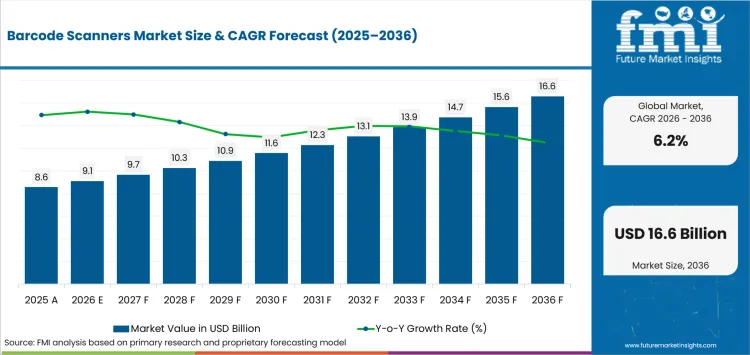
The global barcode scanner market is projected to grow from about $9.1 billion in 2026 to $16.6 billion by 2036, a compound annual growth rate (CAGR) of 6.2%, as retailers, warehouses, and manufacturers increase their reliance on accurate, real-time identification.
Barcode systems reduce human error, speed up data entry, and streamline workflows, cutting the need to count every item by hand. Five benefits of inventory management software with barcode:
- Fewer tracking errors. Manual tasks prone to mistakes, like misreading numbers, skipping entries, or illegible handwriting, become less frequent.
- Greater precision and speed. Barcode scanning converts symbols into inventory data quickly and accurately, and teams using barcode systems tend to work faster than those relying only on manual entry.
- More efficient data collection. Labeling and scanning techniques suit a wide range of applications across industries.
- Fewer preventable errors. In sectors like healthcare and pharmaceuticals, barcode systems reduce mistakes when properly implemented.
- Better data for decisions. Higher-quality data delivers more accurate inventory details and real-time reports, with alerts when stock reaches set limits so reordering aligns with actual demand.
How to Implement a Barcode System for Inventory?
Once you’ve decided to adopt a barcode-based inventory system, the next step is setting it up to fit your operation. Start by organizing your inventory thoroughly. This helps identify unique product characteristics and the system capabilities you’ll need, and makes the transition easier to manage.
Choose and integrate a barcode scanner. The scanner must be compatible with your product labels and inventory platform. Consider your scanning environment: low light, damaged codes, or dusty warehouses. The connection between scanner and software needs careful configuration, usually with input from both IT and operations teams.
Pick your inventory tracking software. Base the choice on how your business operates: product types, transaction volume, reporting needs, and growth plans. Test compatibility between the software, your barcodes, and your scanners before committing.
Identify the most suitable barcode format. Before printing barcodes, decide what you need to record about each product. Some businesses only need a simple identifier; others need location, expiration dates, or batch numbers. The format, such as QR, Code 128, or UPC, should match these needs and your scanning setup.
Create and format your barcode labels. Labels often include the barcode along with branding, descriptions, or pricing, so customers and staff can recognize the item while it still scans quickly. Print in-house or work with a supplier, and keep label placement consistent to speed up scanning.
Apply labels to physical stock. Consistent placement across similar items makes scanning faster and reduces errors, whether you’re labeling boxes in a storeroom or items on a shelf.
Prepare your staff. Success depends on your team knowing how to use both the hardware and the software. Manuals, video tutorials, and hands-on demonstrations help, and training should be paced for different roles, from warehouse staff to sales clerks.
Test and monitor the system. Try the new setup in a limited area or with one product line first, so you can catch errors or weak spots before a full rollout. After launch, review performance periodically and keep software and hardware updated.
Keep your data current. Build routines around the system: reviewing stock levels, checking labels, and backing up data on a schedule that fits your sales volume, whether that’s weekly, monthly, or quarterly. Use your software’s reports, alerts, or inventory snapshots to stay organized and avoid overstocking, misplaced items, or late reorders.
A Barcode-Enabled Inventory Solution Built for Omnichannel Retail
For retailers operating across multiple locations, managing inventory with precision requires more than a basic tracking tool. One platform built specifically for this level of complexity is ConnectPOS, a cloud-based system that combines barcode technology with real-time inventory control across stores, warehouses, and online channels.
Key capabilities that make it a strong fit for omnichannel retailers:
- Precision through barcode scanning: ConnectPOS supports barcode scanning across various devices, helping maintain accurate data entry throughout the inventory process. This minimizes manual errors and supports consistent stock tracking across stores and warehouses. As products arrive or sales occur, updates appear instantly in the system.
- Centralized inventory across locations: ConnectPOS consolidates inventory information into a single dashboard, making it easier to track, assign, and transfer products between branches. Updates appear in real time, so warehouse teams and store staff work from the same figures, avoiding overselling and stockouts.
- Hardware integration and mobility: ConnectPOS supports a range of peripherals, including barcode scanners, receipt printers, and card readers. It runs on iPads, Android devices, and desktop systems, so retailers can operate fixed checkouts and mobile POS setups. With support for Progressive Web Apps (PWA), the system can also work offline, syncing once connectivity returns.
- Flexible payments and customer-centric operations: ConnectPOS supports split payments, gift cards, and layaway plans. These sync with backend systems for accurate updates in sales and inventory. The platform also supports staff monitoring, role-specific access, and shift management.
- Smooth omnichannel integration: ConnectPOS integrates directly with major eCommerce platforms, including Magento, Shopify, WooCommerce, and BigCommerce, keeping product, customer, and order data in sync across channels.
Pricing (per register, per month):
- Standard: $49/month
- Advanced: $79/month
- Premium: $99/month
Annual billing available from $39/month per register.
FAQs: Inventory Management Software with Barcode
What is inventory management software with barcode?
It tracks product movement using barcodes. Each scan records stock activity, helping maintain accuracy and visibility throughout the process.
How does barcode scanning support stock accuracy?
It eliminates manual entry. As items are scanned during receiving, transfers, or checkout, the system logs the changes in real time.
Can it be used across different warehouse sites?
Yes. Businesses can manage stock in several locations through one platform, allowing oversight of quantity, location, and transfer status.
Which barcode formats are supported?
Common formats include UPC, EAN, QR codes, and Code 128. The system’s compatibility depends on your item types and industry.
Conclusion
Barcode-based inventory systems are a practical necessity for retail, wholesale, and supply chain operations that need reliable data and stronger workflow control. Inventory management software with barcode integration supports precise tracking, faster fulfillment, and smoother cross-location coordination.
ConnectPOS offers a barcode-enabled system built for real-time updates, cross-device compatibility, and centralized management. Check our pricing plans to find the right fit for your business, with options starting from $49 per register per month.
Discuss your needs►►► Optimal solution set for businesses: Shopify POS, Magento POS, BigCommerce POS, WooCommerce POS, NetSuite POS, E-Commerce POS