Sticker shock hits fast when a small pharmacy starts comparing tools. Free pharmacy POS software looks tempting, especially when paid POS software for pharmacy can come with setup fees, register costs, add-ons, and support charges. In this guide from ConnectPOS, we’ll explain what “free” really means, where these tools fall short, and when a pharmacy needs a stronger system.
Highlights
- Free pharmacy POS tools exist, but many are trials, open-source projects, or basic billing tools.
- Pharmacy teams need expiry tracking, prescription support, reporting, and store-level control.
- Free tools may work for testing, but growing pharmacies usually need paid software.
Free Pharmacy POS Software Sounds Attractive Until You Read The Fine Print
Free sounds neat on a pricing page. Then the setup work begins, and the word ‘free’ starts to feel smaller.
Many pharmacies search for free tools because software costs keep climbing. In the U.S., out-of-pocket prescription drug spending hit $98 billion in 2024, up 25% over five years, based on IQVIA data reported by Axios. Cost pressure touches the full pharmacy chain, including the tools used to run daily work.
Free pharmacy POS software may mean several things. It could be an open-source project, a free trial, a freemium retail POS plan, a local desktop billing tool, or a free download that needs a developer.
That last part catches many owners off guard. A free file is not always a ready store system.
A pharmacy needs more than product lookup and receipt printing. A proper setup must manage medicine details, stock age, expiry dates, sales records, and staff access. That’s where many free tools start to show cracks.
Pharmacy POS software must also fit the store’s real workflow. A single cashier screen won’t carry the whole workload if your team handles prescriptions, insurance notes, returns, batches, and fast-moving stock.
Pharmacy Teams Need A POS That Handles The Details
A pharmacy counter can get busy in seconds. One customer asks about a refill, another pays for wellness products, and the back shelf has medicine nearing expiry.
A reliable POS system for pharmacies helps staff keep those details visible. The system should support the daily rhythm of a pharmacy, not make staff patch things together in a spreadsheet.
- Prescription-related sales workflows: Pharmacies need a clean way to handle prescription-linked sales. Staff should see the right order details, product notes, and customer history without digging through paper.
- Barcode scanning: A fast scan matters when queues build up. It helps staff find products faster and lowers the chance of wrong item entry.
- Batch, lot, and expiry tracking: Medicine stock needs tighter control than regular retail goods. A batch number or expiry date can affect which item should leave the shelf first.
- Supplier and purchase management: Pharmacies often buy from different suppliers. Purchase records help owners see cost changes, stock delays, and repeat supplier issues.
- Stock alerts: Low-stock alerts help teams reorder before daily sellers run out. Expiry alerts also help managers act before products become dead stock.
- Customer or patient purchase records: Repeat customers often expect faster service. Purchase records support better follow-ups, safer checks, and smoother loyalty work.
- Reports for sales and stock: Pharmacy owners need reports that show what moves, what slows down, and what drains cash. ConnectPOS’ report & analytics tools support this kind of store visibility.
- Role-based staff access: A cashier, manager, and owner shouldn’t have the same access. Staff permissions keep sensitive actions under control.
- Multi-store control: Pharmacy groups need one clear view across locations. A multi store POS helps teams check sales and stock without calling every branch.
- Compliance flexibility: Pharmacy rules differ by country and store type. A system should adapt to the reporting and control needs a business asks for.
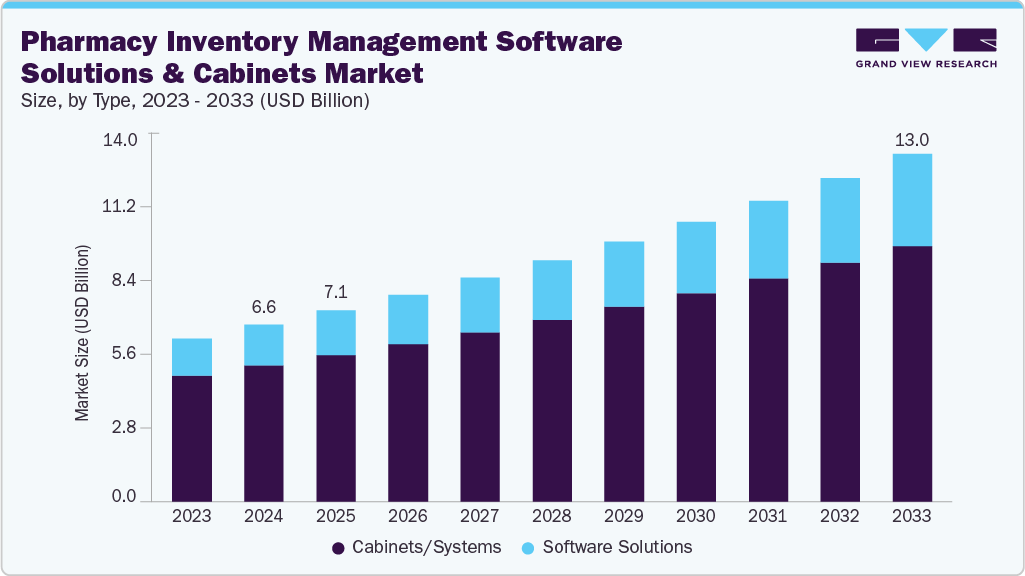
The demand for pharmacy inventory tools keeps growing. Grand View Research valued the pharmacy inventory management software solutions and cabinets market at USD 7.16 billion in 2025 and expects it to reach USD 13.03 billion by 2033. That growth says a lot about the pressure behind stock control.
Do Free Pharmacy POS Software Tools Really Exist?
Yes, they do exist. The better question is whether they can handle real pharmacy work for longer than a short test.
Most free tools sit in one of a few buckets. Some are open-source systems, some are free-to-download desktop projects, and some are retail POS plans that can be bent into pharmacy use.
Yes, But Most Are Not Complete Pharmacy Systems
Free POS software for pharmacies can handle basic tasks. A small tool may record sales, list products, print receipts, and track stock counts.
That can be enough for a tiny shop or a test store. It’s not the same as full pharmacy point of sale software, especially when expiry dates, prescriptions, and reports become part of daily work.
Open-source software gives you access to code. Free trials let you test paid platforms. Freemium POS plans usually cover basic retail tasks.
Local billing tools may fit small markets where pharmacies need simple sales and inventory records. Still, ‘free’ often means the store owner carries the setup burden.
Open-Source Pharmacy POS Tools Need Technical Support
Open-source pharmacy POS tools often live on GitHub, SourceForge, or small developer sites. Projects like PharmaSpot or older desktop pharmacy POS systems may look useful at first glance.
These tools can help students, developers, or pharmacy owners who already have IT help. They may work well for learning how pharmacy sales and stock logic connect.
Daily use is a different story. Someone must handle setup, databases, hosting, backups, bug fixes, and updates.
A free download can still cost money through time, support, and risk. If the developer stops updating the project, your pharmacy may be stuck with old code and no clear fix.
Free Retail POS Plans Usually Need Workarounds
A free retail POS plan can manage products, sales, receipts, and basic stock. Some stores try this route because it feels simple and cheap.
The gaps appear when pharmacy needs enter the picture. Prescription notes, expiry dates, FEFO selling, batch details, and health-related records often need workarounds.
A store may add spreadsheets, barcode tools, accounting software, and manual files around the POS. After a few months, the ‘free’ setup can feel like a pile of separate chores.
A strong pharmacy POS system should keep pharmacy data tied to sales and stock. If your team must recheck everything by hand, the system has already become too light.
Free Trials Are Paid Systems In Disguise
Free trials can be useful. They let you test screens, reports, checkout speed, and staff comfort before you pay.
Still, a trial is not long-term free software. Many last 7, 14, or 30 days, then shift into a monthly or yearly plan.
Read the pricing page slowly. Check register fees, support fees, onboarding costs, hardware needs, and add-ons.
A trial can answer a key question: does the system match your pharmacy workflow? If the answer is yes, the paid cost may be easier to justify.
Basic Free Billing Tools May Fit Very Small Pharmacies
Some free billing tools are built for small local pharmacies. They may handle invoices, stock entries, product lists, and daily sales.
That can work when store operations stay simple. A small owner may only need a basic screen and a clean receipt at the start.
- Low product count: A small catalog is easier to manage in a simple system. Staff can still spot stock issues without heavy reports.
- Single store: One location removes many transfer and stock-sharing problems. The owner can check shelves directly when needed.
- Simple cash sales: Basic billing tools suit stores that don’t handle complex payments or insurance-linked workflows. Less complexity keeps the system usable.
- Manual stock checks: Small pharmacies can still count key items by hand. That gets harder when the catalog grows.
- No complex reporting needs: Some owners only need daily sales and stock value. Deeper profit, staff, and supplier reports may come later.
Free billing tools can help a new store get moving. But growth changes the math fast, especially when teams, branches, and expiry-heavy stock enter the picture.
Where Free Pharmacy POS Systems Start To Break Down
Free tools usually fail in quiet ways. The receipt still prints, but staff start building side processes outside the system.
That’s when errors creep in. A note gets missed, a batch gets mixed, or a slow-moving item expires before anyone notices.
- No e-prescription support: Digital prescription workflows need secure data exchange. Surescripts reported 30.5 billion network transactions in 2025, a reminder that modern prescription work runs on serious data rails, not simple checkout screens.
- Weak reporting and sales tracking: Basic tools may show today’s sales, but not the story behind them. Owners need to see patterns across items, staff, shifts, and locations.
- Limited customer support: Free tools rarely come with fast help. If the system fails during store hours, your team may have to search forums.
- Manual backups and data risks: Local systems often need manual backups. A laptop crash can turn into a serious business problem.
- Hard setup for non-technical teams: Open-source tools can be flexible, but setup may require technical skill. Pharmacy owners should not have to debug software after closing.
- Few controls for staff roles: Weak access control creates risk. Managers need control over refunds, discounts, stock edits, and sensitive records.
- Poor multi-store visibility: Several locations need shared data. Without it, managers rely on calls, screenshots, and late reports.
- Weak online sales links: Pharmacies that sell online need stock and orders to stay connected. ConnectPOS supports this through order fulfillment workflows that help store teams manage orders across channels.
- Limited supplier and purchase tools: Purchase data matters when costs change. A weak system makes it harder to track supplier performance.
- Compliance gaps: FDA’s Drug Supply Chain Security Act calls for an electronic way to identify and trace certain prescription drugs at package level in the U.S. That kind of rule shows why pharmacy systems need serious traceability support.
- Slow updates: Some free tools become abandoned projects. A system that doesn’t change can become risky as rules and store needs shift.
Free pharmacy POS systems can look fine during a calm day. The real test comes during peak hours, stock checks, and month-end reporting.
Free Pharmacy POS Software Works Best For Testing, Not Scaling
Free tools have a place. We just shouldn’t pretend they can carry every pharmacy past the early stage.
They work best when the goal is learning, testing, or proving a simple workflow. They become weaker when the store depends on clean data every hour.
- Testing POS workflows: Free tools can help your team test checkout steps. You’ll see which fields, screens, and reports you actually need.
- Learning how pharmacy software works: A free setup can teach basic product, stock, and sales logic. That knowledge makes future paid software decisions easier.
- Running a tiny store with basic sales: A very small pharmacy may manage for a while on simple billing. Low volume gives staff more room to catch mistakes.
- Building a demo or school project: Open-source tools can fit training or student work. Real store data should still be handled with more care.
- Trying product and stock setup before paying: Free tools let you test categories, SKUs, and barcode flows. That trial work can sharpen your software checklist.
The risk grows when the store grows. More sales, more staff, and more branches demand better control.
- High order volume: Busy counters expose weak systems quickly. Slow screens and missing data can frustrate staff and customers.
- More than one store: Transfers, branch stock, and location-level reporting need a connected setup. A basic tool makes managers work harder.
- Large product catalog: More SKUs mean more room for errors. A strong inventory management software setup lets teams track movement, cost, and stock age.
- Expiry-sensitive inventory: Medicine needs careful rotation. FEFO logic helps staff sell stock that expires first.
- Online and in-store selling: Online orders change stock in real time. A disconnected system creates overselling and awkward customer calls.
- Need for reliable reports: Owners need data they can trust. Guesswork gets expensive when stock value rises.
- Need for ongoing support: Software issues don’t wait for a quiet day. Paid support can be worth it when the store depends on the system.
McKinsey’s retail pharmacy research used a survey of more than 1,000 U.S. consumers to study changing pharmacy needs. The customer side is shifting, so store systems must keep up as pickup, delivery, loyalty, and digital touchpoints become normal parts of pharmacy service.
ConnectPOS Gives Pharmacies the Control-Free Tools Often Miss
A free pharmacy POS system can help with simple sales. Yet pharmacy teams often need tighter control over stock, prescriptions, batches, and daily reports.
ConnectPOS gives pharmacies a stronger setup when basic tools start to feel too thin. Its custom POS setup can be shaped around store workflows, reporting needs, and pharmacy-specific controls.
- Prescription management: ConnectPOS can support prescription-related workflows based on store needs. Staff can handle pharmacy orders with clearer records and less manual checking.
- Batch and expiry date management in MSI: Pharmacies can track batches and expiry dates across stock sources. This helps teams spot slow-moving medicine before it becomes a costly issue.
- Batch selling: Staff can sell items based on batch details, not just product names. This gives better control when the same product has different expiry dates.
- FEFO stock selling: ConnectPOS supports First Expire, First Out stock logic. Pharmacies can sell items with the nearest expiry date first, which helps limit waste.
- Reports: Store owners can track sales, stock movement, and staff activity. These reports help you see what sells fast, what sits too long, and where stock decisions need work.
- Drive-thru, curbside, and delivery options: ConnectPOS can support flexible pickup and delivery flows. This helps pharmacies serve customers who want faster, safer, or more private order options.
- Multi-store control: Pharmacy groups can manage several locations from one connected system. Teams can check stock, sales, and store data without jumping between separate tools.
- Custom compliance based on client demand: ConnectPOS can be adjusted around pharmacy workflows and local business needs. This gives stores more room to match internal rules, staff roles, and reporting demands.
A free POS may look good at the start. But when prescriptions, expiry dates, and store growth enter the picture, the limits show up fast.
ConnectPOS gives pharmacies a cleaner way to manage daily work without stitching together too many tools. That’s where a paid POS solution for pharmacies starts to make sense.
Free Vs Paid Pharmacy POS Software: A Quick Decision Guide
A free system cuts the upfront bill. Paid software usually cuts daily friction.
The right choice depends on your store size, staff skill, product range, and growth plan. Use this table as a quick filter before you commit.
| Area | Free pharmacy POS software | Paid POS system | Better choice for |
| Setup | Often self-managed | Guided setup may be available | Paid system |
| Support | Forums or limited help | Vendor support and onboarding | Paid system |
| Inventory control | Basic stock counts | Batch, expiry, and stock rules | Paid system |
| Reporting | Simple sales reports | Deeper sales and inventory reports | Paid system |
| Multi-store use | Often weak | Store-level data in one view | Paid system |
| Online sales | Usually needs add-ons | Better channel connection | Paid system |
| Data backup | Often manual | Cloud or managed backup options | Paid system |
| Long-term cost | Low upfront cost | Higher monthly cost, less patchwork | Depends on scale |
| Scalability | Limited | Better for growing stores | Paid system |
Free tools fit early testing. Paid tools fit stores that need daily control, clear data, and fewer side processes.
A Smarter Way To Test POS Software Before Paying
Don’t choose software just because the first month costs nothing. A poor fit can waste more time than a paid tool.
Test the system against real pharmacy work. Use actual product types, staff roles, and sales flows during the demo.
- Start with a short trial or demo: Try the POS during realistic store tasks. A pretty dashboard means little if checkout feels clumsy.
- List must-have pharmacy workflows: Write down prescription support, batch control, expiry tracking, stock alerts, and reports. Then test each one.
- Check barcode scanning and returns: Scan fast-moving products and process returns. Watch how the system records stock changes.
- Test inventory updates: Change stock in one area and see how quickly the data updates. Slow updates can create overselling.
- Ask staff to try it: Your team will use the system all day. If they struggle after basic training, the tool may be too awkward.
- Review support hours: A pharmacy can’t pause sales because support is offline. Ask who helps when something breaks.
- Check pricing details: Look at register fees, store fees, add-ons, hardware, training, and renewal costs. ‘Cheap’ software can get pricey later.
- Test online order handling: Pharmacies that sell online should test pickup, delivery, and stock sync. Omnichannel flow needs real order data, not a sales pitch.
- Avoid choosing based on free alone: A free plan can be useful, but it should pass real workflow checks. If not, keep looking.
A good test saves your team from buyer’s regret. Better yet, it shows which POS setup can stay useful after the store gets busier.
FAQs: Free Pharmacy POS Software
1. Does free pharmacy POS software really exist?
Yes, free pharmacy POS software exists. Most options are open-source tools, free trials, free billing systems, or generic POS plans adapted for pharmacy use.
The main catch is depth. Free tools often lack prescription support, expiry tracking, batch selling, and reliable reports.
2. Is open-source pharmacy POS software safe for daily use?
Open-source pharmacy POS software can be safe if a skilled technical team sets it up and maintains it. Security, backups, updates, and hosting still need careful work.
For a live pharmacy, weak maintenance can create business risk. A free codebase doesn’t remove the need for technical support.
3. What are the biggest limits of free pharmacy POS systems?
The biggest limits include weak reporting, poor support, manual backups, limited staff permissions, and gaps in pharmacy-specific workflows. Expiry tracking and batch control are often missing or basic.
Free systems may also struggle when stores add online sales or more locations. Growth usually exposes the gaps.
4. Can a free retail POS system work for a pharmacy?
A free retail POS can work for very basic sales. It may handle products, payments, receipts, and simple stock counts.
Pharmacy work often needs more detail. Prescription notes, expiry dates, and batch records may require manual workarounds.
5. When should a pharmacy switch from free POS software to a paid system?
Switch when the free tool slows staff down or makes data hard to trust. Common signs include stock errors, missing reports, expiry issues, and too many spreadsheets.
A pharmacy should also move to paid software when it opens more stores or starts selling online. That’s when connected data becomes harder to manage by hand.
Final Thoughts
Free pharmacy POS software can help you test the basics, but it rarely supports a busy pharmacy for long. As your team handles more stock, prescriptions, reports, and pickup options, the limits become harder to ignore. ConnectPOS gives pharmacies stronger control over daily retail work, store data, and growth plans. If your current setup feels too thin, contact us to discuss a POS setup that fits your pharmacy workflow.