Fresh flowers don’t wait. Every unsold stem, every missed delivery window, every double-booked arrangement eats into your margin. A florist POS system must keep up with daily freshness shifts, sudden holiday spikes, and constant order changes. In this guide from ConnectPOS, we’ll examine what truly separates a generic checkout tool from a retail system built specifically for florists, and which platforms deserve your attention.
Highlights
- Managing perishable inventory requires real-time tracking, delivery coordination, and demand forecasting that generic retail tools rarely handle well.
- The best options, including ConnectPOS, FloristWare, Hana Florist POS, QuickFlora, and Floranext, approach bouquet workflows and freshness control with different strengths.
- Choosing the right florist POS system depends on your order volume, delivery model, and how well the platform controls waste during peak floral seasons.
Managing Flowers as Fast-Expiring Stock Requires a Different POS
Flowers don’t sit on shelves like shoes or electronics. Their value drops every day they remain unsold. A bouquet that looked perfect on Monday may already feel tired by Thursday. That short shelf life makes spoilage one of the biggest hidden expenses in floral retail.
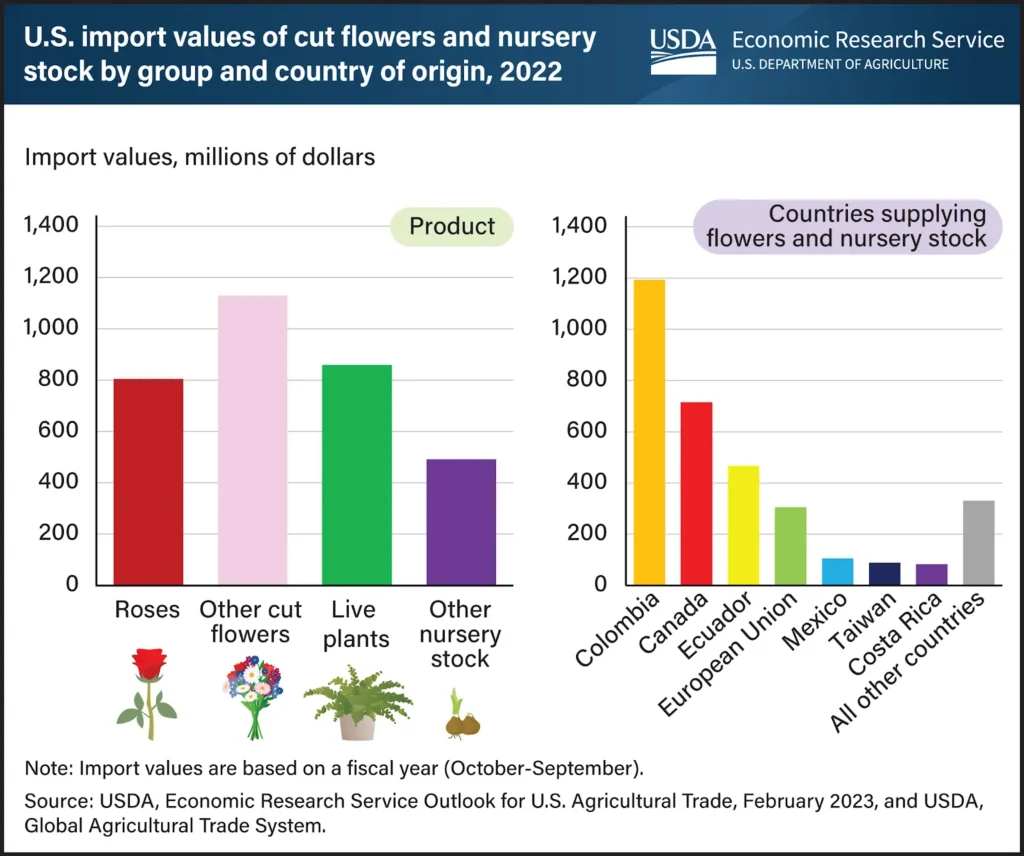
Daily stock levels also shift constantly. One late supplier truck changes everything. In fiscal year 2022, the United States imported nearly $3.3 billion worth of cut flowers, plants, and nursery stock products from 81 countries. Delays can start long before that truck reaches your door. A sudden heat wave affects freshness. Seasonal demand swings from quiet weekdays to packed weekends. Valentine’s Day and Mother’s Day turn your store into a pressure zone where every stem counts. In the weeks before Feb. 14, AP reported that Miami International Airport will process about 990 million stems, and around 90% of fresh-cut Valentine’s flowers sold in the U.S. come through Miami.
During those peak periods, even a small inventory error leads to overselling or last-minute substitutions. Customers expect precision. They want the exact arrangement shown online, delivered on time, with no confusion. That expectation demands more than a basic cash register.
Generic retail software struggles here. It tracks items as stable products, not living inventory. Many inventory management software tools still fall short on bouquet variants, stem-level counts, and delivery cutoffs built around same-day service. A true florist POS system understands that inventory behaves differently in floral retail.
For flower shops, freshness is not just a detail. It’s the foundation of profit. And that’s why the technology behind your counter must reflect how your business actually works.
POS Functions That Actually Support Floral Workflows
Running a flower shop isn’t only about ringing up sales. It’s about timing, coordination, and keeping fragile stock moving. A strong florist POS system should mirror how your day actually unfolds, not force you to adjust to retail logic that doesn’t fit flowers.
Below are the core functions that truly support floral operations.
- Real-time perishable inventory tracking: Fresh stems lose value quickly, so stock data must update the moment a sale happens. A flower shop point of sale should track bouquets, loose stems, and arrangement variants without delay. When red roses drop below a set level, the system alerts you before customers notice a shortage.
- Unified bouquet order workflow: Orders come from walk-ins, phone calls, and online checkouts. Floral POS software must combine these into one dashboard. This avoids double bookings and keeps special instructions tied to the correct arrangement. If a customer changes ribbon color, the update appears instantly for your design team.
- Delivery scheduling and routing control: Valentine’s Day exposes weak systems fast. Delivery scheduling tools should allow time slots, route grouping, and confirmation tracking. Instead of manual spreadsheets, the platform assigns drivers and flags overlapping windows automatically. This is where tighter order fulfillment support starts to matter.
- Multi-location stock visibility: Growing florists often share inventory across branches or storage units. A retail system for florists should display stock levels in each location in real time. TechCrunch reported that merchants using Omniful could reduce workforce costs per store by up to 40% and cut fulfillment time by up to 70% by lining up orders with real-time inventory across channels, which is the same kind of speed you need when stock sits in more than one place. If Store A runs low on lilies, staff can check Store B before declining an order.
- Demand forecasting and waste reporting: Sales data tells a story. A florist inventory system should highlight fast-moving arrangements and identify recurring waste. Over time, those patterns guide smarter purchasing and help avoid overordering during slow weeks. Strong Report & Analytics makes those decisions easier to trust.
These tools shift daily operations from reactive to controlled. When the software reflects how flowers move through your business, you spend less time correcting errors and more time focusing on design and service.
The Best 5 Florist POS System for Managing Perishable Stock and Orders
Choosing the right technology shapes how smoothly your shop runs each day. A good retail system for florists does more than process payments. It tracks stems, organizes deliveries, and keeps orders aligned across every channel. Below, we’ll show you five leading options that handle perishable inventory and bouquet workflows with different strengths.
1. ConnectPOS
ConnectPOS stands out as a cloud-based florist POS system built for retailers managing fast-moving, fragile inventory across sales channels. It’s designed as a next-gen POS for teams that need real-time data and operational clarity. For shops juggling in-store purchases and online orders, that visibility matters every hour.
Key features
- Real-time inventory sync: Stock updates instantly across physical counters and eCommerce platforms. If a dozen roses sell online, the in-store count adjusts at once.
- Smart low-stock alerts and forecasting: The platform tracks sales patterns and signals when popular arrangements approach depletion. This helps guide restocking decisions before shortages appear. You can also extend that logic with automation workflows for alerts, tagging, and internal handoffs.
- Multi-store and warehouse coordination: Growing florists can view inventory across branches and storage spaces in one dashboard. Transfers between locations stay visible and organized.
- Flexible checkout with add-ons: Staff can attach vase upgrades, ribbon styles, or delivery notes during checkout. The bouquet order workflow remains clear and traceable.
- Centralized customer profiles: Purchase history and preferences remain stored, helping staff personalize repeat orders without searching through paper notes. Strong CRM POS support helps teams keep those details accurate.
- Repeat-order incentives: For corporate accounts and loyal gift buyers, a built-in loyalty Program POS approach can keep reorders consistent across seasons.
- On-the-floor selling: During rush hours, staff can take orders away from the counter with mobile POS to reduce lines and speed up service.
Best for: Multi-channel or multi-location florists who need accurate stock data and smooth coordination across teams.
Considerations: Initial configuration may require thoughtful setup to align with arrangement variants and workflow preferences.
Pricing
- Standard: $49 per register per month
- Advanced: $79 per register per month
- Premium: $99 per register per month
- Enterprise: Custom pricing
2. FloristWare
FloristWare has long served as a dedicated POS for flower shops. It concentrates on floral-specific workflows and accounting tools tailored to independent retailers. Many established shops rely on it for its familiarity.
Key features
- Order management built for florists: The system tracks phone, web, and in-store requests in a structured sequence. Each order moves through production and delivery stages clearly.
- Inventory tracking for floral products: It manages stems, supplies, and finished arrangements in one catalog. Staff can monitor availability during busy seasons.
- Delivery routing and confirmations: Built-in mapping tools organize delivery schedules and capture confirmations.
- Customer loyalty tracking: Repeat buyers remain visible within the database, supporting targeted promotions.
Best for: Traditional brick-and-mortar shops seeking a floral-first workflow with accounting integration.
Considerations: Its structure feels less flexible for stores expanding heavily into online sales or multi-branch coordination.
Pricing
- Basic: $149 per month
- Advanced: $199 per month
- Enterprise: $500 per month
3. Hana Florist POS
Hana Florist POS approaches floral retail with a modern, cloud-driven design. It emphasizes delivery precision and perishable inventory awareness. Shops that prioritize event orders and timed deliveries often consider this platform.
Key features
- Stem-level tracking: The florist inventory system monitors individual flower quantities and expiration windows.
- Real-time driver updates: Delivery scheduling tools connect drivers with live routing details. Customers receive notifications once orders arrive.
- Integrated online and in-store management: Orders from the website and counter merge into one workflow.
- CRM reminders: Automated prompts encourage repeat purchases for birthdays or anniversaries.
Best for: Florists focused on frequent deliveries, weddings, and large event coordination.
Considerations: Full functionality appears in higher-tier plans, so pricing clarity requires consultation.
Pricing
- Bud plan: On request
- Blossom plan: On request
- Bouquet plan: On request
- Enterprise: Custom pricing
4. QuickFlora
QuickFlora positions itself as a practical flower shop point of sale built by florists. It combines inventory, accounting, and delivery in a single interface. Budget-conscious retailers often explore this option first.
Key features
- All-in-one shop management: Sales, inventory, and purchase orders share one platform.
- Floral product tracking: The tool records stems and supplies to help control shrinkage.
- Delivery workflow support: Routing and order confirmation remain part of daily operations.
- QuickBooks integration: Accounting sync reduces manual entry between systems.
Best for: Small to mid-sized flower shops seeking a cost-aware bouquet order management system.
Considerations: The interface may feel dated compared to newer cloud-based solutions.
Pricing
- Starts at $99 per month
5. Floranext
Floranext presents a florist-focused software suite combining POS, website tools, and event proposal management. It aims to simplify daily order intake while supporting wedding and custom arrangement planning.
Key features
- Stem-level inventory and daily run sheets: Staff can track stock movement and print organized production lists.
- POS for phone and web orders: Online and counter transactions merge into one control panel.
- Event proposal builder: Wedding quotes and revisions stay centralized.
- Integrated florist website: Built-in eCommerce templates connect directly to the POS.
Best for: Single-location flower shops wanting a florist-first system paired with website management.
Considerations: Customization options remain narrower compared to broader retail platforms.
Pricing
- Starts at $29.99 per month
Comparison Table: Best Florist POS Systems for Perishable Stock
Each platform above approaches floral retail from a different angle. Some focus on traditional shop workflows. Others center on real-time sync and multi-location visibility. This quick comparison highlights how each flower shop point of sale handles inventory speed, delivery coordination, and omnichannel sales.
| POS System | Inventory Tracking | Delivery Management | Omnichannel Support | Best For | Starting Price |
| ConnectPOS | Real-time, multi-store, demand alerts | Delivery options at checkout | Strong online + in-store sync | Multi-location, high-volume florists | $49 per register |
| FloristWare | Floral-focused inventory | Built-in routing and confirmations | Limited omnichannel | Traditional brick-and-mortar florists | $149 per month |
| Hana Florist POS | Stem-level perishable tracking | Real-time driver updates | Online and in-store orders | Delivery-heavy and event florists | On request |
| QuickFlora | Florist-specific inventory | Route and delivery workflow | Basic omnichannel | Small to mid-sized florists | $99 per month |
| Floranext | Stem-level and daily run sheets | Standard florist delivery tools | Limited online flexibility | Single-location flower shops | $29.99 per month |
How to Choose the Right Florist POS System for Your Business?
Not every flower shop runs the same way. Some rely on walk-in traffic. Others depend on delivery volume and online orders. Selecting the right florist POS system starts with understanding how your inventory moves and how your team handles daily pressure.
Before making a decision, consider these practical factors.
- Match features to your order volume: A small boutique may only need basic bouquet tracking and simple checkout tools. A multi-branch store requires deeper stock visibility and coordinated routing. When daily orders climb during peak holidays, the platform must handle that surge without confusion.
- Balance floral workflows with omnichannel growth: A POS for flower shops should manage stem-level inventory and arrangement variants. Yet it also needs to sync online and in-store sales. If you plan to expand into eCommerce or event proposals, choose software that supports those channels from the start.
- Look beyond the monthly fee: The subscription price rarely tells the full story. Waste reduction through better forecasting can save more than the software costs. A florist inventory system that prevents overordering before Mother’s Day can protect thousands in margins.
- Test before committing: Demos reveal how intuitive the interface feels. Ask staff to simulate a busy day with multiple deliveries and custom notes. That exercise shows whether the bouquet order management system fits your workflow.
Choosing carefully now avoids costly changes later. When the tool aligns with your shop’s rhythm, operations feel controlled rather than reactive.
FAQs: Florist POS System
1. What is a florist POS system?
A florist POS system is software designed to help flower shops manage sales, perishable inventory, orders, deliveries, and customer data in one place. Unlike generic retail POS tools, a florist POS system supports freshness tracking, delivery scheduling, and florist-specific workflows like custom arrangements and event orders.
2. Why do florists need a POS system built for perishable stock?
Flowers have short shelf lives and seasonal demand swings. A florist POS system helps track real-time inventory, set low-stock alerts, and plan purchasing more accurately. This reduces waste, prevents overselling, and protects profit margins during peak dates like Valentine’s Day and Mother’s Day.
3. Can a florist POS system handle online and in-store orders together?
Yes, modern florist POS systems can sync inventory and orders across in-store, phone, and online sales channels. This ensures stock levels stay accurate when multiple orders come in at the same time and helps florists avoid double-selling popular arrangements.
4. How much does a florist POS system cost?
Pricing varies based on features and scale. Entry-level florist POS systems can start around $30 to $99 per month, while more advanced or multi-location systems range from $49 per register per month to several hundred dollars monthly for enterprise plans.
5. What should I look for when choosing a florist POS system?
Key factors include real-time inventory tracking for perishables, delivery and routing tools, support for custom products and add-ons, customer history tracking, and the ability to scale as your shop grows. The best florist POS system fits your order volume, delivery needs, and sales channels without adding unnecessary complexity.
Final Thoughts
Running a flower shop means managing beauty that fades quickly. The right florist POS system keeps that reality under control. Real-time stock tracking, delivery coordination, and clear demand data turn daily chaos into structured routines. As your shop grows, your flower store POS solution should grow with it. We recommend exploring platforms that handle perishable inventory without adding complexity. If you’re planning to scale across channels or locations, ConnectPOS is worth considering as a long-term retail system for florists. Contact us to see the system in action.
►►► Optimal solution set for businesses: Shopify POS, Magento POS, BigCommerce POS, WooCommerce POS, NetSuite POS, E-Commerce POS