Managing inventory with precision stands as a defining factor for success in today’s demanding retail and B2B landscapes. A well-chosen Point-of-Sale (POS) system with integrated inventory management does more than count items. It forms the backbone of operational efficiency, directly affecting profitability and customer satisfaction. This article from ConnectPOS advice on selecting the best POS inventory management software solution, highlighting six top-tier options trusted by leading brands.
Highlights:
- POS inventory management affects stock accuracy, shrinkage, cash flow, and retail speed. The right system supports better decisions at every level.
- Choosing POS software goes beyond features. Consider integration, offline use, ease of adoption, and scalability to match both current and future needs.
- Six POS solutions are reviewed here: ConnectPOS, Square, Lightspeed, Shopify POS, Revel Systems, and IT Retail. Each is built for a specific type and stage of retailer.
How Does POS Inventory Management Impact Business Performance?
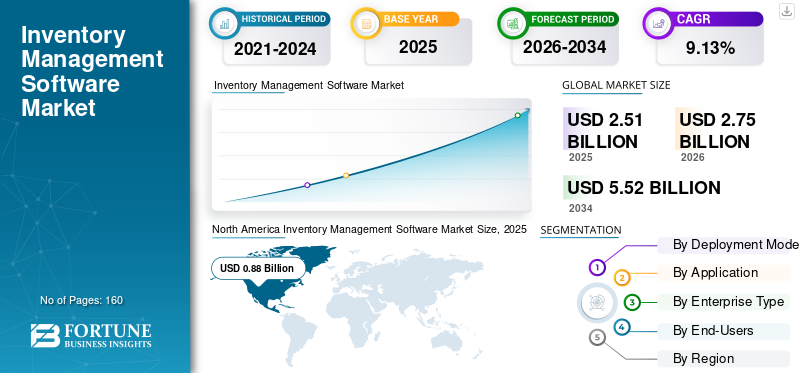
The global inventory management software market is projected to be worth $2.75 billion in 2026, up from $2.51 billion in 2025. It is expected to reach $5.52 billion by 2034, a compound annual growth rate (CAGR) of 9.13%.
In this context, the best POS inventory management software is more than a utility. It acts as a performance driver, influencing everything from turnover rates to customer experience and operational visibility. This article looks at how inventory systems affect outcomes across the retail life cycle, from purchasing to fulfillment, and why the right technology sets the tone for sustainable growth.
Here is how POS inventory management impacts business performance:
- Accuracy in stock levels: Precise tracking as products sell means you always know what is on hand. This prevents overselling, which frustrates customers, and underselling, which means missed revenue.
- Customer satisfaction: When inventory data is accurate, customers find the products they want. This builds trust, repeat business, and brand loyalty.
- Purchasing decisions: Real-time insight into sales trends and stock movement supports smarter buying. You avoid overstocking slow movers and understocking popular products.
- Operational cost control: Excess inventory brings storage costs, insurance, and the risk of obsolescence. A well-managed POS inventory system keeps these costs down and protects margins.
- Loss prevention: Gaps between physical inventory and recorded stock often point to theft or admin errors. A robust POS system gives you the data to find and fix them.
- Cash flow: Capital that is not tied up in stagnant stock is available for marketing, training, and other investments.
- Data-driven forecasting: Historical sales data recorded by the POS is the base for accurate demand predictions and better preparation for seasonal shifts.
- Employee productivity: Automated counts and reconciliation free staff to focus on customer service.
- Return on investment: A good POS inventory system pays for itself through less waste, better sales, and operational efficiency.
- Market responsiveness: Knowing what sells and what does not lets you adapt your range quickly to changing consumer preferences.
Key Considerations When Choosing the Best POS Inventory Management Software
A clear starting point is how a system handles real-world inventory complexity. Businesses that skip this step often run into problems not because the tool is poor, but because it does not match their structure or their scale.
- Operational scope. Start by checking whether the system reflects the structure of your catalog, sales cycle, and fulfillment needs. A mismatch in product attributes, variant tracking, or stock movements often causes friction across departments.
- Real-time data and inventory accuracy. Real-time data supports both stock accuracy and purchasing choices. According to IHL Group’s 2026 study, out-of-stocks and overstocks cost retailers about $1.7 trillion a year worldwide, or 6.2% of global retail sales. The value of a POS depends on how reliably it captures transactions, syncs across locations, and feeds data into other platforms.
- Growth without manual overload. Scalability matters more as operations grow. Systems that depend on manual reconciliation or separate spreadsheets create delays and errors as sales volume rises. Zara faced this during expansion and adopted a real-time POS with inventory tracking, which helped it restock faster and handle more stores without changing core systems.
Top 6 POS Inventory Management Software – Recommended by Leading Brands
ConnectPOS
ConnectPOS is a cloud-based POS for retailers that sell both online and in store. It supports real-time stock tracking, multi-location control, and automation tools in one platform. Built on MACH architecture, it integrates with existing business systems.
Best for: Retailers are growing across stores, sales channels, and warehouses.
Features:
- Real-Time Inventory Tracking: Accurate stock levels across warehouses and retail locations, with instant visibility into inventory movement. Real-time sync and offline mode are included from the Standard plan.
- Multi-Location and Multi-Warehouse Management: ConnectPOS’s inventory management software sstock-taking and automates inventory tasks across locations. Track individual SKUs or RFID-tagged items, move inventory between locations, and fulfill orders from the most convenient source. Stock transfers, stock-takes, and multi-source inventory are part of the Premium plan.
- Automated replenishment and low-stock alerts: Set custom thresholds to trigger replenishment notifications, so you avoid stockouts and over-ordering.
- Inventory auditing and reconciliation: Audit records, compare inventory history, and correct errors to keep stock data accurate.
- Forecasting tools: Use historical sales data and trends to plan purchasing and reduce excess or aged stock.
- Built-in offline mode: Sales continue during internet outages and sync automatically when the connection returns.
- Custom dashboards and reports: Reporting and analytics come with every plan, with custom fields for sales, stock turnover, and staff performance.
- Staff roles and permissions: Flexible staff access control is included from Standard. Premium adds custom staff permissions.
- Backup and recovery: Data is stored in the cloud with automatic backups and quick recovery tools.
- Smart integrations: Works with ERP, CRM, OMS, and payment systems. Its API-first, modular design supports a connected retail setup that grows with you.
Pricing:
| Plan | Monthly | Billed Annually | What it adds |
| Standard | $49 | $39/month | eCommerce integrations, product and order management, unlimited payment gateways, reporting and analytics, flexible staff access control, real-time sync and offline mode, 24/7 support |
| Advanced | $79 | $69/month | Everything in Standard, plus quote and cart management, inventory and shipping control, partial and gift card payments, second customer screen, advanced checkout tools, loyalty program support |
| Premium | $99 | $89/month | Everything in Advanced, plus stock transfer and stock-take, multi-source inventory, multi-currency support, omnichannel and click & collect, custom staff permissions, discount rules, priority support |
Square for Retail
Square for Retail suits startups and small shops that want a simple entry into inventory management. The free plan is easy to adopt and works well for early-stage businesses testing retail operations. The interface is straightforward, and real-time inventory tracking works out of the box.
Best for: Startups and single-store shops getting started.
Standout Features
- Free tools: The basic POS supports unlimited SKUs and item categories, real-time inventory tracking across locations, and automatic item creation when barcodes are scanned.
- Plus and Premium plans: Plus adds advanced inventory tools, loyalty, marketing, and staff management. Premium adds 24/7 phone support and advanced reporting. Both lower card processing rates.
- Built-in online store: Every plan includes a free Square Online store, and inventory syncs across in-store and online automatically.
- Inventory management: Real-time tracking, bulk item import, quantity adjustments, automated purchase orders, multi-location inventory, and low-stock email alerts with custom levels per product.
- Mobile app: Your phone or tablet doubles as a barcode scanner for mobile sales and inventory checks.
Pricing
- Software (per location, per month): Free · Plus $49 · Premium $149 · Enterprise custom quote. Plus and Premium include a free 30-day trial.
- Card processing, in person: 2.6% + 15¢ (Free), 2.5% + 15¢ (Plus), 2.4% + 15¢ (Premium)
- Card processing, online: 3.3% + 30¢ (Free), 2.9% + 30¢ (Plus and Premium)
- Hardware: options start at $59
Lightspeed Retail
Lightspeed Retail suits stores that manage large inventories, need custom product variants and detailed reports, and rely on purchase ordering. It also fits businesses that buy wholesale using built-in catalogs.
Best for: Growing retailers with large catalogs, product variants, and regular purchase ordering.
Standout Features
- Custom product matrices: Sell variations of the same item as bundles, serialized items, or broken cases.
- Work order tools: Track and handle work orders directly in the POS.
- Inventory tracking: Identify and monitor items by SKU or serial number.
- Vendor catalogs: Access over 3,000 preloaded catalogs. Upload up to 10,000 items, set reorder points, and group purchases into a single order. Special orders can be fulfilled for individual customers.
- Reports and analytics: Over 40 built-in reports, adjustable settings, charts, and tips based on your data.
Pricing:
- Software plans (monthly, or billed annually): Basic $109 / $89 · Core $179 / $149 · Plus $339 / $289 · Enterprise custom quote
- Free trial available
- Card processing: 2.6% + 10¢ in person, 2.9% + 30¢ online
Shopify POS
Shopify POS suits businesses that sell online and in store and want everything synced in one place. It offers barcode support, inventory reporting, and tools for monitoring stock across locations.
Best for: Merchants who already sell on Shopify and want online and in-store selling in one system.
Standout Features
- Omnichannel selling: Inventory stays consistent across channels. Customers can buy online and pick up in store, return or exchange at a physical location, or buy in store and have items delivered.
- Inventory tracking: Move items between locations, scan for quick counts, and receive shipments with a barcode scanner.
- Purchase orders and transfers: Manage suppliers, purchase orders, transfers, and adjustments with Shopify’s built-in inventory management in Shopify admin.
- Staff tools: POS Pro adds unlimited staff accounts with roles and permissions.
- Shipping tools: Discounted shipping rates and label printing from your account.
Pricing
- POS Lite: included with every Shopify plan (Shopify plans start at $5/month for Starter and $39/month for Basic)
- POS Pro: $89/month per location, or $79/month per location billed annually, added on top of your Shopify plan
- Card processing, in person: 2.4% to 2.6% + 10¢ on Basic through Advanced plans (5% on Starter)
- Card processing, online: 2.5% to 2.9% + 30¢ on Basic through Advanced plans
Revel Systems
Revel Systems works well for restaurants, cafes, and bars that manage several locations and want access to business data, inventory, and menus from anywhere. It’s a fit for teams that rely on flexible payment processing and offline access in a cloud-based setup.
Best for: Multi-location restaurants, cafes, and bars.
Standout Features
- Inventory tracking: Track items down to ingredients. Use low-stock alerts, build purchase orders, and scan items with a mobile device. Sort and display items by size, color, or other custom tags.
- Branch control: Use an iPad to manage stock, update menus, check reports, and monitor delivery and online sales across branches from one central POS.
- Mobile Order Taker: Staff take orders at tables on handheld devices. Orders go straight to the kitchen, and the device shows the latest menu updates.
- Self-checkout kiosk: Kiosk XT lets guests order and pay on their own. It accepts Revel gift cards and supports loyalty programs and upsell suggestions.
Pricing
- Software and payment fees are quote-based. Third-party reviews report plans from about $99 per terminal per month on an annual, multi-terminal contract. Confirm current terms with Revel.
- Payment partners: Revel Advantage, First Data, Heartland, TSYS, and Worldpay
IT Retail
IT Retail suits markets, grocery stores, and shops that need to track perishables, use scales, or accept EBT and WIC payments. It works well for stores that rely on FIFO practices and want clear visibility into stock loss or expiration dates.
Best for: Grocers, markets, and specialty food shops, from a single store to multiple locations.
Standout Features
- Purchase orders: Create orders based on low stock alerts or new items. You can receive items with or without a PO, and add an invoice after paying the supplier.
- Shrinkage tracking: The system compares sold products with past inventory and received goods. This helps spot spoilage, damage, or missing stock.
- Expiration management: Track items by lot and expiration date. This supports FIFO handling and helps products get sold before expiry to keep profit margins on target.
- User permissions: Growth and higher plans let you give each team member access to exactly what they need.
Pricing
- Software plans (per month): Starter from $69 · Growth about $149 · Premium about $299. The final price depends on the options you choose in IT Retail’s pricing configurator.
- Setup: installation available, quoted by needs
- Payment processing: rates vary by business model, volume, and card type
At-a-Glance Comparison Table
This table compares six popular POS inventory management systems on starting price, card processing fees, and standout features. Use it to see which one fits your stage and structure.
| POS Provider | Starting Price | Processing Fees | Key Features |
| ConnectPOS | $49/register/month (Standard) · $79 (Advanced) · $99 (Premium) | Set by your payment gateway (unlimited gateways supported) | Real-time inventory tracking, multi-location management, offline mode, forecasting, ERP/CRM/API integrations |
| Square for Retail | Free plan · Plus $49/location/month | In person: 2.4% to 2.6% + 15¢. Online: 2.9% to 3.3% + 30¢ | Unlimited SKUs, auto item creation, mobile app scanner, built-in online store, low-stock alerts |
| Lightspeed Retail | $109/month ($89 billed annually) | In person: 2.6% + 10¢. Online: 2.9% + 30¢ | Custom product matrices, vendor catalogs, 40+ reports, multi-location inventory, purchase ordering |
| Shopify POS | POS Lite included with any Shopify plan · POS Pro $89/location/month | In person: 2.4% to 2.6% + 10¢. Online: 2.5% to 2.9% + 30¢ | Omnichannel sync, built-in inventory and purchase orders, barcode scanning, staff roles, shipping label tools |
| Revel Systems | Custom quote | Custom (based on processor) | Ingredient-level tracking, mobile order taker, self-checkout kiosk, real-time multi-branch control |
| IT Retail | From $69/month | Custom (flat-rate or interchange-plus) | Expiration tracking, shrinkage reports, PO and invoice handling, EBT/WIC compliance, FIFO support |
FAQs: Best POS Inventory Management Software
How much does POS inventory software cost?
Prices vary. Some plans are free, like Square’s Free plan, and some start around $49 per month, like ConnectPOS Standard per register. Others go beyond $100 a month depending on the tools you need. Some providers also tailor pricing for larger operations.
What makes the best POS inventory management software stand out?
It tracks stock in real time, handles sales across channels, and keeps product data accurate. Some tools also include low-stock alerts, purchase orders, and forecasting to support daily operations.
Does the best POS inventory management software support online and in-store selling?
Yes. Tools like ConnectPOS, Shopify POS, and Square keep stock levels aligned across all channels, so you don’t need to update things manually.
Conclusion
The best POS inventory management software is more than a purchase. It is an investment in how your business will run as it grows. Each system in this list fits a different stage. A free plan or a lightweight setup is a sensible way to start with a single store, and many merchants run that way for a long time.
Needs change as a business grows. These are the moments when many merchants start looking at a system built for a larger operation:
- You open a second store. You need one view of sales and stock across locations. With ConnectPOS, reporting and analytics come with every plan, and moving stock between stores through stock transfer and stock-take is part of Premium.
- You sell on more than one channel. Once you run an online store next to your physical shop, orders and stock need to stay in sync in real time. ConnectPOS includes eCommerce integrations and real-time sync from Standard, and adds omnichannel and click & collect in Premium.
- You keep stock in several warehouses. Real-time inventory across warehouses becomes essential. Multi-source inventory is available in ConnectPOS Premium.
- Your team grows. You need roles and permissions so cashiers, store managers, and head office each see and do the right things. Flexible staff access control starts in Standard, and Premium adds custom permissions.
If you are reaching one of these milestones, look for a platform built for it. ConnectPOS plans run from $49 to $99 per register per month, or $39 to $89 when billed annually.
Comparing options? See ConnectPOS plans and pricing.
►►► Optimal solution set for businesses: Shopify POS, Magento POS, BigCommerce POS, WooCommerce POS, NetSuite POS, E-Commerce POS