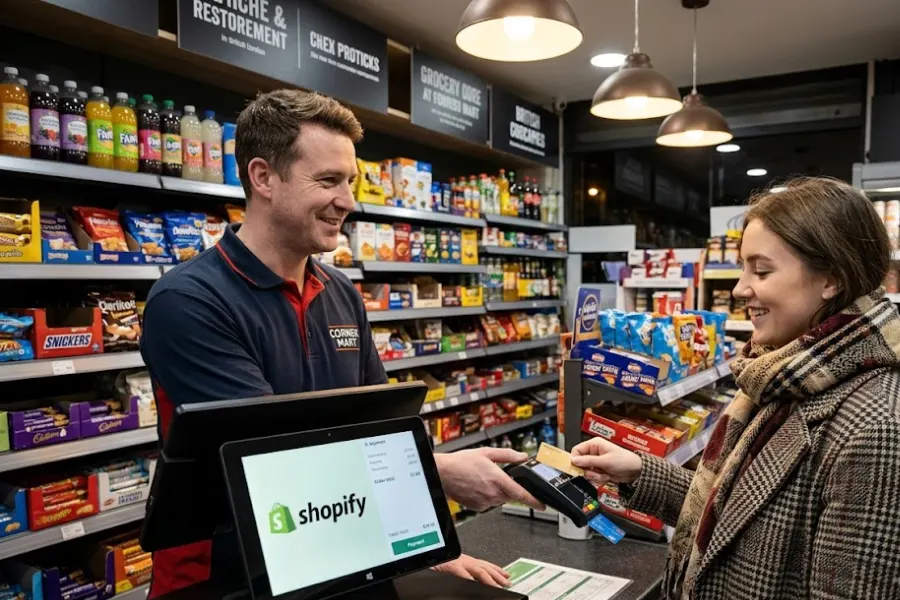
Choosing the right technology dictates your business growth trajectory. This article from ConnectPOS advises on selecting the best Shopify retail POS systems for 2026. Retailers need robust tools to manage complex daily operations effectively.
A reliable point of sale platform bridges the gap between online stores and physical locations. Managers face constant pressure to maintain accurate stock levels and process transactions quickly. We evaluate the top platforms based on practical performance and core features. You will discover exactly which software meets your specific business requirements.
Highlights
- A great Shopify retail POS should smoothly connect online and offline operations through real-time inventory, omnichannel order management, offline selling, and centralized multi-store control.
- When choosing a solution, retailers should consider Shopify integration, inventory needs, omnichannel capabilities, payment options, customer tools, and hardware compatibility.
What Makes a Great Shopify Retail POS System?
A great Shopify retail POS system should do more than process in-store transactions, it should connect your physical and online operations into one smooth ecosystem. Key capabilities such as Shopify integration, real-time inventory synchronization, omnichannel order management, offline selling, and multi-store management help retailers improve operational efficiency, maintain accurate data, and deliver a consistent customer experience across channels.
Smooth Shopify Integration
Direct connection to your e-commerce database prevents fragmented customer data. Store owners often struggle with disjointed systems that require manual data entry.
Data silos occur when physical terminals cannot communicate with the main digital platform. This separation forces employees to update product descriptions in two different places. Unified platforms eliminate this redundant administrative work entirely.
A high-quality point of sale reads and writes data directly to your main database. It pulls product details, customer profiles, and pricing rules instantly. Cashiers process transactions without switching between different software applications. This direct link reduces human error and speeds up the checkout process significantly.
Real-Time Inventory Synchronization
Accurate stock counts prevent overselling and disappointing customers. Managing physical and digital shelves simultaneously remains a major challenge for modern merchants.
The software automatically deducts an item from the global inventory the moment a cashier scans it. This immediate update reflects across all connected sales channels instantly.
Retailers also use this immediate synchronization to identify stock discrepancies quickly. Managers compare digital records against physical counts to spot potential theft or misplacement. This proactive approach protects profit margins significantly.
23% of US adults look at a product online before buying in-store. Accurate digital stock displays guarantee these shoppers find the exact items they want upon arrival.
Omnichannel Order Management
Customers expect flexible fulfillment options like buying online and picking up in-store. Disconnected systems make managing these hybrid orders incredibly difficult for staff. The point of sale routes digital orders directly to the appropriate physical location for fulfillment. Staff members receive instant notifications to pick and pack the requested items.
Handling cross-channel returns also becomes much easier with a unified database. A customer can return a web order to a physical store without confusing the staff. The software processes the refund and updates the global stock count automatically.
A recent study by McKinsey & Company indicates that omnichannel customers spend 15% to 30% more than single-channel shoppers. Proper order routing helps retailers capture this additional revenue effectively.
Offline Selling Capabilities
Internet outages stop sales completely if your system relies solely on cloud connectivity. Lost sales during downtime directly impact your monthly revenue targets.
The system stores transaction data locally on the device during an internet disruption. Cashiers continue scanning barcodes and accepting cash payments without interruption.
The local database encrypts all temporary transaction records to protect sensitive payment details. This security measure keeps your business compliant with strict payment industry standards. Customers trust that their financial information remains safe during outages.
Once the connection returns, the software automatically pushes all stored data to the central server. Retailers maintain full operational capacity regardless of network stability.
Multi-Store Management
Expanding to new locations requires centralized control over pricing and staff permissions. Managing each store as an isolated entity creates massive administrative overhead.
Administrators use a single dashboard to adjust prices across all locations simultaneously. They assign specific roles and access levels to employees based on their physical store assignment.
Moving products between different branches requires precise tracking to prevent losses. The software generates digital transfer orders that staff must verify upon receipt. This strict chain of custody guarantees accurate stock counts across the entire retail network.
Store managers generate location-specific reports to analyze local buying trends. This centralized approach reduces administrative hours and improves overall data accuracy.
5 Top-Tier Shopify Retail POS Systems to Consider
Choosing the right Shopify POS system can help retailers connect their online and offline operations while improving inventory accuracy, customer experiences, and overall store management. The best solution depends on factors such as store size, number of locations, inventory complexity, omnichannel requirements, and the level of integration needed with Shopify.
ConnectPOS
ConnectPOS is a Shopify retail POS solution designed for retailers that need to connect their Shopify ecommerce operations with physical stores through a unified retail environment. It synchronizes key data such as products, inventory, orders, and customer information between online and offline channels, helping businesses maintain consistent operations across multiple sales touchpoints. Its flexible architecture and integration capabilities also make it suitable for growing retailers and businesses with more complex omnichannel requirements.
- Real-Time Shopify Synchronization: ConnectPOS synchronizes product catalogs, inventory, orders, pricing, and customer information between Shopify and physical stores. This helps retailers maintain consistent data across channels and reduces the need for manual updates.
- Multi-Store and Multi-Location Management: Retailers can manage multiple stores, warehouses, and selling locations from a centralized POS environment. Inventory and operational data can be monitored across locations, making it easier to maintain stock visibility as the business expands.
- Omnichannel Retail Features: ConnectPOS supports omnichannel shopping experiences such as buy online, pick up in store (BOPIS), click-and-collect, and other online-to-offline workflows. These capabilities allow customers to move between ecommerce and physical stores more conveniently.
- Offline POS Mode: Stores can continue processing transactions when the internet connection is temporarily unavailable. Once the connection is restored, transaction and inventory data can synchronize with the Shopify environment.
- CRM Integration: ConnectPOS can connect customer information from physical purchases with ecommerce customer data. This gives sales teams better visibility into customer purchase history and enables more consistent experiences across online and offline channels.
- Flexible Integrations: The platform can integrate with third-party systems such as payment providers, ERP platforms, inventory solutions, CRM systems, and other retail technologies. This flexibility is useful for businesses that already rely on an established technology stack.
- Scalable Retail Architecture: ConnectPOS is designed to support retailers as they grow from a single store to multiple locations and more complex omnichannel operations. Its flexible architecture makes it a consideration for businesses looking beyond basic checkout functionality.
Shopify POS
Shopify POS is Shopify’s native point-of-sale solution for merchants that want to manage physical retail and ecommerce operations within the same Shopify ecosystem. Because it is directly connected to Shopify, retailers can manage products, orders, inventory, and customer information across online and physical sales channels without maintaining completely separate systems.
- Native Shopify Integration: Shopify POS works directly within the Shopify ecosystem, allowing retailers to connect their physical stores with their existing Shopify online store. Products, orders, inventory, and customer information can be managed through the same platform.
- Unified Inventory Management: Retailers can track inventory across stores and other sales locations while maintaining visibility into product availability. This can help reduce inventory discrepancies and make it easier to determine where products are available.
- Omnichannel Selling: Shopify POS supports online-to-offline retail experiences, allowing merchants to provide options such as buying online and picking up products in-store. Customers can interact with the brand through multiple channels while the retailer maintains a connected backend.
- Integrated Payments: Shopify POS can be used with Shopify’s payment ecosystem to process transactions at physical retail locations. This provides retailers with a more centralized approach to managing payments and sales data.
- Customer Profiles and Retail Insights: Customer information and purchase history can be connected between online and offline transactions. Retailers can use these insights to better understand customer behavior and provide more personalized shopping experiences.
- Shopify App Ecosystem: Merchants can extend the capabilities of Shopify POS through Shopify’s broad ecosystem of apps and integrations. This makes it easier to add functionality for areas such as loyalty, accounting, marketing, inventory, and customer management.
Lightspeed Retail
Lightspeed Retail is a cloud-based POS platform built for retailers that require more advanced inventory, reporting, and operational management capabilities. It is particularly suited to businesses with larger product catalogs, multiple locations, or more complex retail workflows that require detailed control over inventory and store operations.
- Advanced Inventory Management: Lightspeed Retail provides tools for managing extensive product catalogs, stock levels, purchase orders, and inventory movement. This can be particularly useful for retailers that need more detailed inventory controls than a basic POS system provides.
- Multi-Location Management: Businesses operating multiple stores can manage locations and inventory through a centralized system. Retailers can monitor stock levels across locations and better coordinate inventory between stores.
- Detailed Reporting and Analytics: Lightspeed provides reporting capabilities that allow retailers to analyze sales, products, inventory, employee performance, and other business metrics. These insights can help managers identify trends and make more informed operational decisions.
- Supplier and Purchase Order Management: Retailers can manage purchasing processes and supplier relationships within the platform. This helps businesses maintain more organized replenishment workflows and improve visibility into upcoming inventory.
- Customer Management and Loyalty: Lightspeed provides customer profiles and tools for building stronger relationships with shoppers. Retailers can use customer information and purchasing behavior to strengthen loyalty and inform marketing initiatives.
- Shopify and Third-Party Integrations: Lightspeed can integrate with Shopify and other e-commerce and business applications. This allows retailers to connect POS operations with their broader technology ecosystem rather than relying on an isolated checkout system.
Square for Retail
Square for Shopify retail POS solution aimed primarily at small and growing retailers looking for an accessible way to manage physical sales, payments, inventory, and customer information. Its straightforward interface and integrated payment ecosystem make it a practical option for businesses that prioritize ease of deployment while still requiring essential retail management capabilities.
- Easy In-Store Checkout: Square for Retail provides a straightforward interface designed to make checkout and daily store operations easy for employees to manage. This can reduce training requirements for businesses with new or frequently changing staff.
- Inventory Management: Retailers can monitor product quantities, track stock movements, and manage inventory from their POS environment. This gives store teams greater visibility into product availability and simplifies day-to-day stock management.
- Integrated Payment Processing: Square combines POS software with its own payment infrastructure, allowing retailers to manage transactions through a connected ecosystem. This can simplify payment setup for businesses that want fewer separate systems to manage.
- Customer Management: Square allows retailers to maintain customer information and purchase history, helping businesses better understand their shoppers. These capabilities enable more personalized interactions and improve customer retention.
- Sales and Business Reporting: Retailers can access reports covering sales performance and other operational metrics. Store owners can use these insights to understand which products and locations are performing well and identify areas that require attention.
Hike POS
Hike POS is a cloud-based retail management platform designed to help businesses manage point-of-sale transactions, inventory, customers, employees, and multiple stores. It can connect physical retail operations with ecommerce channels, making it suitable for merchants that want to manage day-to-day retail activities from a centralized platform.
- Real-Time Inventory Management: Hike POS provides tools for monitoring stock levels and inventory movements across retail operations. Retailers can use centralized inventory information to reduce stock discrepancies and improve visibility into product availability.
- Multi-Store Management: Businesses with multiple physical locations can manage stores through a centralized POS environment. This allows owners and managers to maintain greater oversight of sales, inventory, and store operations as the business grows.
- Customer Loyalty and Engagement: Hike includes customer management and loyalty capabilities that can help retailers encourage repeat purchases. Businesses can maintain customer information and use loyalty initiatives to build longer-term relationships with shoppers.
- Employee Management: Retailers can manage staff accounts, permissions, and other employee-related functions from the POS platform. This helps businesses maintain appropriate access levels while monitoring store operations and employee performance.
- Detailed Retail Reporting: Hike provides reporting tools for monitoring sales, inventory, and other business metrics. Retailers can use these insights to identify sales trends, evaluate product performance, and make better operational decisions.
- Shopify and Ecommerce Integration: Hike can connect with Shopify and other ecommerce platforms, allowing retailers to bridge their online and offline operations. This integration can help synchronize important retail data and provide customers with a more consistent omnichannel shopping experience.
How to Select A Suitable Shopify Retail POS for Your Store?
Selecting the right Shopify retail POS requires more than comparing pricing or checkout features. Retailers should consider how well the POS integrates with Shopify, manages inventory, streamlines daily operations, and scales with business growth. The ideal solution should fit the current retail workflow while offering the flexibility needed for future expansion.
- Check Shopify Integration Compatibility: Make sure the POS can reliably connect with your Shopify store and synchronize essential information such as products, inventory, orders, prices, and customer data. Strong integration reduces manual data entry and helps prevent inconsistencies between online and physical stores.
- Evaluate Inventory Management Capabilities: Look for inventory features that match the complexity of your business. If you manage a large catalog, multiple warehouses, or several stores, prioritize solutions that provide real-time stock visibility, inventory transfers, purchase orders, and centralized inventory management.
- Consider Multi-Store and Multi-Location Support: If you operate or plan to open multiple retail locations, choose a POS that can manage stores from one centralized system. It should allow you to monitor inventory, sales, employees, and store performance across different locations without creating disconnected workflows.
- Review Omnichannel Selling Features: A suitable Shopify POS should enable customers to move smoothly between online and offline channels. Features such as buy online, pick up in store (BOPIS), click-and-collect, ship from store, and cross-channel returns can create a more consistent shopping experience.
- Assess Offline Functionality: Internet interruptions can prevent retailers from processing transactions if their POS depends entirely on a live connection. Check whether the system offers an offline mode that allows staff to continue selling and then synchronize transaction data when connectivity is restored.
- Compare Payment and Checkout Options: Consider whether the POS supports the payment methods your customers commonly use, including cards, mobile payments, contactless payments, gift cards, and other relevant options. A fast and flexible checkout process can improve customer satisfaction and reduce queues.
- Examine Customer Management and Loyalty Tools: If customer retention is important to your store, look for features such as customer profiles, purchase history, loyalty programs, rewards, and personalized promotions. Connecting online and offline customer data can also give staff a more complete view of each shopper.
- Review Hardware Requirements: Consider what hardware the POS requires, including tablets, scanners, receipt printers, cash drawers, card readers, and customer-facing displays. Make sure the solution works with your existing equipment or determine the additional investment required for a complete setup.
- Consider Third-Party Integrations: Your POS should work with the other systems your business already uses, such as ERP, accounting, CRM, fulfillment, payment, marketing, and inventory management platforms. Strong integration capabilities can prevent data silos and make it easier to build a connected retail ecosystem.
FAQs: Shopify Retail POS
1. Does The Shopify Retail POS System Require Proprietary Hardware To Function Properly?
Most high-quality platforms allow you to use your existing tablets, barcode scanners, and receipt printers. However, some specific payment processors might require you to purchase their distinct card readers. You should verify hardware compatibility with your chosen provider before making a final decision.
2. How Does The Software Handle Massive Inventory Catalogs?
Top-tier systems use structured database queries to load thousands of SKUs without slowing down the application. They offer deep search filters and barcode scanning to help cashiers locate specific items instantly. This architecture prevents system crashes during peak operational hours.
3. Can I Process Returns For Items Originally Purchased Online?
Yes, a connected point of sale accesses your complete digital order history. Cashiers simply scan the digital receipt or search for the customer profile to locate the original transaction. The system then automatically returns the item to your physical stock and issues the refund.
4. What Happens To My Data If A Physical Terminal Breaks?
Cloud-based platforms store all your transaction and inventory data on secure remote servers continually. You simply log into your account on a replacement device to resume normal operations. You will not lose any historical sales data or customer profiles.
5. How Long Does It Take To Train New Staff On These Systems?
Modern retail platforms feature intuitive interfaces designed similarly to popular consumer smartphone applications. Most cashiers learn basic transaction processing and order fulfillment within a few hours. Managers might require a few days to master deep reporting and inventory management tools.
Conclusion
Implementing the right technology directly impacts your daily operational success. A robust Shopify retail POS eliminates manual data entry and prevents costly inventory mistakes. Managers gain complete visibility over physical and digital sales channels simultaneously. This clarity helps businesses scale their retail footprint with absolute confidence.
Are you ready to upgrade your retail technology stack? Contact us today to discover how our solutions fit your specific business requirements.
►►► Optimal solution set for businesses: Shopify POS, Magento POS, BigCommerce POS, WooCommerce POS, NetSuite POS, E-Commerce POS