A lunch rush can expose every weak point in your store. Orders pile up, fries wait too long, delivery drivers crowd the counter, and one wrong modifier can send the whole line sideways. A fast food POS solution should fit that real pressure, not just look clean in a demo. In this ConnectPOS guide, we’ll look at how to judge POS workflow fit across ordering, kitchen routing, stock control, staff training, delivery channels, reporting, and long-term store growth.
Highlights
- A POS should match real fast food workflows across counter, kitchen, pickup, delivery, and stock.
- The best test happens during rush-hour pressure, not during a calm software demo.
- Strong workflow fit depends on speed, ingredient tracking, channel control, and clear reporting.
Fast Food Workflows Break When POS Only Handles Checkout
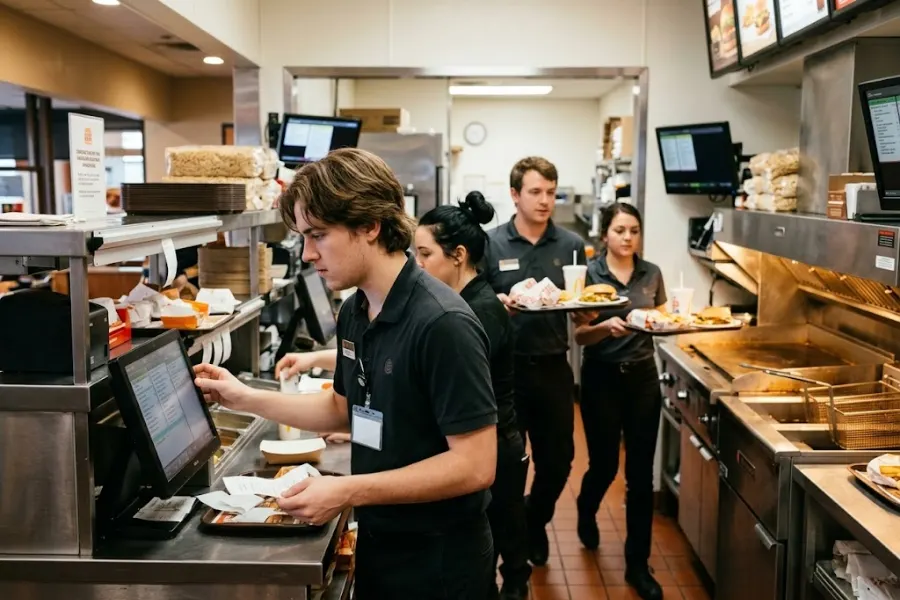
Fast food teams rarely work in a straight line. One cashier takes a combo order, another handles a pickup, the kitchen prepares three tickets, and the manager checks stock before the dinner rush.
That’s why checkout alone isn’t enough. A basic POS may process payments well, yet still slow down prep, confuse kitchen staff, or leave managers guessing about stock.
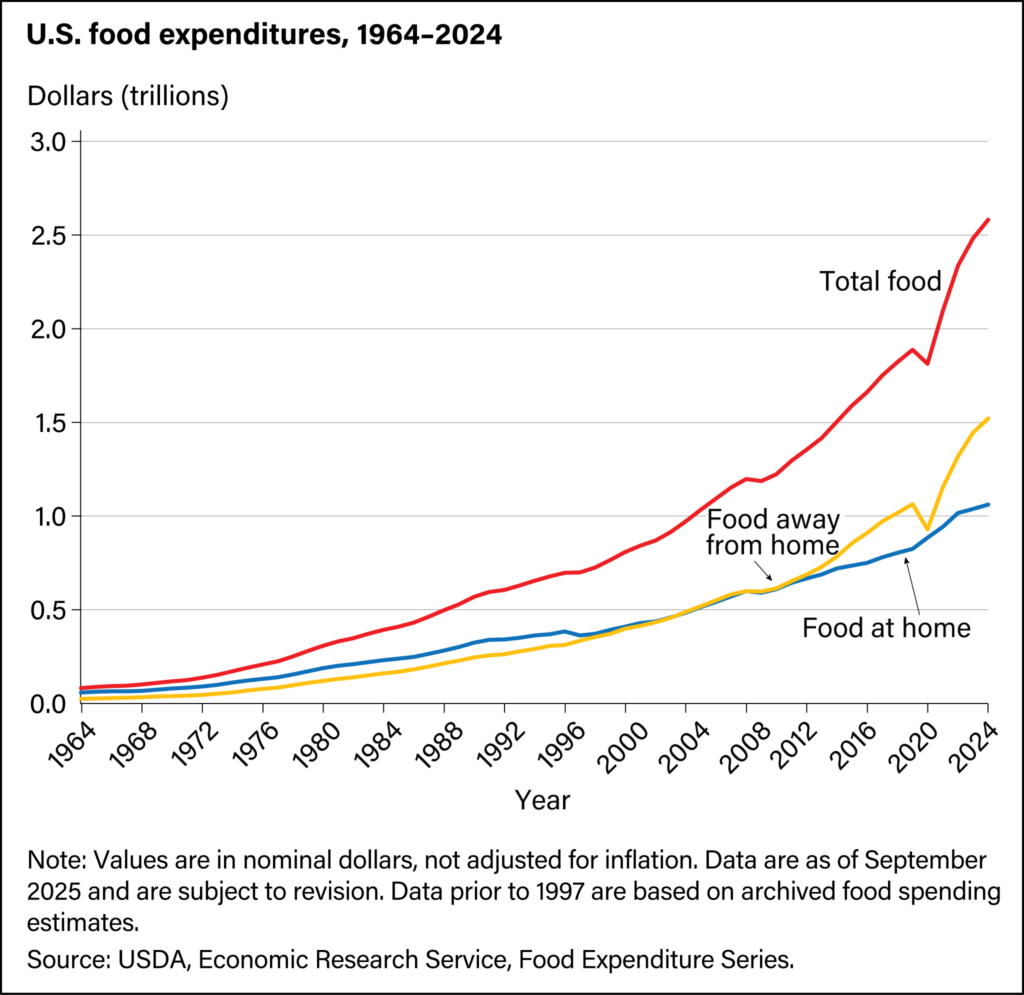
U.S. food-away-from-home spending reached $1.52 trillion in 2024, and it made up 58.9% of total food spending. That scale puts more pressure on stores to serve faster, cleaner, and across more channels than before.
A strong quick service restaurant setup should connect the counter, kitchen, pickup area, delivery orders, and back office. When these areas speak the same language, staff spend less time fixing mistakes.
The right fast food restaurant POS solution should fit the store’s pace. It should support how your team works when the line is long, not only when the store is quiet.
Early Signs Your POS Is Slowing Down Service
POS problems don’t always appear as big failures. They often show up as small delays that repeat all day.
A few extra taps per order can feel harmless. But during lunch, those seconds stack up fast.
- Long Tap Paths: Cashiers shouldn’t need seven screens to add fries, remove pickles, or change a drink size. Common orders should feel quick and natural.
- Late Kitchen Tickets: Kitchen staff need clear orders the moment customers pay. If tickets arrive late or land in the wrong station, prep time suffers.
- Slow Menu Edits: Sold-out items need quick action. Managers should pause menu items before customers order what the kitchen can’t make.
- Manual Delivery Entry: Retyping delivery orders wastes time and creates easy mistakes. It also pulls staff away from guests standing in front of them.
- Weak Stock Detail: Tracking finished menu items isn’t enough. A burger sale should connect to buns, patties, cheese, sauce, and packaging.
- Hard Staff Training: Fast food teams change often. New staff needs a system they can learn quickly, without thick manuals or endless manager help.
- Late Store Data: Managers need live sales and stock data during the shift. End-of-day reports help less when the dinner rush already went wrong.
National Restaurant Association data shows 47% of adults pick up takeout at least weekly, 42% use drive-thru weekly, and 37% order delivery weekly. Those habits turn every POS delay into a channel problem, not just a counter problem.
A Workflow Fit Checklist For Choosing A Fast Food POS Solution
A demo can hide friction. A checklist brings it back into view.
Use real menu items, real order types, and real store pressure when testing any POS. That’s where the truth shows up.
Match Order Entry To Your Service Channels
Fast food orders now come through many doors. Counter, dine-in, takeout, kiosk, QR, drive-thru, and delivery can hit the same kitchen at once.
Your POS should pull these orders into one clean queue. Staff shouldn’t jump between tablets, apps, handwritten notes, and POS screens.
Combo meals also need special care. The system should handle drink swaps, side upgrades, sauces, toppings, coupons, and meal deals without slowing the cashier.
A simple test works well. Build your ten most common orders in the demo, then count the taps. If the flow feels awkward there, it’ll feel worse at noon.
Keep Kitchen Routing Clear And Fast
Kitchen routing can make or break service speed. The cashier may do everything right, but the order still fails if the kitchen sees it too late.
Clear routing means each station gets the right part of the order. Drinks don’t need the same queue as burgers. Fries shouldn’t wait behind desserts.
- Station-Based Routing: Send items to the right prep area. This keeps each staff member focused on their lane.
- Readable Digital Tickets: Kitchen staff should see modifiers, timing, and order notes at a glance. No one should guess what “extra” means.
- Prep Status: Managers need to see what’s waiting, cooking, ready, or delayed. That view helps them step in sooner.
- Priority Control: Rush orders, pickup orders, and delivery orders may need different timing. The kitchen display should make that visible.
- Fewer Verbal Checks: Staff shouldn’t shout across the store to confirm every sauce or side. Digital order flow keeps the kitchen calmer.
Good kitchen routing removes the messy middle between checkout and pickup. Customers only see the final bag, but your team feels every step before that.
Track Ingredients Behind Every Menu Item
Fast food inventory moves fast. A store can still have “burgers” on the POS while running out of buns or sauce in the kitchen.
Hence, ingredient tracking matters. A strong inventory management software setup should connect each sale to the raw materials behind it.
- Recipe-Based Stock: Each menu item should deduct ingredients based on its recipe. One burger can update patties, buns, cheese, lettuce, sauce, and packaging.
- Low-Stock Alerts: Managers need warnings before rush periods. A low-sauce alert at 4 p.m. beats an apology at 6 p.m.
- Waste Tracking: Spilled drinks, burnt fries, and wrong orders should appear in stock reports. Without that, inventory numbers drift.
- Purchasing Clarity: Better stock data helps managers order based on real demand. Guesswork gets expensive when ingredients spoil.
- Menu Profit Checks: Ingredient costs can change quickly. Reports should help managers see which combos still make sense.
The USDA estimates food waste at 30% to 40% of the U.S. food supply. Ingredient-level tracking won’t fix the whole problem, but it gives fast food teams a better grip on waste, prep, and purchasing.
Test Speed Under Rush-Hour Pressure
A polished demo can feel great. A rush-hour test tells the real story.
Ask the vendor to run through your busiest order patterns. Add combo meals, split payments, discounts, refunds, delivery orders, and modifiers in one test flow.
Watch screen speed closely. Slow loading during a quiet demo can become a serious problem when staff handle many orders at once.
Offline mode also deserves attention. Internet issues shouldn’t stop the store from selling. Staff need a fallback that keeps orders moving and syncs later.
Large buttons help too. Fast food cashiers work quickly, often under noise and pressure. Tiny buttons and crowded screens invite mistakes.
Centralize Delivery, Kiosk, And QR Orders
Channel control matters because customers don’t care where the order came from. They only care whether it’s right, fast, and ready on time.
A store that runs counter POS, delivery apps, QR ordering, and kiosks through separate tools can lose control quickly. Prices drift. Stock goes out of sync. Kitchen screens become crowded.
- One Order Queue: Every channel should feed into one flow. Kitchen staff shouldn’t check five screens.
- Shared Menu Data: Prices, item names, modifiers, and sold-out status should match across channels.
- Live Stock Sync: If nuggets sell out in-store, online ordering should know too. No one wants to cancel paid orders later.
- Clear Pickup Timing: Delivery and pickup orders need prep timing that matches driver arrival and customer pickup windows.
- Less Counter Pressure: Self-Service options and QR menus can move simple orders away from the cashier, giving staff room to handle complex cases.
Square’s restaurant trends report found that 59% of consumers may never return to restaurants with complicated ordering and payment experiences. The same report said 64% of surveyed customers acknowledged the convenience of self-service kiosks.
Make Menu Changes Easy During Service
Fast food menus change during the day. A lunch combo ends, a sauce runs out, a seasonal drink starts, or a manager needs to pause one item for 30 minutes.
Your POS should let managers handle those changes without calling IT. Small edits should be quick, safe, and synced across every channel.
- Sold-Out Control: Staff should pause unavailable items in seconds. The change should reach kiosks, QR menus, and online orders.
- Combo Updates: Meal deals need simple editing. Add-ons, sides, drinks, and upgrade pricing should stay clean.
- Modifier Templates: Reusable modifier groups help staff enter orders faster. They also keep kitchen notes consistent.
- Timed Menus: Breakfast, lunch, dinner, and late-night menus may need separate rules. The POS should switch without manual stress.
- Price Sync: Price changes should stay consistent across channels. Manual updates across tools create errors.
Small menu edits can protect the whole shift. When managers can act fast, staff don’t need to explain avoidable problems to customers.
Make Staff Training Short And Simple
Fast food stores train new people often. A POS with a steep learning curve drains manager time and slows service.
The screen should make common tasks obvious. New staff should know where to tap for combos, modifiers, payment types, discounts, refunds, and order status.
- Simple Order Screens: Cashiers need clear menu groups and large touch points. Speed starts at the screen.
- Guided Modifiers: The POS should prompt required choices, like drink size or sauce. This cuts missed details.
- Role-Based Access: New cashiers shouldn’t see every manager tool. Clean permissions keep screens less crowded.
- Easy Corrections: Mistakes happen. Staff should fix order details before payment without restarting everything.
- Kitchen View Basics: Kitchen staff need simple status buttons. “Preparing” and “Ready” should be easy to mark.
Training time affects service quality. When staff learn the system quickly, managers can focus on coaching, not repeated POS rescue.
Use Reports That Help Daily Store Decisions
Reports should help managers run the next shift better. Monthly revenue charts alone won’t help much if the store keeps over-prepping fries every Friday.
A better reporting setup shows hourly sales, top combos, stock movement, waste, staff activity, delivery channel sales, and menu performance.
ConnectPOS’s Report & Analytics can give managers a clearer look at sales and product trends. That kind of data helps teams plan prep, adjust staffing, and spot weak menu items sooner.
McKinsey noted that U.S. food-away-from-home now makes up more than half of food and beverage spending, while restaurant and takeout costs rose about 6% from January 2024 to September 2025. Food-at-home rose around 3% in the same period. Price pressure makes daily data harder to ignore.
A strong fast food restaurant POS solution turns reports into action. Managers should know what to prep, when to staff up, which items drain stock, and where orders slow down.
Questions To Ask Before You Commit To A Fast Food Restaurant POS Solution
Sales demos can sound smooth. Better questions cut through the shine.
Bring your real store flow into the conversation. Ask about the parts that usually go wrong, not only the parts that look good.
- How long does setup take? Ask about menu setup, hardware, training, payment setup, and data migration. A short timeline means little if key tasks aren’t included.
- Can the system run during internet issues? Offline mode should support order taking and payment flow where possible. Ask how data syncs after the connection returns.
- Does inventory update in real time? Stock should change as orders happen. Delayed updates can create false availability across channels.
- Can the POS track raw ingredients? Product-level tracking won’t show sauce, cups, buns, or packaging shortages. Ingredient tracking gives managers better control.
- Does it support kiosks, QR orders, and delivery apps? Growth often adds new order channels. The POS should be ready before you need them.
- Can menus be edited across channels from one place? Managers should update sold-out items, combo pricing, and modifiers without duplicate work.
- What support is available during weekends and holidays? Fast food problems often happen when stores are busiest. Support hours should match real service pressure.
- Can the system support more locations later? Multi-store control matters when you expand. Ask about location reporting, staff permissions, and shared menus.
- What costs are extra? Hardware, integrations, support, payment tools, and add-ons can change the real price. Ask for the full cost before signing.
Good questions protect the rollout. They also show whether the vendor understands fast food operations or only general retail checkout.
Red Flags That The POS May Not Fit Your Store
A bad fit often reveals itself early. The trick is to spot it before the contract starts.
Don’t ignore the small signs. They often become daily headaches after launch.
- Too Many Taps: Common orders should feel quick. Long tap paths slow every cashier and stretch every line.
- No Clear Kitchen Workflow: A POS without strong kitchen routing can create missed tickets, late orders, and confused prep stations.
- Weak Inventory Tracking: Finished-item stock alone won’t help much in fast food. Ingredients and packaging need attention too.
- Limited Delivery Support: Delivery channels shouldn’t live outside the POS. Separate tools create duplicate work and messy stock data.
- Slow Menu Updates: Managers need fast control over sold-out items and price changes. Slow edits cause avoidable customer issues.
- No Offline Mode: Internet drops shouldn’t shut down the counter. Ask how the system behaves during outages.
- Thin Reporting: Basic sales totals won’t guide daily decisions. Managers need item, channel, staff, stock, and time-based reports.
- Hard Training: If part-time staff struggle after basic training, the interface may be too heavy for fast food work.
- Low Base Price, Many Add-Ons: Cheap software can become expensive once you add delivery, loyalty, analytics, hardware, or support.
A fast food pos solution should remove friction from the shift. If it adds new work for cashiers, kitchen staff, and managers, it’s the wrong kind of ‘upgrade’.
ConnectPOS Helps Fast Food Teams Control The Full Order Flow
A fast food POS solution should support the whole store, not only the payment counter. Orders need to move fast, kitchen teams need clear tickets, and managers need live stock data before small issues turn into delays.
ConnectPOS supports self-service, O2O operation, multi-store inventory and sales management, several payment methods, and real-time analytics in its cloud POS setup. Its case studies also show real-time sync across orders, inventory, and customer data, which is key for brands that sell across many touchpoints.
- Raw-Material Inventory: ConnectPOS tracks ingredients behind each menu item. When a burger is sold, the system can update patties, buns, cheese, sauces, and packaging. This gives managers a sharper stock view before rush hours begin.
- Real-Time Analytics: Store data updates as sales happen. Managers can check hourly sales, top combos, busy periods, and staff activity. That helps teams plan prep, labor, and menu choices with less guesswork.
- Digital Kitchen Displays: Orders move from the counter to the kitchen in a clear digital format. Kitchen staff can see items, modifiers, order status, and prep priority. Fewer missed notes. Less back-and-forth.
- Smart Combo Prompts: Cashiers can see suggested combos or add-ons during order entry. That keeps ordering fast and helps staff recommend fries, drinks, desserts, or meal upgrades without slowing the line.
- Self-Service and QR Ordering: Customers can place orders through self-service options or QR menus. Staff get more breathing room at the counter, and orders still flow into the same POS system for kitchen prep.
- Customer Loyalty: ConnectPOS helps fast food brands bring customers back through Loyalty Program POS tools. Teams can connect purchase history with better rewards, so regular guests feel seen without extra manual work.
ConnectPOS fits fast food teams that want more control across ordering, kitchen prep, inventory, and repeat sales. When each part of the workflow connects, staff work faster and managers see problems sooner.
FAQs: Fast Food POS Solution
1. What is a fast food pos solution?
A fast food pos solution is a POS system built for quick-service workflows. It handles order entry, payments, kitchen routing, inventory, reporting, delivery orders, and customer data in one setup.
The best systems support fast combo ordering, modifiers, digital kitchen tickets, ingredient tracking, and quick staff training. They should match how your store works during rush hours.
2. What should a fast food POS include?
A fast food POS should include fast checkout, combo buttons, modifier control, kitchen display support, delivery integration, self-service options, real-time inventory, and daily sales reports.
It should also support refunds, discounts, split payments, loyalty, and menu edits. If your store plans to grow, multi-location control also matters.
3. How do I know if a POS fits my restaurant workflow?
Test the POS with your real menu and busiest order types. Run through combos, add-ons, refunds, discounts, delivery orders, and sold-out item updates.
Ask staff to test it too. Cashiers, kitchen teams, and managers will notice friction that a vendor demo may hide.
4. Does a fast food POS need ingredient-level inventory tracking?
Yes, if you want better stock control. Fast food stores don’t only sell finished items. They use buns, patties, sauces, cups, fries, napkins, and packaging.
Ingredient-level tracking helps managers spot waste, shortages, and purchasing needs. It also makes menu planning more accurate.
5. Can a fast food POS support delivery, kiosks, and QR ordering?
Yes, many modern systems can support those channels. The main point is control.
Orders from delivery apps, kiosks, QR menus, and counters should land in one queue. Menu, pricing, stock, and order status should also sync across channels.
Final Thoughts
The best fast food POS solution fits the way your team already works, then makes that flow easier to control. Counter speed, kitchen routing, ingredient tracking, staff training, delivery sync, and reporting all need attention before you commit. ConnectPOS gives fast food teams a connected way to manage orders, stock, customers, and sales channels in one place. To see how it can fit your store workflow, contact us and we’ll help you explore a setup that fits your ordering, kitchen, and inventory needs.
►►► Optimal solution set for businesses: Shopify POS, Magento POS, BigCommerce POS, WooCommerce POS, NetSuite POS, E-Commerce POS