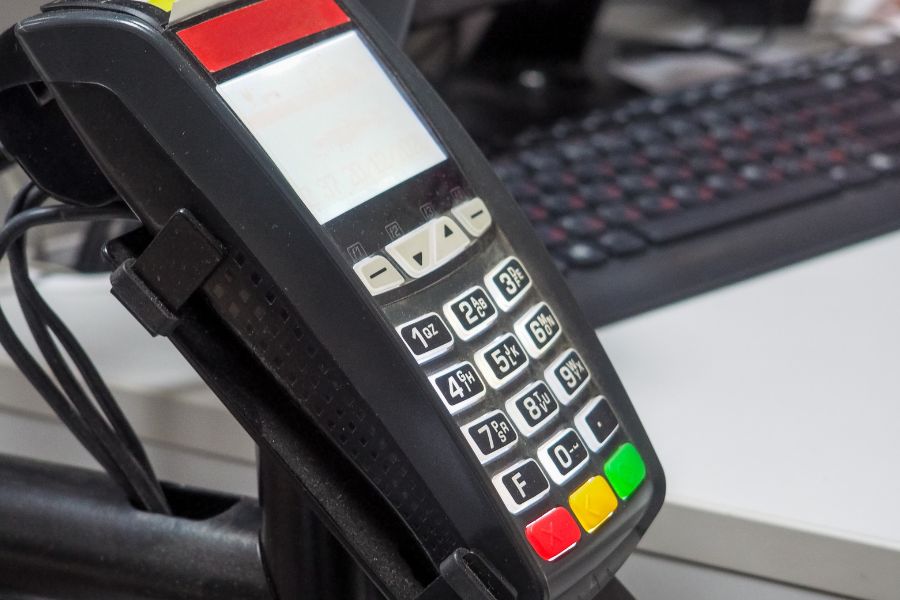
Big retail rarely breaks in one dramatic moment. It starts with small misses, stock that looks right in one store and wrong in another, promotions that don’t match, returns that stall, and reports that arrive too late. Enterprise POS solutions bring those moving parts into one working system. In this guide from ConnectPOS, we’ll show which functions deserve your attention and how they support daily operation management.
Highlights
- Large retail teams need live control across stores, channels, stock, and staff.
- A strong POS setup supports faster decisions, cleaner execution, and fewer manual fixes.
- Long-term fit depends on reporting, integration, mobility, and room to scale.
The Gap Between Standard POS and Enterprise Retail Reality
A basic POS can ring up a sale. That part is easy. The trouble starts when your business grows past one store, one stockroom, and one sales channel.
Retail has changed fast. The U.S. Census Bureau reported that e-commerce made up 16.6% of total retail sales in the fourth quarter of 2025, so store systems now need to work as part of a wider selling setup, not as a stand-alone checkout tool.
- More stores mean more friction: One location can still run on habits and quick fixes. Ten or fifty stores can’t. Price changes, tax rules, stock counts, and staff permissions need one shared logic.
- Data splits fast: A regular POS often handles only counter sales well. Inventory, customer history, online orders, and returns can end up in different tools, and that creates delays.
- HQ loses sight of daily action: Store managers see local issues. Head office needs the full picture. When reports are late or partial, the business reacts slowly.
- Customers feel the cracks first: They see different prices, missing loyalty data, or staff who can’t find an item across locations. Those moments look small, yet they shape trust.
That’s where enterprise POS solutions earn their place. They help operations teams keep control when retail stops being simple and starts getting ‘busy’ in every direction.
What Operations Management Teams Should Expect From Enterprise POS Solutions
Operations teams don’t buy software for the sake of software. They need clear control over daily work, clean data across the chain, and fewer fires to put out.
A strong POS setup should help retail leaders run the business with more confidence. That includes COOs, operations managers, retail directors, and IT teams that have to keep everything connected.
- Visibility: You should see sales, stock, orders, and store activity as they happen, not after the day ends.
- Speed: Checkout, returns, stock lookup, and store updates need to move fast. Slow tools create lines, errors, and tired staff.
- Consistency: One brand needs one logic. Promotions, product data, and customer records should stay aligned across stores and channels.
- Scalability: Growth changes the pressure on your systems. A tool that works for three stores may fail at thirty.
- Integration: Your POS should talk directly to the rest of your stack. If teams still copy data between systems, the setup is already falling behind.
That’s the real standard for enterprise POS solutions. They need to support today’s workload and still stay useful when your store count, order flow, and channel mix get bigger.
Core Functions Enterprise POS Solutions Need for Better Operation Management
The list of POS functions can get long fast. Yet daily operations usually come back to a smaller set of jobs: control stores, track stock, manage orders, process payments, read reports, guide staff, and keep customers recognized across channels.
That’s why the strongest enterprise POS solutions focus on the parts that keep the business moving every hour of the day.
Centralized Multi-Store Control
Running one store is local work. Running a chain needs one command layer that keeps every location aligned.
- One source for store rules: Pricing, tax settings, promotions, product updates, and user access should move out from one place. That cuts repeated manual work at the store level.
- Cleaner execution across branches: Store teams shouldn’t guess which discount is live or which price is current. Central control keeps each location on the same page.
- Better HQ oversight: A multi-store POS gives the head office a stronger grip on daily retail flow. That matters when local speed and central control need to work together.
Chain retail gets hard when every location behaves like its own island. Centralized control brings the chain back into one operating model.
Real-Time Inventory Visibility Across All Locations
Inventory errors have a habit of spreading. One wrong count turns into a bad transfer, a failed pickup, or a sale your team can’t complete.
- Live stock across stores and channels: Teams need to see what is in store, in transit, reserved, or already sold. That helps staff act on real stock, not old numbers.
- Lower risk of overselling: Alerts, transfers, and stock updates keep the business from promising what it can’t fill.
- Stronger replenishment work: NRF noted in 2025 that retailers can reach inventory accuracy rates of over 98% through stronger tracking tools like RFID. The point is simple: inventory accuracy changes how fast you can replenish and how often customers hear “sorry, that item isn’t here.”
Stock visibility isn’t just a warehouse job. It shapes customer service, order flow, and store confidence every day.
Omnichannel Order Management and Fulfillment
Customers don’t think in channel silos. They just want the order to work.
- One order flows across online and offline: Click and collect, ship from store, return anywhere, and exchange anywhere, all of which depend on one clean order record.
- Fewer fulfillment breaks: Stores need to know what was ordered, where it should be picked, and how it should be completed. That logic belongs inside the POS flow, not in side notes or inboxes.
- Real proof in store operations: Take Departure Thailand. After moving from online-only to omnichannel retail, the brand used ConnectPOS to sync orders, inventory, products, and taxes across channels in real time, while also supporting flexible payments and existing hardware. The result included 20% higher customer satisfaction and a 15% rise in sales conversion.
Order handling gets messy fast when channels stay apart. Enterprise POS solutions pull those steps into one system, and that gives store teams fewer chances to miss a handoff.
Flexible and Secure Payment Management
Payment should feel simple to the shopper and controlled to the business. That balance takes more work than it seems.
- Choice at checkout: Cards, wallets, split payments, gift cards, and store credit all help customers pay the way they want.
- Consistency across locations: A chain shouldn’t have one store that accepts a method and another that doesn’t. Payment rules need to stay aligned.
- Accuracy behind the counter: Clean payment records support refunds, daily closeouts, and finance review. That saves store teams from manual fixes later.
Payment flexibility keeps the line moving. It also keeps back-office records cleaner, which matters just as much.
Reporting and Analytics for Faster Decisions
Retail teams don’t need more dashboards. They need answers they can act on that same day.
- Live sales and store tracking: Managers should see store performance, staff activity, top products, and sales patterns without waiting for batch reports.
- Action, not just data: A good report tells you what needs attention now, slow sellers, stock pressure, weak conversion hours, or stores that need staffing changes.
- Concrete store value: JAT Clothing used ConnectPOS to sync sales, stock, and customer data with Shopify, then gained 100% data accuracy and a 30% sales lift. That kind of result comes from using live data as an operating tool, not a monthly review document.
If reporting arrives late, the value is already lower. A strong Report & Analytics setup lets teams act while the day is still in motion.
Employee Management and Role-Based Permissions
Store teams move faster when the system matches their job, not someone else’s.
- Permissions by role: Cashiers, supervisors, and head office teams should each see what they need and nothing extra. That keeps sensitive actions under control.
- Clearer accountability: Activity logs, shift tracking, and user-level records make it easier to trace errors, coach staff, and spot repeat issues.
- Less confusion at the store level: When access rules stay clear, teams spend less time asking for overrides and more time serving customers.
This part often gets ignored early. Later, it becomes one of the first pain points operations teams want to fix.
Customer Profile, Loyalty, and Service Consistency
Customer service gets stronger when staff know who is in front of them. That doesn’t mean long scripts. It means useful context.
- Shared customer history: Purchase records, loyalty status, saved data, and return history should follow the customer across stores and channels.
- Better repeat business: McKinsey has found that 71% of consumers expect personalized interactions, and 76% get frustrated when they don’t get them. Retail teams need customer context at the counter, not just in marketing tools.
- Service that feels consistent: A connected CRM POS setup helps stores keep loyalty and service rules intact, even when the shopper moves between online and offline touchpoints.
That consistency helps the brand feel organized. Customers notice it right away.
Integration With ERP, CRM, Accounting, and eCommerce Platforms
Disconnected tools create duplicate work. They also create doubt, because teams stop trusting the numbers.
- Direct system connection: POS data should move cleanly into ERP, CRM, accounting, and eCommerce systems. That cuts re-entry and lowers human error.
- Cleaner finance and stock records: When sales, refunds, taxes, and stock movements sync in one flow, finance teams spend less time correcting records.
- Stronger retail logic across the stack: Integration keeps the store from becoming a separate world. It lets the whole business work from the same version of events.
This is where many tools fall short. Enterprise POS solutions need to fit into the business stack, not sit beside it like an extra add-on.
Mobile POS, Self-Service, and Flexible Store Operations
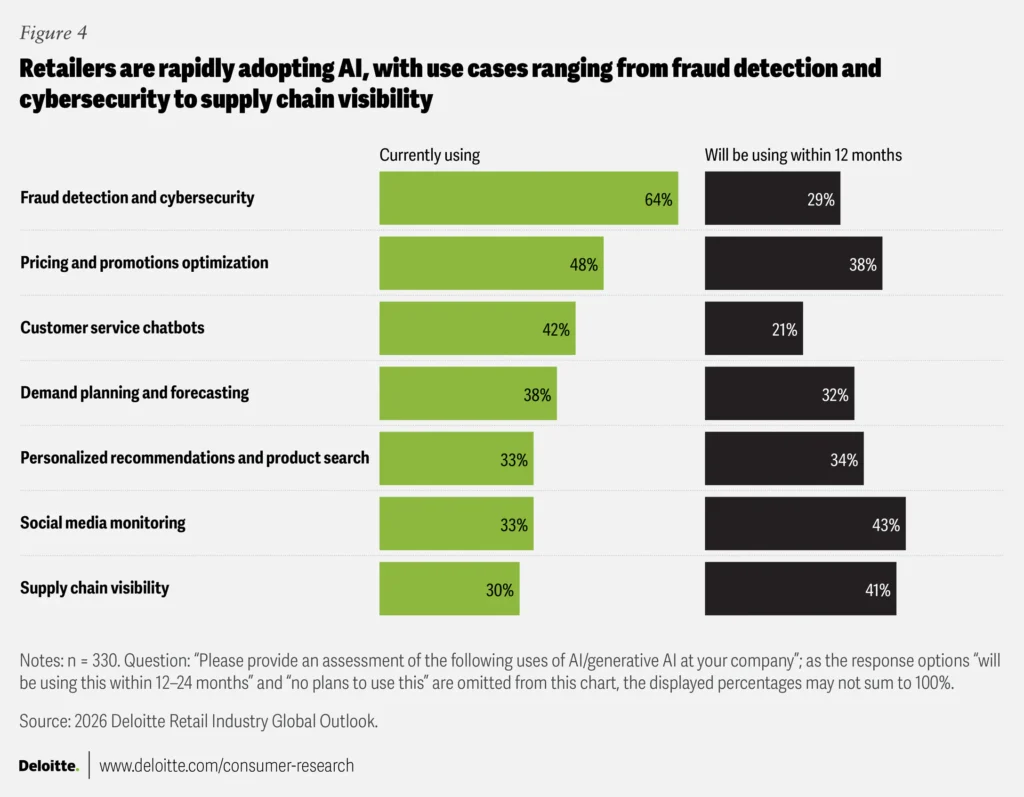
Source: Deloitte
Store operations work better when checkout can move to the customer, not the other way around.
- Faster service on the floor: Staff can check stock, complete sales, and assist customers without sending them back to the main counter.
- Less queue pressure: Self-service and line-busting give stores more options when traffic spikes.
- Support for changing store formats: Deloitte reported in early 2026 that 30% of retailers surveyed already use AI for supply chain visibility, and that figure is expected to rise to 41% in the next year. Retail tools are getting more connected and more responsive, so fixed counter-only selling looks more dated every year.
A Mobile POS setup keeps stores agile. That matters in busy stores, pop-up spaces, and large floor plans where customers expect quick help.
Customization and Scalability for Enterprise Growth
Retail growth always brings exceptions. New markets, new store formats, new tax rules, new workflows. The POS has to keep up.
- Custom logic where it counts: Some retailers need custom screens, tailored permissions, local payment logic, or unique product flows. A rigid tool gets in the way.
- Room to grow: New stores, new regions, and new channels shouldn’t force a full system reset.
- Long-term fit beats short-term comfort: A system can feel easy in year one and feel limiting in year three. That’s why operations teams need to judge future fit early.
Scalability is not just about store count. It’s about whether the system still works when the business changes shape.
Checklist Before Choosing an Enterprise POS Solution
A good shortlist saves a lot of pain later. The wrong POS can slow stores, confuse teams, and create new manual work that nobody asked for.
- Match the setup to your real footprint: Check store count, order volume, return flow, and channel mix. A nice demo doesn’t tell you enough.
- Look past surface integrations: Ask whether the system connects directly with ERP, CRM, accounting, and eCommerce, or if teams still need workaround steps.
- Read the reporting depth: Good reporting should help store leaders act fast. It shouldn’t bury them in data they can’t use.
- Check mobility and offline support: Stores still need to sell during network issues, floor events, or busy seasons.
- Test room for change: Growth always brings new demands. Your POS should accept that reality instead of fighting it.
The right choice solves friction. Weak enterprise POS solutions add more layers to it.
ConnectPOS: A Smarter Enterprise POS for Daily Operational Control
Enterprise operations need one system that keeps stores, channels, staff, and inventory aligned. That’s where ConnectPOS fits. We support centralized control, live visibility, flexible selling flows, and connected retail work, so operations teams can run daily execution with more accuracy and less back-and-forth.
- Centralized multi-store control: We help head office teams manage stores from one place. That includes store visibility, sales tracking, and tighter daily control across locations.
- Real-time analytics: We give teams live access to staff activity, product trends, and store data. That helps managers spot issues early and act before they spread.
- Omnichannel commerce management: We connect online and offline selling in one flow, so customers can buy, return, and exchange more smoothly.
- Synced inventory and sales: We keep data aligned across stores. That supports cleaner stock handling and faster store-to-store coordination.
- Flexible in-store service: We support mobile selling, self-service options, QR or barcode scanning, and digital receipts to help stores handle traffic better.
- Customer tools that stay connected: Our CRM solutions support profile management, rewards, and omnichannel engagement, so stores can deliver consistent services.
- Custom fit for retail workflows: We support tailored workflows, multi-location sync, and modular setup, so larger retailers can shape the system around the way they work.
- Open integration structure: We connect with eCommerce platforms, ERP, CRM, accounting tools, and payment systems to keep teams out of manual double entry.
ConnectPOS works well for retailers because it supports control and flexibility at the same time. We help operations teams keep stores connected, workflows cleaner, and decisions grounded in live data, not guesswork.
FAQ: Enterprise POS Solution
1. What are enterprise POS solutions?
They are POS systems built for larger retail operations. They support store control, inventory, reporting, customer data, staff management, and channel coordination across a wider business setup.
2. How is an enterprise POS different from a standard POS system?
A standard POS usually handles checkout well. An enterprise setup also supports multi-store visibility, live reporting, shared customer data, direct integrations, and more control from HQ.
3. What functions matter most in enterprise POS solutions for multi-store retailers?
Multi-store control, live inventory visibility, order management, payment support, reporting, staff permissions, customer tracking, and system integrations usually sit near the top of the list.
4. Can enterprise POS solutions connect with ERP and eCommerce platforms?
Yes, and they should. Direct connection between POS, ERP, CRM, accounting, and eCommerce systems helps keep data clean and cuts manual work.
5. How do enterprise POS solutions improve operation management across channels?
They keep orders, stock, payments, returns, and customer data in one working flow. That helps stores act faster and helps HQ see the business more clearly.
Final Thoughts
Retail operations get harder as the brand grows. Stores multiply, channels overlap, and manual fixes stop working. That’s why enterprise POS solutions need to do far more than process a sale. They need to support control, speed, visibility, and connected execution across the business. ConnectPOS is built for that kind of daily work. If you’re reviewing your next retail system, contact us and let’s talk through what your operations really need.
►►► Optimal solution set for businesses: Shopify POS, Magento POS, BigCommerce POS, WooCommerce POS, NetSuite POS, E-Commerce POS