
A pharmacy chain can look calm at the counter, yet feel messy behind the scenes. One branch has too much cold medicine, another runs out before noon, and head office still waits for reports. A strong POS system for pharmacy setups keeps these moving parts under control. In this guide, ConnectPOS will explain the store-level features pharmacy teams need when one location turns into five.
Highlights
- Multi-store pharmacies need shared inventory, staff control, reports, and customer data across every branch.
- Batch tracking, expiry dates, FEFO selling, and prescription support help protect daily pharmacy operations.
One Pharmacy Store Is Simple, Five Stores Are Different
A single pharmacy can run on simple tools for a while. Staff know the shelves, remember regular customers, and can double-check stock by walking a few steps.
That comfort fades once more branches join the picture. Stock moves between stores, managers need branch-level reports, and staff permissions can’t stay loose forever.
Pharmacy products also carry more risk than normal retail goods. A shirt can sit on a shelf for months, but medicine needs expiry checks, batch records, and careful handling.
A growing pharmacy also needs stronger data habits. The pharmacy management system market is estimated at USD 116.45 billion in 2026 and is forecast to reach USD 236.28 billion by 2031, according to Mordor Intelligence. That growth points to a clear shift: pharmacies are turning daily store work into connected data flows, not scattered counter tasks.
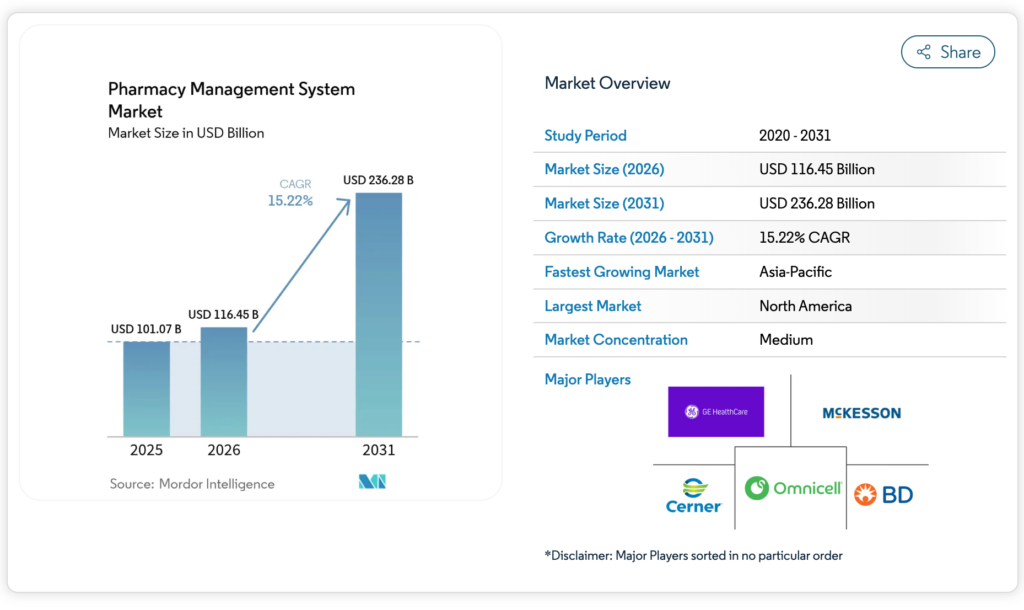
A smart POS software for pharmacy setup connects sales, inventory, customer records, and store teams. The goal is simple: fewer blind spots across branches.
That kind of control pays off when the day gets busy. If a customer asks for a product at one branch, staff should know whether another location has it before saying, ‘Sorry, we’re out.’
Store Expansion Creates More Room For Stock Errors
More stores bring more movement. Products come in, go out, expire, transfer, return, and get adjusted by different people every day.
Small stock gaps can hide inside one shop. Across several branches, the same gaps turn into daily noise.
- Unclear Stock Counts: Staff lose trust in the numbers when branches update stock at different times. A branch may show five packs on hand, yet the shelf is empty.
- Messy Inter-Store Transfers: Medicine transfers need clear records. Without them, teams may know that stock moved, but not who approved it, where it went, or when it arrived.
- Near-Expiry Products: Expiry risk grows when each branch tracks dates in its own way. One store may sell newer stock first while older items sit untouched.
- Locked Customer Records: Prescription details and customer notes can get stuck at one location. A returning customer then has to explain the same issue again at another branch.
- Slow Management Checks: Managers waste time chasing reports store by store. Sales, refunds, staff activity, and stock adjustments should be easy to compare.
- Uneven Customer Service: Customers expect the same experience at each branch. A weak system makes service depend too much on who is working that shift.
The pressure is real for independent pharmacy teams. NCPA reported that the estimated number of independent community pharmacies fell to 18,984 locations in June 2024, down from 19,432 the year before. The same report noted 59,644 prescriptions per store in 2023. Thin margins and heavy workloads leave little room for stock errors.
A solid POS system for pharmacies setup doesn’t remove every mistake. It makes mistakes easier to spot, trace, and fix before they reach customers.
Which POS System Features Help Pharmacies Control Multiple Stores?
Multi-store pharmacy control starts with visibility. You need to know what each branch sells, what it holds, and what needs action today.
The best setup connects pharmacy work to retail work. Sales, prescriptions, inventory, reports, staff roles, and customer service should speak the same language.
Centralized Multi-Store Inventory Control
Inventory control gets harder when every branch runs its own little system. One store may sit on excess stock, while another loses sales due to stockouts.
A connected multi store POS empowers pharmacy teams to see what is happening across locations. It turns branch data into one shared view.
- Live Stock Visibility: Staff can check product availability across every branch. This saves time and helps customers get what they need sooner.
- Shared Product Data: SKUs, names, prices, barcodes, and product rules stay aligned. Teams avoid small naming errors that break reports later.
- Store-Specific Stock Levels: Each branch can keep its own count. Head office can still see the full chain without asking for separate spreadsheets.
- Clear Transfer Records: Stock transfers should show the source branch, receiving branch, quantity, date, and staff action. This helps managers track product movement.
- Better Reordering: Purchase decisions improve when managers see stock across the chain. One branch may need new stock, but another may have enough to transfer.
- Less Overbuying: Extra stock can look harmless until it expires. Shared visibility helps teams move products where demand is stronger.
A quick case: a customer asks for a skin care medicine at Branch A. Staff see Branch C has three units and reserve one for pickup. No phone calls. No guesswork.
Good inventory control also protects cash flow. A pharmacy chain can’t afford shelves full of slow-moving items while high-demand products sell out elsewhere.
Batch And Expiry Date Management
Pharmacy inventory needs more than quantity tracking. Batch numbers and expiry dates shape safety, recalls, selling order, and daily shelf checks.
A normal retail system may track units. A pharmacy-ready setup needs to know which batch those units belong to.
- Batch-Level Tracking: Staff can record batch numbers at receiving, transfer, and sale. This creates a clear product trail across branches.
- Expiry Date Visibility: Managers can see which products are close to expiry. They can move them, discount them when allowed, or remove them before risk grows.
- Recall Support: A supplier may flag a batch. The POS should help teams find which stores received it and whether any units were sold.
- Shelf Rotation Checks: Batch data helps staff rotate stock in a more disciplined way. It also keeps branch teams from relying on memory.
- Supplier Review: Repeated expiry waste may point to poor buying patterns or weak supplier terms. Reports can reveal those patterns over time.
US pharmacies also work under product tracing rules. FDA states that DSCSA product tracing and verification requirements apply to trading partners, including dispensers, mainly pharmacies. It also notes that pharmacy-to-pharmacy sales can trigger tracing requirements unless the transfer fills a specific patient need.
A strong pharmacy POS system should make batch checks part of daily work. The system should keep records clean without forcing staff to slow down every transaction.
FEFO Stock Selling
FEFO means First Expired, First Out. Pharmacy teams use it to sell products with the nearest expiry date before newer stock.
This sounds simple on paper. Busy counters, mixed shelves, and branch transfers can make it hard in practice.
- Expiry-Based Selling Order: The POS should guide staff toward items that expire sooner. That guidance protects margin and lowers waste.
- Shelf-Level Discipline: FEFO works best when staff can match system data with shelf labels. Regular checks keep the process honest.
- Branch Transfer Logic: Near-expiry stock can move to branches with higher demand when rules allow it. That gives products a better chance to sell in time.
- Reduced Manual Sorting: Staff shouldn’t need to check every box during each sale. The system should show the right batch at the right moment.
- High-Volume Product Control: Pain relief, supplements, and seasonal medicine often move fast. FEFO keeps rotation steady when shelves get busy.
A reliable FEFO workflow keeps small losses from piling up. It also gives managers a cleaner view of which branches follow stock rules well.
ConnectPOS can support pharmacy teams that need expiry-aware workflows tied to real sales. That makes stock rotation part of the checkout process, not a separate ‘later’ task.
Prescription Management Across Branches
Prescription work needs care, privacy, and clear steps. A customer may visit one branch this week and another branch next month.
Branch teams need enough information to serve the customer properly. Access must still follow the pharmacy’s data rules.
- Controlled Prescription Records: Prescription details should sit inside a protected workflow. Staff need the right access, not unlimited visibility.
- Refill Status Checks: Staff can check refill history and customer records faster. That helps customers avoid repeated explanations.
- Branch-to-Branch Continuity: A customer shouldn’t feel like a stranger at another location. Shared records help staff keep service steady.
- Sales and Stock Connection: Prescription sales should update inventory right away. This keeps the branch count closer to reality.
- Role-Based Access: Pharmacists, cashiers, and branch managers don’t need the same view. Permission settings keep sensitive work tighter.
Prescription support also improves daily counter flow. Staff can move faster when they don’t need to search through paper notes or call another branch.
A good point of sale system for pharmacies should fit the pharmacy’s prescription process. It should support the work already happening behind the counter, then make it cleaner.
Branch-Level And Chain-Level Reports
Reports help pharmacy owners see what’s working and what’s quietly draining money. Gut feeling has a place, but it can’t run a growing chain.
A good reporting setup gives the branch view and the whole-chain view. Managers need both.
- Branch Sales Reports: Compare daily, weekly, and monthly sales across stores. This shows which branch needs support or stock changes.
- Product Movement Reports: Fast-selling and slow-moving items tell different stories. Teams can adjust purchasing before stock turns stale.
- Refund and Adjustment Tracking: Refunds, voids, and stock changes need clear records. These details help managers catch training gaps or misuse.
- Waste and Expiry Data: Expired stock should never stay invisible. Reports can show which products or branches create the most loss.
- Purchase Planning: Better reports make buying less reactive. Managers can plan around real demand, not last-minute pressure.
- Staff Activity: Branch managers can review staff performance without hovering. The system records actions, then reports them cleanly.
ConnectPOS’s report & analytics gives pharmacy teams a clearer view of sales, stock, and staff activity. A chain can then compare branches without building endless spreadsheet tabs.
Good reports should answer practical questions fast. Which branch ran out of a top product? Which items sit too long? Which shift had unusual refunds?
Staff Roles And Access Control
A growing pharmacy team needs guardrails. Staff need access to do their jobs, but not every screen should be open to everyone.
Loose access may feel easy at first. Later, it creates risk.
- Role-Based Permissions: Cashiers, pharmacists, warehouse staff, and managers can receive different access. This keeps work focused.
- Sensitive Data Protection: Customer and prescription data should stay limited to approved roles. Pharmacy teams need trust inside the system.
- Tracked Staff Actions: Price changes, stock edits, refunds, and voids should show who did what. This makes branch reviews fairer.
- Manager Control: Branch managers need enough access to solve store problems. Head office can keep higher-level settings protected.
- Easier Onboarding: New staff can start with preset roles. This lowers the chance of giving too much access by mistake.
- Cleaner Accountability: Good staff don’t mind clear records. They usually prefer a system that shows what happened.
Access control protects more than data. It also protects daily work from confusion, overreach, and small mistakes that grow.
Pharmacy teams should review roles often. A staff member’s access should match current duties, not an old job title.
Customer Profiles And Loyalty Tools
Pharmacy loyalty depends on trust and memory. Customers remember whether staff know their needs, refill habits, and common purchases.
Technology can’t replace that human care. It can give staff better memory across branches.
- Shared Customer Profiles: Basic profiles and purchase history should follow the customer across locations. This helps branch teams serve regular shoppers better.
- Refill Reminders: Reminder workflows can bring customers back on time. They also support better service for recurring needs.
- Member Pricing: Pharmacies can apply member pricing or rewards across branches. Customers shouldn’t lose benefits when visiting another store.
- Better Customer Notes: Scattered notes create messy service. A shared profile keeps useful details in one place.
- Smarter Promotions: Customer data can support more relevant offers. Pharmacies can avoid random discounts that feel like noise.
J.D. Power found overall satisfaction was 102 points higher among pharmacy customers who said they knew their pharmacist by name. The same study said 81% of brick-and-mortar pharmacy customers used digital technology to interact with their pharmacy in 2023, up from 76% in 2022. Personal care and digital access now work side by side.
A pharmacy-focused CRM POS can help teams keep useful customer data within reach. Pair it with a loyalty program POS when member rewards and refill engagement are part of the strategy.
Customer loyalty should feel personal, not mechanical. The right data gives staff a better starting point for each conversation.
Payment And Fulfillment Options
Modern pharmacy customers expect choice. Some want to walk in, some prefer pickup, and some need delivery.
Payment also varies by market. Cash, cards, wallets, and local payment types should fit into one clean transaction flow.
- Flexible Payments: The POS should support common payment methods in your market. Branch teams need fast checkout without workarounds.
- Store-Level Payment Records: Each payment should connect to the right branch, staff member, and order. Clean records make reconciliation easier.
- Pickup Workflows: Curbside and in-store pickup need order status updates. Staff should know what is ready, pending, or collected.
- Delivery Control: Delivery orders need clear tracking, customer details, and branch assignment. Lost notes create delays.
- Drive-Thru Support: Some pharmacies serve customers without asking them to leave the car. Staff need quick order lookup and payment handling.
- Connected Order History: A customer may order online, pay at pickup, or request delivery later. The order record should stay complete.
Digital medication buying keeps gaining traction. McKinsey’s 2026 pharmacy research in Latin America found that 25% of respondents always or frequently purchase medications online, and 75% prefer their nearest pharmacy. That mix says a lot: local stores still count, but digital buying is now part of the routine.
ConnectPOS’s Order Fulfillment can support pharmacy teams managing pickup, delivery, and branch-based orders. It keeps order status clearer, especially when customers buy through more than one channel.
Fulfillment should feel boring in the best way. The order comes in, staff process it, the customer receives it, and the record stays clean.
Custom Compliance Support
Pharmacy rules vary by country, state, store type, and product group. A rigid POS can create extra manual work when local requirements change.
A flexible setup lets pharmacy teams shape workflows around their operating rules. That support matters most when branches serve different markets.
- Audit Trails: The system should record sales, refunds, stock edits, staff actions, and key changes. Clean logs make audits less painful.
- Custom Fields: Some pharmacies need extra fields for prescriptions, batches, controlled products, or branch notes. The POS should allow that setup.
- Approval Rules: Certain actions may need manager approval. High-value refunds or sensitive stock adjustments should not move too freely.
- Data Access Rules: Compliance often starts with who can see what. Permission control helps pharmacies keep access tighter.
- Market-Specific Workflows: A pharmacy in one region may follow different steps than another branch. Custom workflows help the system fit the store.
- Better Recordkeeping: Paper logs can disappear, get damaged, or fall out of date. Digital records make checks faster when the process is well planned.
Custom compliance support isn’t about adding complexity. It’s about making the right steps easy enough for staff to follow every day.
A flexible POS software for pharmacies setup should help teams keep records clean without turning every sale into paperwork.
A Good Pharmacy POS Should Fit The Way Your Stores Work
No two pharmacy branches run the same way. One location may focus on quick walk-in purchases, while another handles more prescriptions, delivery orders, or long-term customers.
A POS should respect those differences. The system still needs one shared structure, but each branch needs room to work properly.
- Branch Workflow Fit: Smaller branches may need speed and simple stock checks. Larger branches may need deeper reports and stricter access.
- Growth Readiness: A pharmacy may start with two branches and reach ten later. The system should support growth without forcing a full replacement.
- Real Task Testing: Demo screens can look nice. Managers should test receiving stock, selling batches, transferring items, issuing refunds, and checking reports.
- Staff Comfort: A system that feels hard at the counter won’t get used well. Staff need simple screens and clear steps during busy periods.
- Manager Control: Head office needs visibility, but branch managers still need room to solve local problems. That balance keeps stores moving.
- Integration Needs: Pharmacies may need eCommerce, accounting, ERP, CRM, or supplier links. The POS should fit the wider tech setup.
- Inventory Depth: Basic stock counts aren’t enough for medicine-heavy branches. Teams need inventory management software that supports branch movement, stock rules, and product details.
A quick test works well: ask staff to run through a busy lunch-hour order, a batch sale, a near-expiry item, and a branch transfer. Watch where the process slows down.
The right POS system for pharmacies setup should feel practical on the floor. Managers need stronger control, and staff still need a tool they can use without stress.
ConnectPOS Gives Pharmacy Teams One Place To Control Every Branch
Running one pharmacy is already demanding. Running several branches at once adds a whole new layer of pressure. Stock moves daily, prescriptions need tighter control, and staff across stores must follow the same process.
That is where ConnectPOS is the solution. We give pharmacy teams one connected system to manage sales, inventory, customers, and store operations without jumping between disconnected tools.
- Multi-Store Inventory Visibility: ConnectPOS lets teams view stock levels across every branch in real time. Staff can quickly check which location has available products before turning customers away.
- Batch and Expiry Date Tracking: Pharmacies can manage medicine batches and expiry dates inside the system. This helps cut expired stock and supports safer product handling.
- FEFO Stock Selling: ConnectPOS supports First Expire, First Out workflows. Staff can prioritize products with earlier expiry dates and avoid needless waste.
- Prescription Workflow Support: Pharmacy teams can connect prescription handling with sales and inventory updates. This creates a smoother process at the counter and cuts manual checking.
- Centralized Reporting: Managers can monitor branch sales, inventory movement, refunds, and staff activity from one dashboard. Reports help spot problems faster before they spread across locations.
- Custom Staff Permissions: Different staff members can receive different access levels. Sensitive pharmacy data stays protected while teams still work smoothly.
- Drive-Thru And Delivery Support: ConnectPOS supports modern pharmacy fulfillment methods, including curbside pickup, drive-thru service, and delivery management.
- Real-Time Sync Between Stores: Product data, pricing, customer records, and stock updates stay aligned across all branches. Teams avoid the confusion caused by delayed updates.
- Customer Loyalty And Refill Support: Pharmacies can build repeat business through loyalty programs, refill reminders, and customer purchase tracking.
- Custom Compliance Configuration: ConnectPOS can adapt to pharmacy-specific operational needs and compliance requirements based on each business setup.
As pharmacy chains grow, disconnected systems often create more problems than they solve. ConnectPOS helps pharmacy teams keep daily operations connected, organized, and easier to control across every location.
FAQs: POS System For Pharmacies
1. What is a pos system for pharmacies?
A pos system for pharmacies is a retail system built to support pharmacy workflows. It handles checkout, inventory, customer records, reports, and pharmacy-related needs like batch tracking or prescription support.
A normal retail POS may work for basic sales. Pharmacy teams usually need tighter stock control, expiry checks, staff access settings, and better records.
2. What features matter most for multi-store pharmacies?
The most useful features include multi-store inventory, batch and expiry tracking, FEFO selling, branch reports, prescription support, and staff permissions. These tools keep branches connected.
Managers should also look for customer profiles, loyalty tools, and fulfillment support. These features help stores serve customers in a more consistent way.
3. Can a pharmacy POS track expiry dates?
Yes, the right pharmacy POS can track expiry dates by product batch. Staff can see which items are near expiry and sell them in the right order.
Expiry tracking works best when it connects to receiving, transfers, sales, and reports. That keeps records cleaner across every branch.
4. Does every pharmacy need prescription management in its POS?
Not every pharmacy uses the same prescription workflow. Some need direct prescription handling inside the POS, while others connect the POS to a separate pharmacy system.
The main point is data flow. Prescription activity should connect with sales and inventory in a controlled way.
5. How should pharmacies choose a POS for several stores?
Start with real branch tasks. Test stock checks, batch selling, transfers, refunds, reports, staff permissions, and customer lookup.
The best choice should match the way your pharmacy team works now. It should also support new branches, new services, and stricter reporting later.
Final Thoughts
A growing pharmacy chain needs more than a cash register and product list. The right POS system for pharmacies setup gives teams better control over inventory, expiry dates, customer records, staff access, reports, and fulfillment. It also keeps branch work connected without forcing managers into constant manual checks. If your pharmacy team needs a POS built around real multi-store operations, contact us and let ConnectPOS help you plan the right setup.
►►► Optimal solution set for businesses: Shopify POS, Magento POS, BigCommerce POS, WooCommerce POS, NetSuite POS, E-Commerce POS