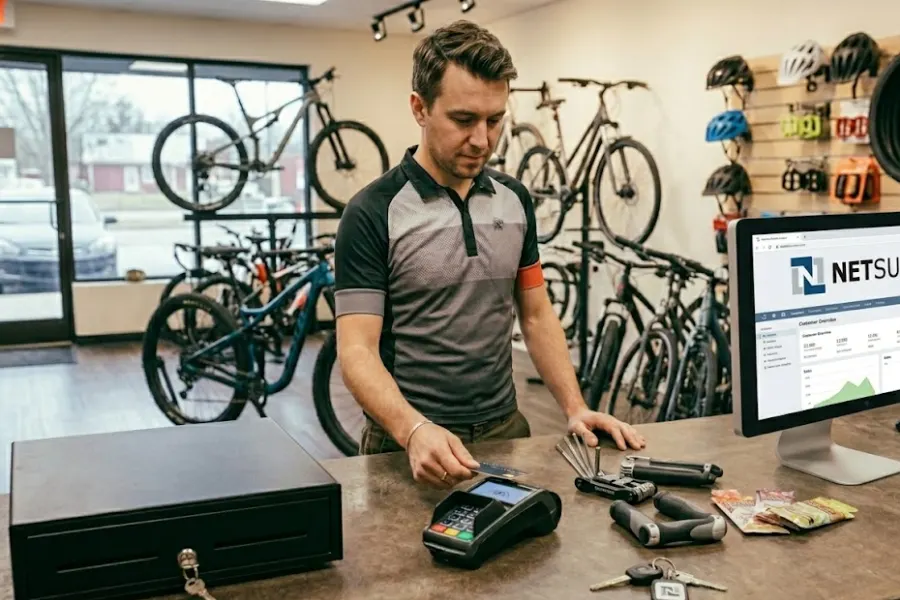
Retail organizations operating across many locations face a constant tension between centralized control and local execution. Inventory must reflect actual stock at each site, sales must flow into financial records without delay, and customer interactions must stay consistent across channels. In fragmented environments, gaps in reporting and stock accuracy appear as the business scales. A NetSuite software POS addresses this by anchoring each transaction to a location while maintaining a single source of truth.
The value of this approach appears in cross-location fulfillment, real-time stock visibility, and unified customer data, where execution depends on accurate and immediate information flow. Retailers gain tighter control over inventory movement and sales attribution, while management sees clearer performance across locations. This article from ConnectPOS advises how a NetSuite POS supports multi-location inventory and sales through a connected model.
Highlights
- NetSuite software POS connects sales, inventory, and customer data within a single system, giving retailers clear visibility across all locations while maintaining accurate transaction records at the store level
- Multi-location setup in NetSuite defines how inventory is tracked, locations are managed, and operational rules are applied, so each site operates based on its own conditions without breaking overall data consistency
Overview of the NetSuite Software POS
NetSuite software POS functions as a direct extension of Oracle NetSuite, connecting in-store transactions with financials, inventory, and customer data inside a single system. Each sale updates stock levels and revenue records instantly, supporting multi-location retail, complex tax setups, and centralized pricing. This structure removes reliance on delayed data syncs and gives leadership clear visibility into performance at the stock-keeping unit (SKU) and store level.
The platform supports both countertop and mobile checkout, giving staff access to customer history, product availability, and order details on demand. Built-in links to CRM and order management enable scenarios like in-store pickup and unified returns without disconnected workflows. Data remains consistent across channels, strengthening reporting accuracy and internal control as retail operations expand.
Setting Up Multi-Location Management in NetSuite
Multi-location management in the NetSuite software POS provides a structured way to control inventory, transactions, and reporting across distributed operations. Each location operates as a defined node within the system, linked to shared financial data while maintaining its own stock positions and operational attributes. This structure supports consistent reporting while ensuring local execution to reflect real-world store or warehouse conditions.
Enabling Multi-Location Inventory
Activating multi-location inventory establishes the foundation for tracking stock across warehouses, retail stores, and fulfillment points. Once set up, inventory records shift from a single global quantity to location-level balances, allowing precise control over availability, allocation, and replenishment. This transition changes how transactions are recorded, as each sale, transfer, or receipt is tied to a specific location.
System behavior also adjusts to reflect distributed operations. Item records can carry location-specific data such as preferred stock levels and reorder points, while purchasing and fulfillment processes begin referencing location context. Finance teams benefit from more granular inventory valuation, aligned with actual stock distribution rather than aggregated estimates.
Creating and Managing Locations
Locations in the NetSuite software POS are configured as structured records representing physical or logical sites such as stores, warehouses, or regional hubs. Each location can be linked to subsidiaries, defining how transactions flow into financial reporting. Proper setup ensures that operational activity aligns with the correct legal and accounting entity.
Management of locations extends beyond basic setup. Users can assign roles, restrict access, and define which teams interact with specific locations. This control supports internal governance, especially in organizations with regional management layers or franchise models.
As operations scale, locations can be grouped or categorized to support reporting hierarchies and operational segmentation. This allows leadership to analyze performance by region, format, or channel without restructuring the underlying system.
Configuring Location-Specific Parameters
Each location can carry its own operational rules, shaping how inventory and transactions behave at that site. Parameters such as reorder points, safety stock levels, and fulfillment preferences guide day-to-day decisions and influence system-generated recommendations.
Location-level configuration also affects tax handling, pricing logic, and fulfillment routing. This allows businesses to reflect regional regulations, local demand patterns, and logistical constraints while maintaining a consistent system backbone across the organization.
Location-specific controls also extend into workflow design and approval logic, allowing each site to operate within defined boundaries while still aligning with corporate standards. For example, transfer approvals, purchasing thresholds, and fulfillment priorities can be tailored per location to reflect staffing capacity, supplier relationships, or service level expectations. This level of configuration supports operational discipline at scale, where each location executes based on its realities without fragmenting data integrity or reporting consistency within Oracle NetSuite.
Managing Transactions by Location in the NetSuite Software POS
Within Oracle NetSuite, transaction management is anchored at the location level, where every sale, return, and inventory movement is tied to a defined site. This structure brings clarity to operational data, so retailers can monitor performance, stock flow, and financial impact with precision across stores and fulfillment points.
Location-based transaction control also strengthens internal accountability. Each store or warehouse operates within its own data scope, while headquarters maintains a consolidated view for reporting and decision-making.
Recording Sales by Location
Sales transactions are captured with a direct link to the originating location, ensuring revenue and inventory adjustments reflect the correct site. When a sale is completed, stock is deducted from that specific location, and the financial entry is recorded under the corresponding entity or store.
This approach supports accurate margin tracking and store-level performance analysis. Managers can review sales trends, product movement, and profitability based on actual activity rather than aggregated data that hides local variation.
Handling Cross-Location Sales
Cross-location sales reflect the operational reality of modern retail, where inventory is sourced dynamically across stores, warehouses, and fulfillment nodes. Industry data shows that 94% of retailers consider omnichannel fulfillment a top priority, highlighting how common cross-location order routing has become in day-to-day operations
Cross-location sales occur when inventory is sourced from a different site than the point of sale. NetSuite software POS supports this by allowing fulfillment from alternate locations while still recording the transaction under the selling store. This is common in scenarios where stock is unavailable locally but exists elsewhere in the network.
The system maintains clear records of both the selling and fulfilling locations, ensuring inventory transfers and financial impact are properly aligned. This prevents discrepancies in stock levels and supports coordinated fulfillment strategies across the organization.
Managing Serial and Lot-Tracked Items
For products that require traceability, NetSuite supports serial and lot tracking at the location level. Each unit or batch is recorded with identifiers that follow it through receiving, storage, and sale, tied to a specific site. This capability strengthens control over regulated or high-value goods. Businesses can trace product movement, manage expiration dates, and respond to recalls with accuracy, all while maintaining consistent tracking across every location in the network.
Managing serial and lot-tracked items also improves audit readiness and operational discipline at scale. Each transaction involving a tracked item creates a documented chain of custody, allowing finance and compliance teams to verify stock origin, movement, and disposition without manual reconstruction.
This level of detail supports tighter control over shrinkage, warranty claims, and supplier accountability, as discrepancies can be traced back to a specific batch or unit. In environments with strict quality requirements, such as food, pharmaceuticals, or electronics, location-level tracking ensures that handling conditions, storage timelines, and distribution paths remain visible and controllable within Oracle NetSuite.
How Alternative POS Solutions Enhance Multi-Location Management
Alternative POS solutions extend multi-location management beyond tightly integrated ERP environments like Oracle NetSuite by focusing on flexibility, faster deployment, and modular integration. These systems often sit on top of existing infrastructure, connecting stores, warehouses, and online channels through APIs and middleware rather than a single unified database. This approach suits retailers that operate across diverse markets or legacy systems, where full platform consolidation is not practical in the short term.
Key Capabilities
- Centralized dashboard for monitoring sales, inventory, and performance across all locations in near real time
- Location-based inventory tracking with automated stock syncing between stores and warehouses
- Cross-location order routing, empowering fulfillment from the nearest or most efficient site
- Configurable pricing, promotions, and tax rules tailored to each region or store
- Integration with third-party systems such as eCommerce platforms, accounting tools, and logistics providers
- Role-based access control to manage permissions across regional teams and store staff
- Scalable architecture that supports adding new locations without restructuring the entire system
ConnectPOS: Simplify Multi-Location Sales Operations
ConnectPOS coordinates sales operations across multiple locations by creating a consistent transaction layer between stores, warehouses, and digital channels. Its NetSuite POS ensures each transaction flows into a centralized system while still preserving location-level control.
This structure supports retailers managing distributed inventory, varied fulfillment models, and region-specific business rules without fragmenting operational data. As a result, leadership teams gain clearer visibility into performance across the network, while store-level execution remains aligned with local demand and inventory conditions.
- Real-Time Inventory Sync: Keeps stock levels aligned across all locations in near real time, reducing discrepancies caused by delayed updates or disconnected systems and supporting more accurate replenishment decisions
- Order Orchestration: Directs orders to the most suitable fulfillment location based on stock availability, customer proximity, and operational priorities, improving fulfillment speed and resource allocation
- Cross-Location Fulfillment: Enables scenarios such as ship-from-store, endless aisle, and in-store pickup, helping retailers to sell beyond on-hand inventory at a single location while maintaining service continuity
- Customer Data Access: Provides store staff with visibility into purchase history, preferences, and order status at any location, supporting a consistent customer experience across channels
- Location Pricing: Applies pricing and promotions tailored to each location, reflecting regional demand, competitive positioning, and store-specific strategies
- Tax Configuration: Manages tax rules at the local level, helping businesses comply with different jurisdictions while maintaining accurate transaction records
- Offline Mode: Allows stores to continue processing transactions during connectivity issues, with automatic data synchronization once the system reconnects
- Inventory Visibility: Gives a network-wide view of stock availability, enabling store associates to locate items in other locations and initiate transfers or alternative fulfillment methods
- Access Control: Defines user roles and permissions, ensuring that employees only access the data and functions relevant to their responsibilities across stores and regions
- System Integration: Connects ERP, CRM, and eCommerce platforms to maintain consistent financial data, customer information, and order lifecycle management across the entire organization
FAQs: NetSuite Software POS
1. How does the NetSuite software POS manage inventory across multiple locations?
Oracle NetSuite tracks inventory at the location level, updating stock balances in real time as transactions occur. Each store or warehouse maintains its own quantities while contributing to a unified system view, allowing teams to monitor availability, transfers, and replenishment without relying on manual consolidation.
2. Can NetSuite POS support cross-location selling?
Yes. The system allows orders to be fulfilled from a different location than where the sale is initiated. This supports scenarios such as ship-from-store or endless aisle, ensuring customers can complete purchases even when stock is unavailable at the selling location.
3. How does the system handle inventory accuracy?
Inventory accuracy improves through real-time updates, controlled transaction flows, and location-specific tracking. Every sale, return, or transfer is recorded against a defined location, reducing discrepancies caused by delayed syncing or disconnected tools.
Conclusion
A NetSuite software POS reshapes how multi-location retail operates by aligning inventory, sales, and customer data within a single framework. Each location functions with clarity, while the organization retains full visibility across the network. This balance supports better stock allocation, cleaner financial records, and more consistent customer experiences without relying on disconnected tools or manual reconciliation.
For retailers seeking a practical way to connect store operations with a broader system landscape, ConnectPOS provides a direct path forward. Its integration with NetSuite supports real-time transaction flow and coordinated execution across locations. Explore ConnectPOS to strengthen control over inventory and sales across your retail network.
►►► Optimal solution set for businesses: Shopify POS, Magento POS, BigCommerce POS, WooCommerce POS, NetSuite POS, E-Commerce POS