Open source inventory management software gives businesses control over how they manage and track stock. With access to the source code, companies can adjust the system to fit their workflows without paying licensing fees. These tools often cover key needs like order tracking, multi-location management, and reporting. For businesses that want flexible, budget-friendly tools, the open source point of sale and inventory management systems below are strong choices in 2026.
Highlights:
- Open source POS and inventory software gives businesses more control over features, customization, and long-term costs.
- The right system depends on your stage. What works for one store today may look different when you add locations, channels, or staff.
Advantages Of Open Source Point Of Sale And Inventory Management Software
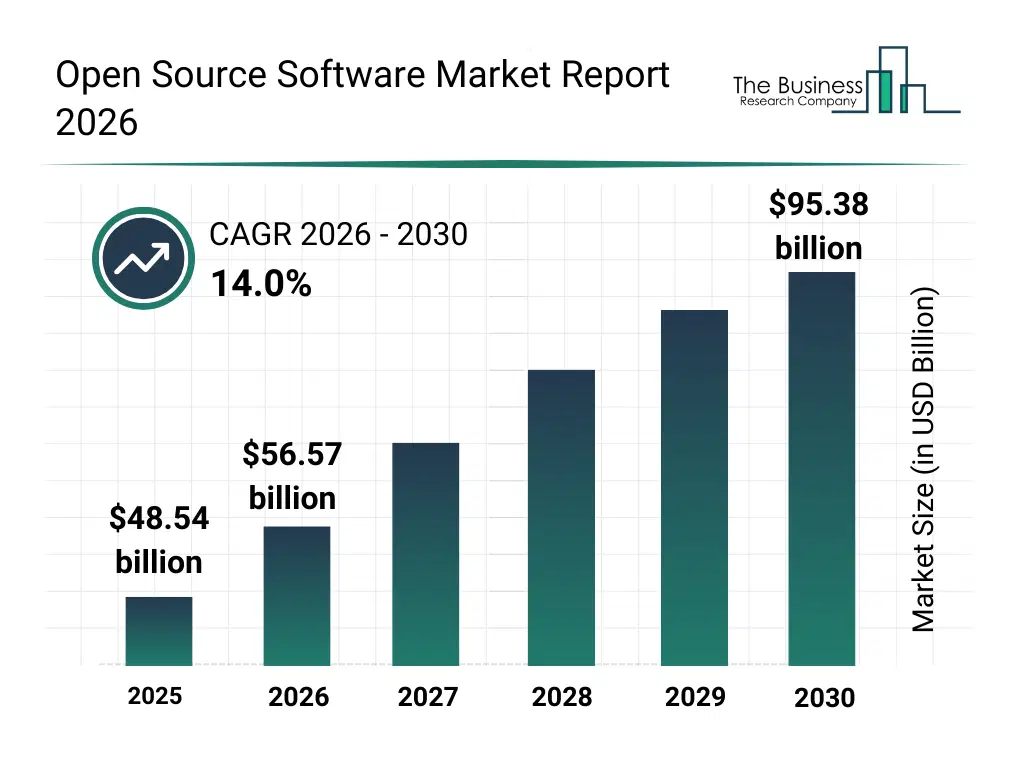
The open source software market keeps growing fast. It is estimated to grow from $48.54 billion in 2025 to $56.57 billion in 2026, a compound annual growth rate (CAGR) of 16.5%, and is forecast to reach $95.38 billion by 2030 (The Business Research Company). Growth comes from wider access to open source platforms, a stronger focus on technology education, government initiatives, and demand for flexible, collaborative software.
Open source POS and inventory software gives businesses more control and flexibility. With source code access, companies can adapt the system to their operations, connect it with other platforms, and make changes without waiting for a vendor’s development cycle.
- Customization: Modify the source code to build features, integrations, and workflows that match your business goals.
- Cost savings: No recurring licensing fees or vendor maintenance costs, so more budget goes to growth, customer acquisition, and operations.
- Security: The community can review the code, which helps find and fix vulnerabilities faster.
- Data control: You keep full access to your data, so you can run your own analytics and business intelligence tools on sales, inventory, and customer behavior.
- Scalability: You can add functions and integrations as the business expands.
- Community collaboration: A global community keeps the software updated and in step with industry trends.
3 Best Open Source Point of Sale and Inventory Management Software for Businesses
A recent survey showed that over 30% of respondents cited cost savings on licenses and faster development as key reasons for increased use of open-source software, with flexibility being a major factor. This flexibility is a key benefit of open-source POS and inventory management software, enabling businesses to customize, integrate, and make changes without vendor restrictions. For businesses seeking to leverage these benefits, exploring the top 5 open-source point of sale and inventory management software can provide the right tools to stay competitive and adapt quickly to shifting demands.
uniCenta POS
uniCenta oPOS is an open source point-of-sale system for retail, hospitality, and service businesses. It is customizable and supports both on-premise and cloud deployments. You can install it across terminals and locations without extra licensing fees.
Best for: Single-store and small multi-terminal businesses with a developer or IT partner who want a customizable system.
Key Features:
- Handles barcode scanning, card payments, and supports various receipt formats.
- Stock levels, product attributes, and warehouse operations
- Customer profiles, transaction history, and loyalty programs
- Staff check-in/out times and role-based access controls Reports on sales, inventory, and employee performance
- Multiple languages, tax rates, and payment methods, with integration options for third-party ERP, CRM, and eCommerce platforms
Pricing:
uniCenta oPOS is available for free under the GNU GPL3 license. Optional one-year subscriptions add support and resources:
- Base Plan: £6 per month (billed annually at £72).
- Plus Plan: £12 per month (billed annually at £144).
- Hosted Plan: £15 per month (billed annually at £180).
Floreant POS
Floreant POS is a widely used open source POS for restaurants, cafes, bars, and pizzerias. This on-premise system supports kitchen displays, ticket routing, and table service. It handles table tracking, tip payouts, and different printer setups for smooth order flow.
Best for: Single-location restaurants, cafes, and bars that want a proven, offline-friendly system.
Key Features:
- Works offline, without an internet connection
- Runs on Windows, Mac, Linux, and Raspberry Pi
- Assigns specific kitchen printers to items
- Shows table status and ticket numbers Sets a maximum number of modifiers per item
- Tracks sales, hourly income, tips, and card use
- Plugins for floor plans, inventory, and customer data
Pricing:
Floreant POS is free and open source. For a supported, paid version, the same company offers ORO POS at $19.99 per terminal per month, billed annually.
Chromis POS
Chromis POS is an open source system for small retail and food shops. It supports CSV product imports, stock control, kitchen screens, barcodes with prices and weights, loyalty programs, and gift cards.
Best for: Small shops and food businesses that want a free, simple system to get started.
Key Features:
- Runs on Windows and Linux
- Works with USB printers
- Imports product lists via CSV
- Supports kitchen screens and variable barcodes
- Includes multi-sale mode and remote kitchen printing
- Includes loyalty and gift card tools
- Manages stocks, suppliers, and orders
- Supports open source databases; migration to MySQL and PostgreSQL
- Customizable with scripting language
Pricing:
Chromis is completely free to use.
Disadvantages of Open Source Point of Sale and Inventory Management Software
While open source systems give businesses more control over features and costs, there are limitations to consider, especially for those without technical expertise or dedicated IT resources.
1. Requires Technical Knowledge
Open source POS and inventory software often need manual setup, configuration, and ongoing maintenance. Tasks like server management, software updates, and integration with other tools usually require coding or system admin skills. Without internal tech support, businesses may need to hire outside developers, which adds to the overall cost and complexity.
2. Limited Structured Support
Most open source platforms rely on community forums or third-party consultants for troubleshooting and help. Unlike commercial solutions with dedicated support teams, response times can vary, and there’s no guaranteed resolution for urgent issues like system downtime or lost transactions.
3. Compatibility and Integration Gaps
Connecting open source POS software to accounting tools, ERP systems, or eCommerce POS platforms may not be straightforward. Some systems lack plug-and-play integrations, so businesses need custom development to sync data across platforms. This can slow down deployment and create bottlenecks during upgrades or system changes.
4. Security and Compliance Risks
Open source tools require the business to handle security patches, data protection setups, and compliance with standards like PCI DSS. If updates are delayed or misconfigured, the system may be exposed to vulnerabilities. Businesses handling sensitive customer or payment data must take extra steps to secure the software.
5. Inconsistent User Experience
Since many open source POS platforms are built by developers for developers, the user interface may not be as polished or intuitive as commercial software. This can lead to longer training times, more user errors, and a steeper learning curve for frontline staff.
Alternative Options for Point of Sale and Inventory Management
Not every business is ready to handle the technical demands of open source software. If you’re looking for a system that delivers flexibility, strong inventory control, and omnichannel support, without the need for heavy customization—there are commercial platforms that still meet those needs. Below are two standout options to consider.
ConnectPOS
ConnectPOS is a commercial POS platform, not open source. It supports physical and online retail from one system. Its focus is real-time inventory tracking and eCommerce integration, so it is a common choice for retailers that sell across multiple stores, channels, and warehouses.
Best for: Retailers are growing across locations, sales channels, and warehouses.
Key Features:
- Omnichannel integration: Works with platforms like Shopify, Magento, and WooCommerce, and syncs online and offline sales, inventory, and customer data in real time.
- Multi-location inventory: View and manage stock across stores and warehouses, with automated alerts. Stock transfers, stock-takes, and multi-source inventory are part of the Premium plan.
- Staff roles and permissions: Flexible staff access control is included from the Standard plan. Premium adds custom staff permissions.
- Reporting and analytics: Customizable reports on sales, inventory turnover, and staff performance.
- Mobile POS: Runs on tablets and mobile devices, so you can sell anywhere on the shop floor or at pop-up events.
- Easy to learn: A clear interface that keeps staff training short.
- Hardware compatibility: Works with common barcode scanners, receipt printers, and cash drawers.
Pricing:
| Plan | Monthly | Billed Annually | What it adds |
| Standard | $49 | $39/month | eCommerce integrations, product and order management, unlimited payment gateways, reporting and analytics, flexible staff access control, real-time sync and offline mode, 24/7 support |
| Advanced | $79 | $69/month | Everything in Standard, plus quote and cart management, inventory and shipping control, partial and gift card payments, second customer screen, advanced checkout tools, loyalty program support |
| Premium | $99 | $89/month | Everything in Advanced, plus stock transfer and stock-take, multi-source inventory, multi-currency support, omnichannel and click & collect, custom staff permissions, discount rules, priority support |
Odoo POS
Odoo POS is a comprehensive point-of-sale system built to integrate with Odoo’s full suite of business applications. It is designed to cater to retail environments, providing an all-in-one solution that allows businesses to handle sales, inventory, and customer relationships smoothly. This system is accessible through both desktop and mobile devices, offering flexibility to meet various operational needs.
Best for: Businesses that already use, or plan to use, Odoo for ERP.
Key Features:
- Integrated with Odoo’s broader ERP system
- Real-time inventory tracking and management
- Multi-currency and multilingual support
- Customer relationship management tools
- Custom POS interface for tailored business needs
- Offline mode for uninterrupted sales in case of internet connectivity issues
Pricing:
Odoo’s free plan (One App Free) covers one app, such as POS, for unlimited users. The Standard plan includes all apps and is priced per user per month, and rates vary by country. In the US, it starts at about $24.90 per user per month for the first year on annual billing. Check odoo.com/pricing for your country’s rate.
How to Decide Between Open Source and Paid POS and Inventory Management Software
Choosing a POS and inventory system comes down to how much control you want, what kind of support you need, and how your team will manage the setup. Both open source and paid solutions can run retail operations well. The right pick depends on your business structure, budget, and internal resources.
If you choose open source, make sure your team can handle installation, updates, and integrations, or has a partner who can. If you would rather spend your time running your stores, a commercial system with vendor support and built-in features may fit better.
- Business Operations
Start by mapping out how your business works day-to-day. Consider how you manage inventory across locations, handle sales, and generate reports. The system you choose should support these workflows without forcing major changes.
- Flexibility and Customization
If your operations don’t follow a standard model, you may need custom workflows or unique reporting formats. Open source tools are generally more flexible, but some paid platforms also provide configurable options without needing deep development work.
- Software Compatibility
Look at how well the POS system connects with tools you already use—like your eCommerce platform, accounting software, ERP, or CRM. Paid systems often come with built-in integrations, while open source options may need manual setup or custom development.
- Ease of Use
The interface should be clear and straightforward, especially for staff who handle daily transactions or inventory tasks. A system that’s easy to navigate improves training time and reduces errors.
- Support Options
If you’re using open source, check for an active user community, forums, or documentation. For paid tools, consider the level of customer support available, including response times, onboarding assistance, and whether support is included in your plan.
FAQs: Best Open Source Point of Sale and Inventory Management
1. Is open source POS software suitable for all types of businesses?
It works well for businesses with technical resources or specific customization needs. Businesses that want fast setup and dedicated vendor support often choose a commercial solution.
2. What features should I expect from open source POS and inventory systems?
Core features usually include sales processing, inventory tracking, customer management, and basic reporting. Some platforms also support multi-location management and integrations, but the feature set can vary widely.
3. How difficult is it to integrate open source POS with other systems?
Connecting to accounting tools, eCommerce platforms, or CRMs may need development work. Some systems provide APIs, but setup depends on your technical capacity.
4. Are there hidden costs with using open source POS software?
While the software itself is often free, you may need to budget for hosting, custom development, security setup, and long-term maintenance, especially if you don’t have internal IT support.
Conclusion
The best open source point of sale and inventory management software gives businesses cost control and room to customize. uniCenta, Floreant, and Chromis each suit a different starting point, from a single café to a small retail shop. For many merchants, open source is a good way to launch and run their first store.
Needs change as a business grows. These are the moments when many merchants start looking at a platform built for larger operations:
- You open a second store. You need one view of sales and stock across locations. With ConnectPOS, reporting and analytics come with every plan, and moving stock between stores through stock transfer and stock-take is part of Premium.
- You sell on more than one channel. Once you run an online store next to your physical shop, sales, orders, and customer data need to stay in sync. ConnectPOS includes eCommerce integrations and real-time sync from Standard, and adds omnichannel and click & collect in Premium.
- You keep stock in several warehouses. Real-time inventory sync across locations becomes essential. Multi-source inventory is available in ConnectPOS Premium.
- Your team grows. You need roles and permissions so cashiers, store managers, and head office each see and do the right things. Flexible staff access control starts in Standard, and Premium adds custom permissions.
If you are reaching one of these milestones, commercial platforms like ConnectPOS and Odoo POS are built for it. ConnectPOS plans run from $49 to $99 per register per month, or $39 to $89 when billed annually.
Comparing options?
See ConnectPOS Pricing►►► Optimal solution set for businesses: Shopify POS, Magento POS, BigCommerce POS, WooCommerce POS, NetSuite POS, E-Commerce POS