POS terminals are at the heart of modern retail, making transactions faster and more efficient. With the market expected to reach $29.09 billion by 2025, businesses use these systems for more than just processing payments. Cloud-based and on-premise options help manage sales, track inventory, and improve customer interactions. As technology evolves, finding a system that fits your business needs is more important than ever. Now, let’s look at how POS terminals work, their benefits, and what to consider when choosing one.
Highlights:
- A POS terminal is a device that processes transactions, tracks sales, and manages inventory, helping businesses improve efficiency and enhance the customer experience.
- Key factors when choosing a POS terminal include hardware compatibility, payment options, ease of use, integration capabilities, security features, and long-term support to ensure smooth operations.
What Is a POS Terminal?
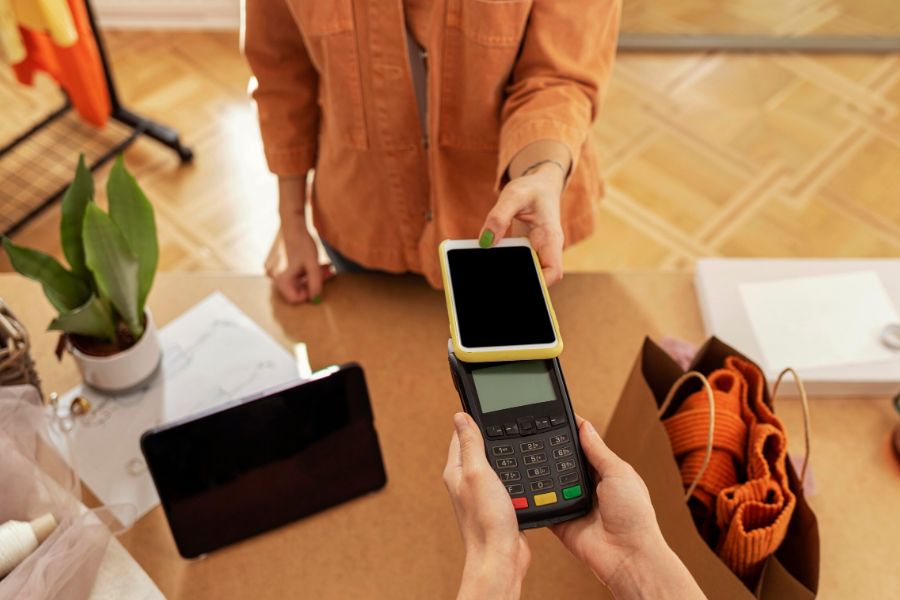
A POS terminal is a hardware device used to process payments at a point of sale. It’s where customers finalize purchases using various payment methods, including credit cards, debit cards, digital wallets, and contactless payments (NFC).
Today’s POS terminals go far beyond basic payment processing. Most are connected to cloud-based POS software, offering features like:
- Real-time inventory syncing
- Sales and customer analytics
- Multi-store coordination
- Employee and shift tracking
- Loyalty program integration
Types of POS Terminals in 2025
Traditional Countertop Terminals
- Fixed units used with registers and receipt printers
- Ideal for retail stores with checkout counters
- Example: Verifone VX520, Ingenico Desk series
Mobile POS (mPOS):
- Portable devices like tablets or smartphones with card readers
- Great for delivery services, markets, and pop-up stores
- Example: Square Reader, Shopify POS Go
Smart POS Terminals:
- All-in-one Android or iOS-powered POS units with touchscreens
- Combines hardware and software in a single handheld device
- Example: Clover Flex, Sunmi V2S, PAX A920
Self-Service Kiosks:
- Customer-facing terminals for order placement and checkout
- Used in fast food, cinemas, and supermarkets
- Reduces wait times and improves order accuracy
Key Features of a Modern POS Terminal
| Feature | Description |
|---|---|
| Omnichannel integration | Syncs sales data across online and offline channels |
| Cloud connectivity | Real-time data access and updates |
| Multi-payment support | Accepts cards, contactless, QR codes, wallets |
| Inventory management | Tracks stock levels and triggers low-stock alerts |
| Customer management (CRM) | Captures emails, phone numbers, and purchase history |
| Employee management | Logs staff shifts and sales performance |
| Advanced reporting | Offers dashboards, insights, and custom reports |
| Offline mode | Allows sales during internet outages with automatic sync later |
How Does A POS Terminal Function?
A POS terminal follows a structured process to complete transactions. These are the steps:
- Item Selection & Pricing – The cashier scans the item or selects it from the system. Pricing, discounts, and taxes apply automatically.
- Payment Processing – The customer pays using a card, mobile wallet, or cash. The terminal reads the chip, magnetic stripe, or NFC signal for contactless payments.
- Authorization & Approval – The terminal encrypts the payment data and sends it to the payment processor for approval. If approved, the transaction proceeds. If declined, the customer must try another method.
- Receipt & Inventory Update – The system generates a digital or printed receipt. At the same time, inventory updates automatically.
Many modern POS terminals sync with cloud-based systems, providing real-time sales data. Some models work offline, storing transactions until they reconnect to the internet.
Why Businesses Use POS Terminals
A POS terminal serves as a multifaceted hub in modern retail, combining sales, inventory, and customer management into one seamless operation. If you’re running a store, restaurant, or service-based business, having the right system can make daily operations smoother and more efficient.
Faster Transactions and Better Efficiency
No one likes waiting in long lines. A fast and reliable POS terminal speeds up transactions, reducing customer frustration and helping you serve more people in less time. Contactless payments, chip readers, and mobile wallets make checkouts even quicker.
Furthermore, a good system streamlines other tasks. Employees can scan barcodes instead of entering prices manually, reducing errors. Digital receipts cut down on paper use and make it easier to track purchase history. These small improvements add up, creating a smoother workflow and letting your team focus on customers instead of manual processes.
Improved Inventory and Sales Tracking
Keeping track of stock manually leads to mistakes and wasted time. A POS terminal updates inventory in real time, helping you avoid stock shortages or excess purchases. When an item sells, the system automatically adjusts stock levels, reducing the risk of overselling or running out of popular products.
Many systems also generate detailed sales reports. Instead of guessing which products are doing well, you get clear data on sales trends, peak hours, and seasonal demand. With this information, you can adjust pricing, restock the right items, and plan promotions more effectively. Some systems even send low-stock alerts, so you know when to reorder before running out.
A Smoother Customer Experience
The checkout process plays a big role in how customers feel about your business. A POS terminal speeds up transactions, supports different payment methods, and applies discounts or loyalty rewards instantly.
Some systems also help personalize customer interactions. By tracking purchase history, you can recommend products or offer targeted promotions. Loyalty programs become easier to manage, rewarding frequent shoppers without needing physical punch cards. When checkout is quick and hassle-free, customers are more likely to return.
Picking the Perfect POS Terminal for Your Business
Not every POS terminal fits every business. A retail store, a restaurant, and a mobile vendor all have different needs. Choosing the right system means looking at features, costs, and how well it integrates with what you already use.
Finding the Right Features for Your Needs
Different businesses need different tools. A retail store might need barcode scanners and inventory tracking, while a restaurant might prioritize table management and split-bill options. Mobile vendors often need lightweight, wireless terminals that accept payments from anywhere.
Some POS systems are also equipped with advanced features like customer management, loyalty programs, and eCommerce integration to assist in the long-term. If you plan to expand, choosing a system with flexible features can prevent the need for frequent upgrades.
Cost Considerations and Long-Term Value
The price of a POS system isn’t just about the initial purchase. Monthly software fees, transaction charges, and maintenance costs all add up. A lower-priced system might seem appealing, but if it lacks key features or requires frequent repairs, it could end up costing more over time.
Instead of focusing only on upfront costs, consider the long-term value. A reliable system that meets your needs from the start can prevent costly upgrades or disruptions later. Comparing pricing models and reading user reviews can help you find the best balance between cost and functionality.
Ease of Use and Staff Training
A complicated system slows everyone down. If employees struggle to use the POS terminal, checkout times increase, and mistakes become more common. A simple, intuitive interface helps staff learn quickly and reduces errors.
Training time is another factor. If your business has a high employee turnover rate, a straightforward POS system minimizes the time spent training new hires. Some systems also include built-in tutorials, making it easier for staff to get familiar with the features.
Integration with Your Existing Systems
A POS terminal should work smoothly with the tools you already use. If you manage inventory, run an online store, or track finances, a system that syncs with these platforms will save time and reduce errors.
For example, if you sell both in-store and online, a POS system like ConnectPOS that updates inventory across both channels prevents overselling. If you track finances with accounting software, automatic transaction syncing ensures accurate bookkeeping. Finding a system that connects with your existing setup makes daily operations easier.
Reliability, Security, and Customer Support
A POS terminal should work when you need it most. If the system crashes or lags during busy hours, it can frustrate customers and lead to lost sales. Choosing a reliable terminal with strong performance ensures smoother operations.
Security is just as important. A POS terminal handles sensitive payment data, so encryption, fraud prevention tools, and compliance with payment security standards help protect customer information. Some systems also use tokenization, replacing card details with secure codes to prevent data theft.
When issues come up, good customer support can make a big difference. A provider that offers 24/7 support, live chat, or on-site assistance can help resolve problems quickly, preventing unnecessary downtime. Quick problem-solving keeps your business running without disruptions.
Top POS Terminals Worth Considering
If you’re looking for a dedicated touchscreen POS terminal beyond mobile devices or computers, these four providers stand out for their reliability, features, and industry reputation: Elo; CJ Legend; POS Guy; Helcim.
Elo
With over 40 years in the touchscreen industry, Elo has built a reputation for producing high-quality POS terminals that work with both Windows and Android operating systems. Some models also support Google Play Services, expanding app compatibility.
Elo offers a variety of touchscreen options along with essential peripherals such as customer displays, magnetic stripe readers (MSRs), printers, cash drawers, and barcode scanners. Their online support system is a strong advantage, providing a well-organized knowledge base, software downloads, and troubleshooting guides. For direct assistance, Elo has dedicated phone lines for technical issues and general customer support.
Pricing details aren’t listed publicly, so you’ll need to contact their sales team for quotes.
CJ Legend
Based in China, CJ Legend has been manufacturing POS terminals for over a decade, offering businesses a range of touchscreen models with sturdy metal stands.
Screen sizes range from 12 to 17 inches, with options for single or dual-screen setups. Customers can choose between Windows or Android systems, depending on their operational needs.
CJ Legend also provides additional POS hardware, including customer displays, barcode scanners, and thermal printers. Their focus on scalability makes them a strong choice for growing businesses that may need to expand their POS setup over time.
Pricing isn’t listed on their website, so reaching out to their sales team is the best way to get a quote.
POS Guy
POS Guy stands out for its wide selection of screen sizes, ranging from standard 17-inch monitors to large 46-inch displays. Businesses looking for a kiosk-style POS system or digital signage solutions may find their offerings particularly useful.
Pricing for a 17-inch POS terminal falls between $460 and $630, while larger touchscreen kiosks can reach around $2,100. Their technical support covers everything from barcode scanner setup to wireless printer installation, with both virtual and on-site service options. Local customers can also schedule in-store installations and repairs.
In addition to terminals, POS Guy stocks a variety of accessories, including cash drawers, card readers, and printing supplies, making it a convenient one-stop shop for businesses looking to build a complete POS system.
Helcim
Helcim is a full-service payment processing platform that supports credit and debit card payments both in-person and online. Businesses using Helcim get access to a complete system that includes merchant accounts, POS terminals, card readers, and an online payment platform for eCommerce transactions.
Their POS terminals include features like invoicing, inventory management, and customer management, making them a good fit for businesses that need an all-in-one solution. One of Helcim’s biggest advantages is its transparent pricing model, using Interchange Plus pricing to help businesses save on transaction fees. They also support Level 2 and Level 3 processing, which can further reduce costs for B2B transactions.
For pricing, Helcim provides detailed cost breakdowns on its website, eliminating the need for business owners to request quotes.
When a Basic POS Terminal Is No Longer Enough
A basic terminal may be sufficient for processing payments at a single location. Problems often emerge when a retailer adds another store, sells through multiple channels, or manages inventory across several locations.
Without connected systems, an item sold in-store may still appear available online. Customer and order data can become fragmented, while staff spend more time reconciling records manually. These gaps increase the risk of overselling, inaccurate stock counts, and slower service.
ConnectPOS is designed for retailers facing these challenges. It connects in-store transactions with eCommerce operations and works with commonly used POS hardware across Windows, Android, and iOS. That gives growing retailers a cleaner way to keep data consistent as operations get more complex.
Below are a few ConnectPOS capabilities that become especially useful once a basic terminal starts falling short:
- Offline selling mode: Stores can keep transactions running during internet interruptions, then sync once the connection is back.
- Real-time data synchronization: Sales, products, customers, and inventory stay updated across channels, so teams aren’t stuck resolving mismatched numbers.
- Unified omnichannel operations: In-store and online workflows run under one system, which keeps pricing, promotions, and customer records consistent.
- Mobile POS: Staff can process sales and support customers on the floor, at pop-ups, or during peak hours when fixed counters get crowded.
- Inventory Management Software (MSI): Supports tighter inventory control when SKUs grow and stock is spread across stores and warehouses.
- Order Fulfillment: Clearer handling for pickup, shipping, and cross-channel orders, so fulfillment doesn’t turn into a manual workaround.
- CRM POS: Centralizes customer data and purchase history at checkout, which supports better service and repeat buying.
- Report & Analytics: Gives managers a faster view of what’s selling, what’s stuck, and where inventory gaps or shrink may be rising.
FAQs: POS Terminals
- What types of businesses need a POS terminal?
Retail stores, restaurants, cafés, and service-based businesses all benefit from a POS terminal. Any business that processes transactions, tracks inventory, or manages customer data can improve efficiency with the right system. - How does a POS terminal improve business operations?
A POS terminal speeds up transactions, reduces manual errors, and provides real-time inventory tracking. Many systems also generate sales reports, helping businesses make informed decisions based on accurate data. - What’s the difference between a traditional POS and a cloud-based POS?
A traditional POS stores data on local servers, limiting access to a single location. A cloud-based POS, on the other hand, syncs data online, allowing business owners to manage sales, inventory, and reports from anywhere.
In A Nutshell
The right POS terminal depends on more than the device itself. Businesses should consider how the complete system handles payments, inventory, integrations, security, staff training, and future expansion.
A basic terminal may be enough for a single store with straightforward checkout requirements. However, retailers operating across multiple stores or online and offline channels need a system that prevents sales, inventory, and customer data from becoming disconnected.
ConnectPOS offers an option for retailers that have reached this stage. Monthly plans are priced at $49 per register for Standard, $79 for Advanced, and $99 for Premium. With annual billing, the effective monthly prices are $39, $69, and $89 per register, respectively. Hardware and payment-processing costs should be considered separately when calculating the total cost of a POS setup.
Not sure which terminal and plan fit your current setup? Chat with our team for guidance based on your stores, sales channels, and existing systems.
Chat with us