Expansion can be exciting, but when a business begins to operate across several locations, the day-to-day challenges tend to multiply. Processes become harder to manage, systems may no longer align, and staff at different stores can end up working in silos. Data gets fragmented, promotions vary without reason, and decisions take longer than they should.
This is where the right POS software for multiple locations steps in, not just as a transaction tool, but as a way to bring order to the growing scale of operations. It connects locations, brings transparency to every corner of the business, and allows decisions to be made with clarity, not guesswork. This article will explore how adopting POS software for multiple locations can reduce complexity and significantly cut costs, making scaling a smoother, more efficient process.
Highlights:
- Managing multiple locations often leads to scattered data, inconsistent processes, and higher operational overhead.
- POS software reduces complexity and costs by centralizing control across stores and streamlining tasks like inventory tracking, reporting, and staff management.
Common Challenges in Managing Multiple Locations
Opening more stores creates opportunities for growth, but it also exposes limitations in systems designed for one location.
- Customer Experience Varies Widely: Each site tends to develop its own approach to customer service. Without a shared standard, the brand experience feels uneven, which may confuse or frustrate returning clients.
- Communication Breaks Down: Distance often weakens the flow of updates and expectations. Misunderstandings build up fast when staff across regions don’t receive the same direction.
- Inventory Gets Out of Sync: Stock may sit untouched in one location while another runs out. Balancing demand across sites requires more than just reordering supplies – it takes planning that fits each area’s patterns.
- Technology Doesn’t Line Up: Using separate tools in different places can block access to data that should be shared. Without a unified system, decision-making slows down and errors increase.
- Culture Starts to Drift: As teams grow apart, the values that once held everyone together begin to fade. Offices may develop their own styles, pulling away from the company’s core.
- Local Rules Complicate the Game: Every city or region comes with its own set of business requirements. What works in one spot might break the rules in another, adding complexity that’s easy to overlook.
- Measuring Performance Becomes a Headache: It’s tough to compare results when sites track progress in different ways. Without a common view, some problems stay hidden too long.
- Finding Leaders for Each Branch Is Tough: Growth often outpaces leadership development. Managers need to understand the local context while still supporting the broader company mission – a rare skill set.
- Security Gaps Appear More Often: The more places you operate, the harder it gets to keep everything safe. Both online and in-person threats increase when oversight thins out.
- Expenses Start to Climb: Running several locations usually means more costs. Without close oversight, spending can spiral faster than expected.
Running a growing network of stores doesn’t have to mean giving up control. The right POS software for multiple locations helps unify your systems, sync your inventory, connect your teams, and bring consistency to the customer experience, no matter how far your brand spreads.
The Ways POS Software For Multiple Locations Reduces Complexity And Costs
Centralized Management Reduces Operational Complexity
Over 78% of companies have adopted centralized data management for handling customer information. Among them, 64% reported smoother operations, while 57% saw business expansion as a result.
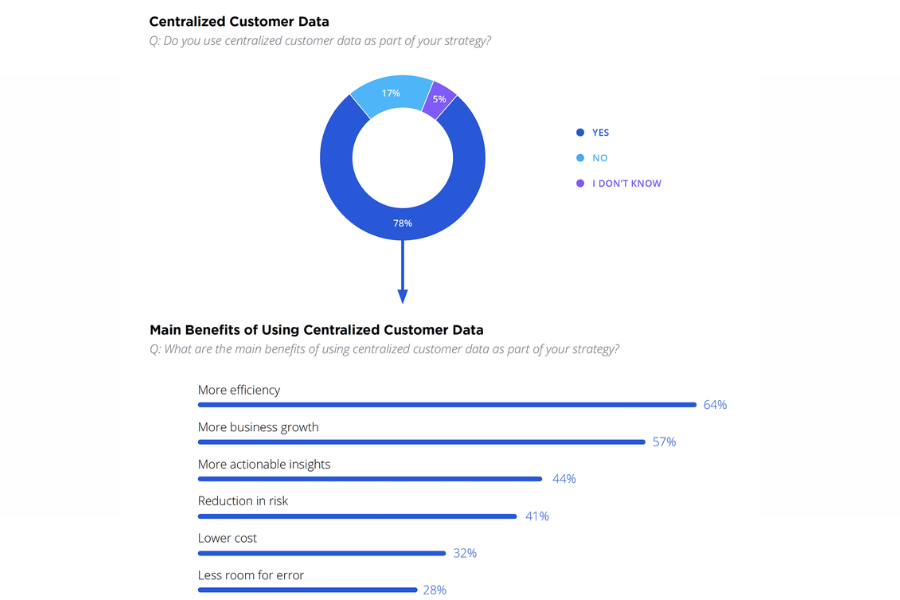
When expansion reaches new locations, day-to-day management becomes harder to control. Separate systems at each site tend to create repeated tasks, gaps in performance, and slow responses. A POS software for multiple locations that brings every location under one structure creates consistency and keeps daily functions in sync.
- One Place for All the Numbers: It’s no longer necessary to gather reports one store at a time. Sales activity, staffing trends, and inventory movement feed into a single dashboard via the POS system. This gives decision-makers a full picture of what’s happening across locations without having to chase updates or rely on delayed reporting.
- Inventory That Moves to Match Demand: One store might see products flying off the shelves while another has them collecting dust. When all stores are connected, stock levels adjust as items are sold, and it’s easier to move products where they’re needed most. This helps keep inventory aligned with actual demand, rather than relying on outdated habits or guesswork.
- Fast Changes Without the Footwork: Rolling out new settings or product lines doesn’t require logging in to each location one by one. A single update reaches every store at once from the POS software. This cuts down on time spent fixing inconsistencies or dealing with rollout delays. All stores move forward together, without requiring extra effort from local managers.
Cost Reduction Through Improved Efficiency
Running several stores comes with plenty of moving parts. When processes run smoother, the impact often shows up in the bottom line.
- Cutting Down on Extra Labor: Manual work slows down staff and often leads to repeated tasks. A POS software for multiple locations cuts out unnecessary steps. It becomes easier to manage shift patterns based on actual demand rather than guesswork. This helps avoid overstaffing during quiet hours and staff shortages during busy ones.
- Fewer Mistakes to Correct: Errors can slip in during pricing updates, stock checks, or transactions, especially when each store handles things on its own. When all locations work under one shared setup, pricing stays uniform, stock records remain current, and sales go through without confusion. Less time is spent cleaning up mistakes, and fewer losses sneak through the cracks.
- Better Inventory Control: Ordering without real numbers often leads to products piling up in storage or running out just when customers want them. Access to up-to-date sales and inventory data across locations through the POS system helps managers know what to order and when to order it. This keeps money from being tied up in items that don’t move and prevents lost sales due to empty shelves.
- Smarter Purchasing Across Stores: Handling procurement in one place makes the process easier and often cheaper. When stores place separate orders, it’s harder to keep track of spending or secure better pricing. Central oversight means higher order volumes and stronger negotiating power with suppliers, without the confusion that usually comes from placing small, scattered orders.
Standardized Checkout and Pricing Reduce Corrective Work
Separate store systems often create inconsistent transaction processes. One branch may use different discount rules, another may have outdated pricing, and a third may handle returns differently. When these inconsistencies require manual corrections, they consume employee time and can complicate reconciliation.
A multi-location POS can support shared checkout procedures and centrally managed pricing policies. This can help retailers reduce avoidable errors while maintaining appropriate controls over local discounts and staff permissions. Where the savings may come from:
- Less time correcting pricing discrepancies
- Reduced manual reconciliation
- More consistent employee onboarding
- Fewer operational workarounds between branches
The benefit depends on how well the POS aligns with actual store processes. Standardization should simplify necessary work, not remove legitimate local flexibility.
When Should Growing Retailers Consider ConnectPOS?
Connecting several stores to a common POS environment can solve basic reporting problems, but it may not address the more expensive challenges that arise as retailers expand.For example, a retailer may have a central dashboard showing sales from five locations while still being unable to track stock transfers accurately, coordinate online orders, or manage inventory held in several warehouses.
At that point, the difficulty is no longer simply seeing what each store sells. It is managing how inventory, orders, and store operations interact. ConnectPOS may be worth evaluating for retailers facing these more complex requirements. The platform offers eCommerce integrations, reporting, staff access controls, and additional inventory capabilities across its subscription tiers.
For multi-location operations, several plan distinctions matter:
- Centralized product, order, and reporting features are available in the Standard offering.
- Advanced adds inventory and shipping controls, along with other checkout capabilities.
- Premium includes stock transfers, multi-source inventory, and omnichannel and click-and-collect features.
- Enterprise is positioned for more complex operations, including extensive multi-store environments and customization.
These capabilities can be relevant to retailers whose existing POS handles individual transactions but requires separate tools or manual processes for wider operations.
However, businesses should confirm how the system integrates with their eCommerce platform, ERP, accounting software, and payment providers. A POS integration does not automatically replace those systems or guarantee that every workflow is supported. According to the published ConnectPOS pricing page, the plans are priced per register:
- Standard: $49/register/month, or $39/register/month with annual billing.
- Advanced: $79/register/month, or $69/register/month with annual billing.
- Premium: $99/register/month, or $89/register/month with annual billing.
- Enterprise: Custom pricing based on business requirements and implementation scope.
Prices are published in USD. Hardware, payment processing, third-party integrations, and customization may introduce additional costs. For retailers needing stock transfers or multi-source inventory, Premium is the relevant published plan to investigate rather than assuming these capabilities are included in the lower tiers.
FAQs: POS Software for Multiple Locations
- Why is managing several store locations such a challenge without a unified POS system?
When each store uses its own setup, tasks are repeated, data gets fragmented, and decisions take longer. It becomes harder to compare performance, share stock, or keep pricing consistent. - How does a centralized POS software for multiple locations simplify operations?
It brings everything under one structure-sales, inventory, promotions, and staff activity are tracked in the same place. This removes the need to juggle between systems or patch together reports from different locations. - Can it help lower labor and training costs?
Yes. When all branches use the same system, staff follow one process. This shortens training time, cuts down on manual steps, and makes it easier to move team members between stores if needed.
Conclusion
Growth doesn’t have to come with extra complications. Businesses that move to a unified POS software for multiple locations often discover a clearer view of what’s happening across locations. Instead of working through disjointed systems, teams collaborate consistently. Stock flows better, pricing stays aligned, and reporting no longer feels like detective work.
When every store speaks the same operational language, the entire business gains strength. It’s not just about cutting costs, it’s about avoiding the mess that slows progress. A well-connected system like ConnectPOS brings a rhythm to the business that holds steady, no matter how many new stores open their doors. Contact us now!
Chat with our team►►► Optimal solution set for businesses: Shopify POS, Magento POS, BigCommerce POS, WooCommerce POS, NetSuite POS, E-Commerce POS