
Pharmacy POS software sits at the intersection of healthcare precision and retail transaction control, where every prescription, inventory movement, and financial record must align with strict operational and regulatory expectations. Selecting the right system goes beyond comparing features; it involves understanding how the platform supports dispensing accuracy, medication tracking, insurance workflows, and multi-location coordination within a real pharmacy environment.
System design, data consistency, and compliance handling all shape how effectively daily operations can run under pressure. This article from ConnectPOS highlights essential considerations in selecting a pharmacy POS and how these choices shape long-term business stability.
Highlights
- Pharmacy POS software addresses pharmacy-specific workflows where prescription handling, inventory accuracy, and compliance requirements operate within tightly controlled healthcare conditions rather than general retail logic.
- Core system capabilities center on prescription management, batch and expiry tracking, insurance processing, reporting, and structured inventory control that supports safe medication dispensing and operational consistency.
- Selection depends on how well the system aligns with real pharmacy workflows, covering prescription flow, regulatory handling, financial accuracy, and support for single or multi-location operations.
Pharmacy POS Systems: Definition and Core Functions
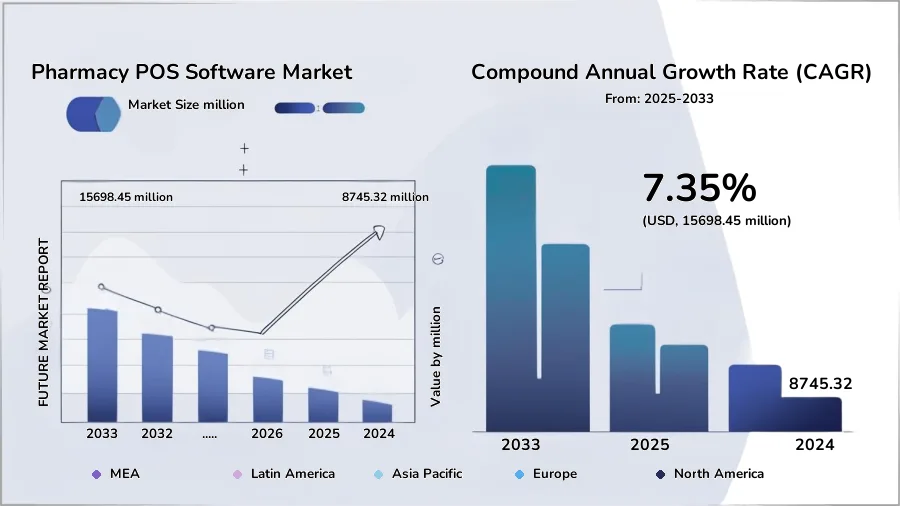
The global pharmacy POS software market is projected to reach about USD 15,698.45 million by 2033, reflecting 7.35% CAGR (Future Market Report). This growth reflects a clear shift toward systems that support both operational control and patient safety, especially as automation becomes more present in dispensing environments.
In one study of automated dispensing systems, 83.33% of pharmacists reported having enough time to review medications before dispensing, compared with 66.6% in traditional setups, highlighting how system design directly affects workflow quality and clinical accuracy.
A Pharmacy POS system refers to a specialized point-of-sale solution built for pharmacy operations, where prescription handling, medication tracking, and sales activity are connected within one operational framework. It supports strict regulatory requirements while linking dispensing processes with inventory records and patient information. Each transaction carries both commercial and clinical relevance, forming a structured flow between the counter, backend data, and compliance controls.
Core functions extend into daily pharmacy management, covering prescription validation, batch and expiry tracking, patient purchase history, billing integration with insurance claims, and reporting on sales and compliance activity, supporting more consistent control across operations.
Reasons Pharmacies Require Industry-Specific POS Solutions
Pharmacies operate under strict clinical, regulatory, and operational requirements where general retail systems often fall short in supporting prescription accuracy, medication safety, and compliance tracking. Industry-specific POS solutions are designed to align pharmacy workflows with these demands by connecting dispensing processes, inventory control, billing structures, and patient records within a single operational framework. This structure helps reduce workflow fragmentation while supporting consistent decision-making across daily pharmacy activities.
Reasons Pharmacies Require Industry-Specific POS Solutions
- Optimized Prescription Fulfillment: Supports structured prescription processing from entry to verification and dispensing, helping pharmacy staff manage medication orders with higher accuracy while maintaining alignment with clinical guidelines and reducing risk in medication handling.
- Real-Time Inventory Management: Provides continuous visibility into medication stock levels, batch tracking, and expiry monitoring, allowing pharmacies to respond quickly to stock changes, avoid shortages, and maintain proper rotation of pharmaceutical products.
- Regulatory Compliance and Safety: Maintains detailed records for controlled substances, prescription history, and audit trails, supporting compliance with healthcare regulations and reinforcing safe dispensing practices across all pharmacy operations.
- Insurance and Third-Party Billing Integration: Connects pharmacy transactions with insurance providers and third-party payers, supporting structured claim submission, verification, and reimbursement tracking to reduce administrative delays and billing inconsistencies.
- Data-Driven Decision Making: Converts daily operational data into insights related to prescription trends, inventory movement, and sales patterns, supporting pharmacy managers in planning procurement, staffing, and service adjustments based on real usage behavior.
- Customer Engagement and Loyalty: Records patient purchase history and prescription patterns, allowing pharmacies to support repeat care cycles, improve communication with returning customers, and maintain continuity in medication management over time.
Essential Features Every Pharmacy POS System Should Include
A Pharmacy POS system operates at the intersection of healthcare delivery and retail transaction management, where accuracy, compliance, and operational clarity must work together without disruption. The system is expected to manage prescriptions, control medication inventory, support regulatory requirements, and handle financial processes in a structured flow. Each feature plays a direct role in maintaining patient safety while keeping pharmacy operations consistent across daily workflows and long-term management needs.
Prescription Management
Prescription management forms the operational core of a pharmacy POS system, connecting prescription intake with validation, dispensing, and recordkeeping in a controlled process. It supports accurate entry of doctor instructions, reducing errors linked to manual handling and improving consistency in medication delivery. Each prescription becomes part of a traceable workflow that links patient records with pharmacy activity.
The system manages prescription status across different stages, including pending review, approved dispensing, and completed fulfillment. This structure helps pharmacy staff maintain visibility over workload and patient requirements without losing track of ongoing cases. It also supports refill tracking, allowing repeated prescriptions to be processed with greater accuracy.
Integration with patient history adds another layer of control, where previous medications, allergies, and dosage patterns are accessible during dispensing. This connection reduces risks linked to conflicting prescriptions and supports safer decision-making at the counter level.
Inventory Control
Inventory control in a pharmacy POS software manages medication availability through structured tracking of stock levels, batch numbers, and expiry dates. It creates a continuous flow of information between sales activity and inventory records, reducing discrepancies that can affect dispensing accuracy. This visibility supports stable stock availability across essential medications.
The system tracks the movement of pharmaceutical products across incoming deliveries, storage, and dispensing points. Each change in inventory is recorded in real time, allowing pharmacy staff to respond to shortages or overstock situations with better timing. Expiry monitoring adds another layer of protection by identifying products that require rotation or removal.
For example, a batch of cold medication nearing its expiry is highlighted in the system dashboard, prompting pharmacists to prioritize its distribution or return it to suppliers. This continuous tracking across deliveries, storage, and dispensing points helps maintain accurate inventory levels and reduces the risk of dispensing outdated or unavailable medication.
Compliance and Security
Compliance and security functions are designed to align pharmacy operations with healthcare regulations and data protection standards. The system records every transaction involving prescription drugs, creating an audit-ready trail that supports regulatory inspections. Controlled substance tracking remains fully documented within the operational flow.
Access control settings restrict system usage based on staff roles, limiting sensitive functions such as prescription editing or financial adjustments. This structure helps reduce internal errors and unauthorized activity within pharmacy operations. Data encryption protects patient and transaction records during storage and transmission.
Security monitoring also tracks system activity patterns, identifying unusual behavior that may indicate procedural issues. This supports early detection of inconsistencies and reinforces accountability across pharmacy staff and operations.
Sales and Financial Reports
Sales and financial reporting functions translate daily pharmacy transactions into structured performance data that supports both operational control and strategic planning. The system breaks down revenue related to product category, prescription type, and time period, allowing managers to observe how different medication groups contribute to overall business performance.
This level of detail helps identify high-demand products, monitor prescription-driven sales trends, and track fluctuations in purchasing behavior across different periods, such as weekly cycles or seasonal changes.
Beyond sales tracking, financial reports connect transaction data with billing and insurance reimbursement records, creating a clear link between recorded sales and actual cash inflows. This reconciliation process helps pharmacies detect discrepancies between expected and received payments, including delayed insurance settlements or incomplete claims. It also supports more accurate financial forecasting by giving operators a clearer view of revenue timing, cash flow stability, and outstanding reimbursements across multiple payment channels.
CRM and Loyalty Programs
Customer relationship management in pharmacy POS software focuses on building structured patient profiles linked to prescription history and purchasing behavior. Each profile captures medication patterns, refill cycles, and contact details, supporting more consistent patient engagement over time. This information helps pharmacies maintain continuity in care.
Loyalty programs connect purchase activity with reward structures that encourage repeat visits and long-term customer retention. These programs can be aligned with prescription refills or general purchases, depending on pharmacy strategy. Engagement data also supports better communication with returning customers.
Patient interaction history provides context for personalized service, where staff can reference past prescriptions or preferences during consultations. This improves service continuity and strengthens long-term customer relationships.
Multi-Location Scalability
Multi-location scalability allows pharmacy chains to operate multiple branches within a single connected POS ecosystem, where inventory, prescription records, and sales data are synchronized to maintain consistent visibility across the entire network and reduce operational fragmentation between stores.
Head offices can monitor performance, control stock distribution, and standardize processes across all locations while each branch still manages its own daily operational data. This structure also supports network expansion without system disruption, as new branches can be integrated into the existing framework while maintaining data consistency.
A practical example can be seen in pharmacy chains where all branches are connected through one POS system, allowing stock checks and transfers between locations during shortages while keeping patient prescription history accessible at any branch. At the same time, central teams track sales, inventory levels, and prescription activity in real time, supporting more balanced stock allocation and consistent operational control across the full network.
How to Select the Best POS System for Your Pharmacy?
Choosing a pharmacy POS software requires assessing how the system supports prescription accuracy, inventory control, compliance requirements, and financial operations within a regulated healthcare environment. The right solution should align with daily pharmacy workflows while maintaining consistency in patient safety, data integrity, and operational coordination across single or multiple locations.
Key selection criteria
- Prescription Workflow Support: The system should manage prescription processing in a structured flow, covering entry, verification, and dispensing with clear traceability to maintain medication accuracy.
- Inventory Accuracy and Tracking: It must provide real-time monitoring of stock levels, batch details, and expiry dates to support proper medication management and reduce dispensing risks.
- Regulatory and Compliance Handling: A pharmacy POS system should maintain detailed audit records and controlled substance tracking to support healthcare regulations and inspection readiness.
- Insurance and Billing Integration: It should connect directly with insurers and third-party payers to support accurate claim processing and consistent reimbursement tracking.
- Reporting and Business Insights: The system needs to generate structured data on sales, prescriptions, and inventory movement to support operational planning and performance analysis.
- Scalability for Multi-Branch Operations: It should support centralized control across multiple locations while keeping data synchronized and operations consistent across the entire pharmacy network.
Introducing ConnectPOS: The All-In-One Pharmacy POS
ConnectPOS is a pharmacy POS software built to support the full operational lifecycle of modern pharmacy businesses, from prescription intake and dispensing to inventory control and multi-location management. It brings clinical accuracy, retail transaction handling, and regulatory requirements into a unified operational framework.
Designed for both independent pharmacies and growing chains, the system supports structured workflows that maintain consistency in medication management, financial tracking, and compliance across every stage of daily operations.
Pharmacy features of ConnectPOS
- Prescription management: Handles prescription entry, verification, and dispensing with full traceability, supporting accurate patient records and reducing manual processing errors.
- Batch and expiry date management in MSI: Tracks medication batches with expiry data and supplier details, helping pharmacies maintain proper stock rotation and reduce risks from expired products.
- Batch selling: Supports selling and managing stock by batch groups, improving control over inventory movement and helping prioritize specific stock based on expiry or demand.
- Reports: Provides structured reports on sales, prescriptions, and inventory movement, helping managers track performance and identify demand patterns.
- FEFO (First Expire, First Out) stock selling: Automates stock rotation by prioritizing items with the nearest expiry date, reducing waste and supporting safer medication distribution.
- Drive-thru/curbside/delivery option: Enables flexible fulfillment models, including in-store pickup, drive-thru, curbside service, and home delivery while keeping prescription workflows controlled.
- Multi-store control: Centralizes operations across multiple branches with synchronized data on inventory, prescriptions, and sales for consistent management.
- Custom compliance based on client demand: Allows configuration of rules, reporting, and audit structures to match specific regulatory requirements and internal pharmacy policies.
FAQs: Pharmacy POS Software
1. How is Pharmacy POS different from regular POS systems?
Unlike general retail POS systems, pharmacy solutions are built to handle prescription validation, controlled substance tracking, and regulatory documentation. They also integrate patient records and insurance processing, which are not typically included in standard retail systems.
2. What features should I prioritize when choosing a Pharmacy POS software?
Key features include prescription management, real-time inventory tracking, compliance and audit support, insurance billing integration, reporting tools, and multi-location management capabilities for pharmacy chains.
3. Can Pharmacy POS systems manage insurance claims?
Yes. Most pharmacy POS systems connect directly with insurance providers to support claim submission, verification, and reimbursement tracking, helping reduce manual errors in billing processes.
4. Is it suitable for multi-branch pharmacies?
Yes. Many pharmacy POS platforms support centralized control across multiple locations, allowing synchronized inventory, prescription data, and sales reporting across the entire network.
Conclusion
Choosing pharmacy POS software is a long-term operational decision that affects prescription safety, inventory accuracy, financial control, and customer service quality. The right system connects clinical workflows with retail activity in a structured way that supports both daily execution and regulatory requirements. Poor alignment at this stage often leads to operational gaps that become more visible as transaction volume and compliance pressure increase.
Pharmacies evaluating new systems should focus on how well the software aligns with real workflows rather than isolated functionality. ConnectPOS provides solutions designed to support pharmacy operations with structured prescription handling, inventory control, and multi-store management. Connect with us to explore a system built for pharmacy environments that require clarity, control, and long-term operational stability.
►►► Optimal solution set for businesses: Shopify POS, Magento POS, BigCommerce POS, WooCommerce POS, NetSuite POS, E-Commerce POS